
To use Seedance 2.5, open Vidwip's AI video generator, pick Seedance 2.5, write one shot in a prompt (subject, action, setting, one camera move, style), choose a length from 4 to 30 seconds and an aspect ratio, and generate. It costs 35 credits a second: 175 for 5 seconds, 350 for 10 and 1,050 for 30. It needs a paid plan, from $25 a month for 2,500 credits, so draft on Seedance 2.0 Fast at 19 credits a second first.
Using Seedance 2.5 takes five decisions: the model, the prompt, the length, the frame and what you feed it. This guide walks through each one in Vidwip’s AI video generator, with prompts you can copy and the real credit cost of every clip.
Seedance 2.5 is ByteDance’s longest-take video model. It makes 4- to 30-second clips with generated sound, and takes first and last frames or up to 30 images, 10 videos and 10 audio clips as references. For what it is and how it ranks, read our Seedance 2.5 review. Here we just make shots.
TL;DR: how to use Seedance 2.5
Pick Seedance 2.5 in the model list, describe one shot, set a length from 4 to 30 seconds, and generate. It costs 35 credits a second in Vidwip’s AI video generator, and the Generate button shows the total first.
| Clip length | Credits | On Starter ($0.01 a credit) | On Pro annual ($0.0079 a credit) |
|---|---|---|---|
| 4 seconds | 140 | $1.40 | $1.11 |
| 5 seconds | 175 | $1.75 | $1.38 |
| 10 seconds | 350 | $3.50 | $2.77 |
| 15 seconds | 525 | $5.25 | $4.15 |
| 30 seconds | 1,050 | $10.50 | $8.30 |
Rates are from Vidwip’s pricing data, checked November 2026. AI video needs a paid plan: Starter’s 2,500 credits cover ten 7-second shots (245 credits each).
What you need before you start
You need a Vidwip account and some credits. That’s all for text to video.
- Account: sign up at app.vidwip.com and choose a plan. AI video starts on Starter, $25 a month.
- Plans: Starter is $25 a month for 2,500 credits. Pro is $99 a month for 10,000, or $79 a month billed annually. No paid plan locks a model.
- Optional inputs: a start frame, an end frame, or reference images, video and audio. Image files are capped at 10 MB, video at 200 MB and audio at 50 MB.
Step 1: choose Seedance 2.5
Open the AI video generator in the AI Studio and pick Seedance 2.5 from the model list. Each row shows the model’s price at the length you’ve set.
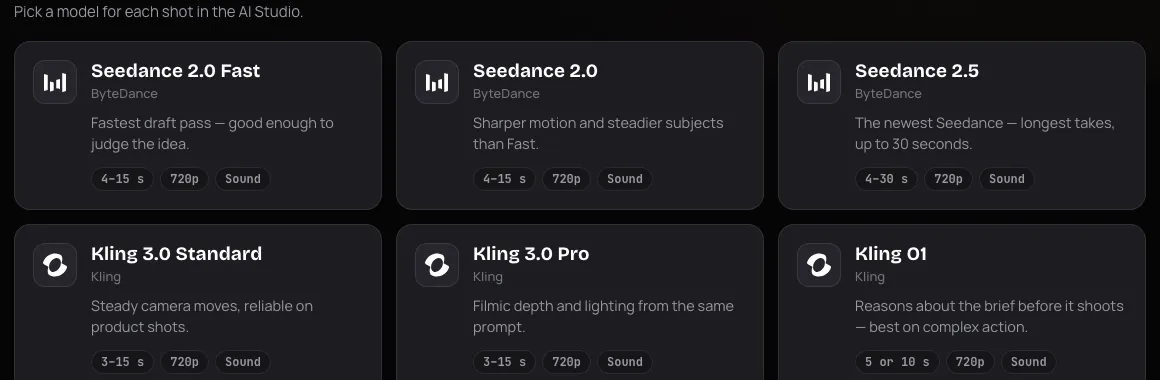 Seedance 2.5 sits beside Seedance 2.0 and Seedance 2.0 Fast on Vidwip’s models page
Here is how the three Seedance models differ in Vidwip:
| Model | Credits a second | Length | Best for |
|---|---|---|---|
| Seedance 2.0 Fast | 19 | 4 to 15 s | Cheap drafts to judge an idea |
| Seedance 2.0 | 30 | 4 to 15 s | Steadier subjects than Fast |
| Seedance 2.5 | 35 | 4 to 30 s | Long takes and many references |
All three make sound and run at 720p. If your shot is under 15 seconds and has no references, Seedance 2.0 is five credits a second cheaper, so choose 2.5 for length or references.
Step 2: write the prompt
Write one shot, in plain sentences, with one camera move. Vidwip’s prompt box takes up to 1,500 characters, but you’ll rarely need more than 100 words.
ByteDance publishes a prompt guide for the Seedance 2.0 series on BytePlus, and we couldn’t find a separate one for 2.5. The guide’s body renders only in a browser, so we worked from APIYI’s summary of it and checked it against Runware’s Seedance 2.5 prompting guide. Read the original before you rely on exact wording.
The rules that matter:
- Follow an order. Subject, action, environment, camera, style, then constraints.
- Keep it short. The guide suggests 60 to 100 words, because longer prompts add conflicting instructions.
- Use one main camera move. Push-in, pull-out, pan, tracking, orbit, aerial, handheld or fixed. Put it near the start.
- Separate camera from subject. Write “the camera pushes in slowly” and “she turns toward the window” as two clauses.
- Be specific. “Epic” and “cinematic” on their own add little. “Low sun, long shadows, shallow depth of field” does.
- Don’t write “fast” alone. Make one element fast and keep the rest calm.
Vidwip also has an Enhance button above the prompt box. It rewrites your idea in a look you pick: Polish, Short drama, Product advertisement, Social reel, Cinematic trailer, Music video or Documentary. The box says to review and edit the result before generating.
Prompt example 1: a product shot
A matte black espresso machine on a marble counter, steam rising from the spout. The camera orbits slowly left around the machine. Warm morning window light, shallow depth of field, clean product-advertisement look. Soft hiss of steam, no music.
Why it works: one subject, one camera move, one lighting setup. The last line names the sound, since Seedance 2.5 makes audio with the picture.
Prompt example 2: a person and a line of dialogue
A woman in a green raincoat stands at a bus stop at dusk, rain on the shelter roof. She looks at her phone, then up at the road and says: “Of course it’s late.” Handheld camera, slight sway, muted blue-grey colors, realistic documentary style.
Put spoken lines in double quotes. ComfyUI’s docs for the model give that advice, and we’ve kept it to one short line per shot.
Prompt example 3: a long take with timing
[0-8s] A drone view rises over a fishing village at sunrise, boats in the harbor. [8-16s] The camera descends to a dock where an old man coils a rope. [16-24s] He looks out at the water and smiles. Slow, steady movement throughout. Gentle waves, gulls, no music.
Time tags like [0-8s] are described in Runware’s guide as working at about one-second precision with no gaps. They suit the 30-second range. We haven’t confirmed how closely Seedance 2.5 holds every window, so treat them as a guide to pacing, not a stopwatch.
Step 3: set the length, aspect ratio and sound
Pick the shortest length that tells the story, because cost scales with every second. Seedance 2.5 makes any whole number of seconds from 4 to 30.
- Length: a stepped slider, 4 to 30 seconds. Over 15 is the reason to use 2.5.
- Aspect ratio: 16:9, 9:16, 1:1, 4:3, 3:4 or 21:9. Use 9:16 for TikTok, Reels and Shorts, 16:9 for YouTube, 21:9 for a cinematic strip.
- Sound: Seedance 2.5 makes its sound with the picture, and a toggle switches between “With sound” and “Silent”.
The Generate button reads “Generate” followed by the credit total, and the footer shows your balance. Watch the number as you move the length slider.
Step 4: add frames or references (optional)
Start frames and references give Seedance 2.5 something to hold on to. This is how you keep a character or product consistent.
- Start frame: your picture becomes the first frame, and the prompt says how it moves. This is image to video.
- End frame: needs a start frame, and the clip travels between the two.
- References: up to 30 images, 10 videos and 10 audio clips for Seedance 2.5. Each video or audio reference runs 2 to 15 seconds.
Two rules from the app. You can use frames or references, never both in one shot. And Seedance 2.5 accepts an audio clip as the only reference, which Seedance 2.0 does not.
A reference video changes the price, and the studio shows the cost on the Generate button before you commit. Check it each time you attach one.
If you attach a file the selected model can’t take, Vidwip keeps it but marks it “not used by” that model, so switching models never loses your work.
Step 5: generate, then fix one shot at a time
Click Generate. The clip is laid on your AI Studio timeline when it finishes.
 Vidwip’s AI video generator puts every shot on one timeline
Don’t like a clip? Select it and choose Create, then write a new prompt. The new shot takes its place, and nothing else on the timeline moves. Settings are saved with each clip, so you iterate instead of starting over. A still photo on the timeline has Create video, which uses the picture as the start frame.
Multi-shot scenes in Vidwip
Vidwip builds a scene from separate shots on a timeline, not from one giant prompt. Each clip is its own generation, so you can mix models and fix any one shot.
A workable pattern for a 30-second ad:
- Generate a 10-second establishing shot on Seedance 2.5.
- Generate two 5-second close-ups, with the same character image as a reference.
- Swap any weak shot using Create, and leave the rest alone.
- Add a voiceover, music and captions in the AI Studio, then export at up to 1080p.
If you want the whole story in one go, a single 30-second Seedance 2.5 take costs 1,050 credits, and a timed prompt like example 3 is how you steer it. Vidwip has no extend button we could confirm, so plan the full length up front.
Character swap with Seedance 2.5
Vidwip’s character swap lives in AI UGC, not in the video generator. Its picker lists Seedance 2.5 alongside Kling O3 Edit, Kling 2.6 Motion Control, MiniMax H3, Runway Aleph 2.0 and Wan 2.7 Edit.
With Seedance 2.5, you give it your video and an image of the character, and it shoots a new clip of that character using your video as a reference. Seedance doesn’t edit pixels in place, and it refuses real people’s faces, so use an illustrated or AI-made character. The picker warns you, because the refusal otherwise arrives only after the upload.
For real faces, or a true edit of your footage, use Runway Aleph 2.0 or Kling O3 Edit instead. The swap has its own credit rate, which you’ll see before you generate.
Tips to get more from every credit
- Draft on Seedance 2.0 Fast. At 19 credits a second, three 4-second drafts cost 228 credits. Lock the idea, then run the keeper on 2.5.
- Shoot short, then lengthen. A 5-second test is 175 credits. A 30-second take you throw away is 1,050.
- Change one thing at a time. Edit the camera or the lighting, not both, so you learn what moved.
- Name the sound. If you don’t want music, say so.
- Compare models on the same prompt. Run it on Kling 3.0 Pro at 26 credits a second too. Our Kling 4.0 vs Seedance 2.5 test shows where they differ. Vidwip runs Kling 3.0 and O1, not 4.0.
Common problems and fixes
- The camera does something odd. You stacked two moves. Keep one and put it first.
- The subject drifts between shots. Add a reference image of the character to every shot.
- The clip feels cluttered. Cut the prompt toward 60 to 100 words and drop vague words like “epic”.
- A reference is refused. Real faces aren’t accepted by Seedance models. Use an illustrated character.
- The price is higher than expected. Check for an attached reference video, and check the length.
Seedance 2.5 vs cheaper options
Seedance 2.5 is the pick for takes over 15 seconds and reference-heavy shots, not the cheapest per second. In Vidwip, Hailuo 3 Max is 13 credits a second, Wan 3.0 is 16 and runs to 30 seconds, and Veo 3.1 Lite is 8.
For other providers and rates, see our cheapest Seedance 2.5 provider check and our Seedance alternatives.
Conclusion
Seedance 2.5 rewards a short, specific prompt: one subject, one action, one camera move. Draft cheap, then spend 35 credits a second on the take you’ll keep.
Start at app.vidwip.com on a plan from $25 a month, then try the espresso prompt above on Seedance 2.0 Fast and 2.5 side by side.