
Vidwip AI Clipping is the pick when you know which moments you want: paste a YouTube link, say in plain words what to find, and get up to 5 captioned 9:16 shorts scored and ranked best first, with no watermark on any plan. Vizard is the cheapest per minute at about $0.05 on its $29/month Creator plan. Opus Clip is the closest one-click swap for Klap, Submagic wins on captions, Spikes Studio suits streamers, and Munch Studio suits teams who want social posting handled too.
The best Klap alternatives take a long YouTube video, podcast or stream and hand back vertical shorts with captions, a speaker-tracking crop and a sense of which clip to post first. They differ on how they pick moments, how they meter your usage, and how much say you get before the render.
Klap made the one-click version popular. It reports 8.5M clips made by 3.5M creators, and its AI Reframe 2 picks split-screen, screencast or gaming layouts on its own.
Klap bills per clip. Basic is $29/month for 100 clips, which is about $0.29 a clip before you know if any of them are worth posting (klap.app/pricing, checked October 2026).
This post ranks six Klap alternatives on clip selection, reframing, captions, virality scoring and real price per minute. Every price was checked on the vendor’s own pricing page in October 2026.
Why creators look for Klap alternatives
Klap is good at what it promises: paste a link, get a pile of vertical clips. Three things send people shopping.
- Per-clip billing adds up. On monthly billing, 100 clips cost $29, 300 cost $79 and 1,000 cost $189. Yearly billing halves that, but locks you in for twelve months.
- You can’t steer the first pass. Klap picks the moments. There’s no way to say “find the bit where the guest pushes back” before it clips.
- The pricing page is thin. It lists clip counts, AI clipping, unlimited social accounts and analytics. It doesn’t state watermark rules, export resolution or max upload length per plan.
What to look for in a Klap alternative
Five things decide whether a clipper saves you an afternoon:
- Clip selection. Does it find moments with a set-up and a pay-off? Can you tell it what to look for?
- Reframing. On a two-person wide shot, the 9:16 crop must cut to whoever is talking.
- Captions. Word-by-word highlighted captions are standard. Check styles and languages.
- Virality scoring. A score per clip tells you which short to post first.
- Price per minute. Convert every plan to dollars per minute of source video. For per-clip or per-video tools, convert to what a month of posting really costs.
1. Vidwip AI Clipping
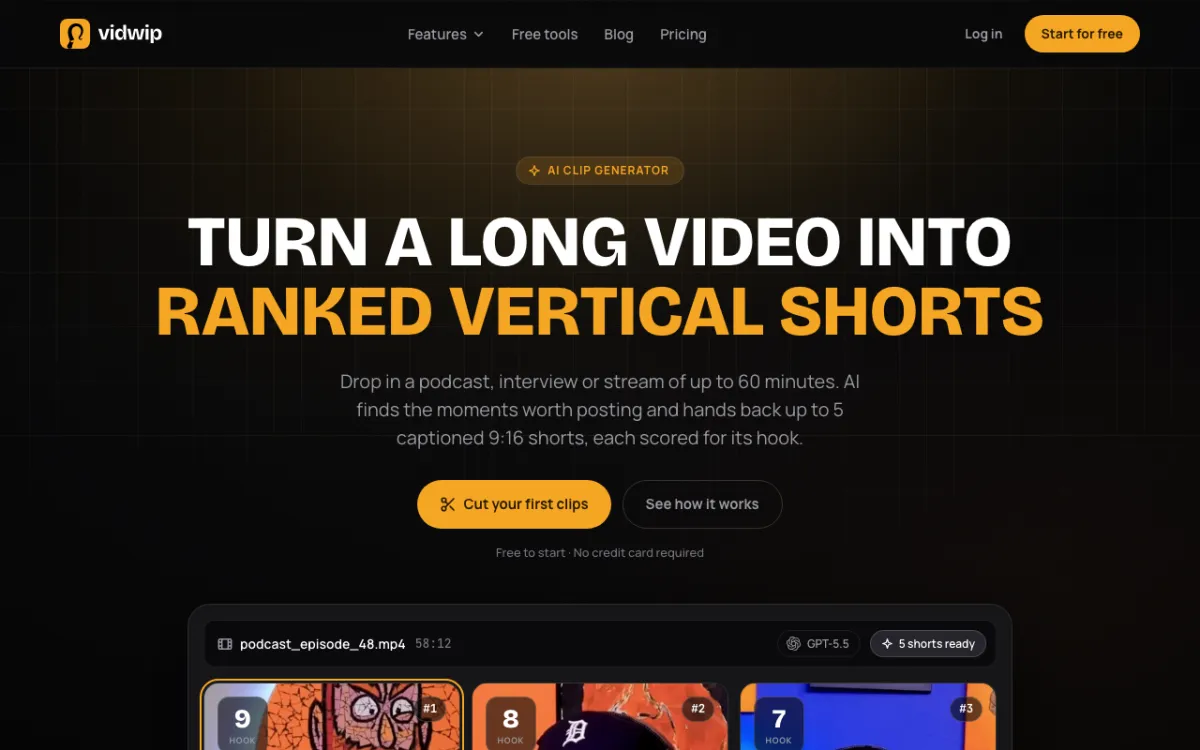 Vidwip AI Clipping — say in plain words which moments to find, get up to 5 shorts ranked best first.
Vidwip AI Clipping is an AI clip generator that starts from what you ask for, not from what it guesses. Paste a YouTube link or upload a video up to 60 minutes, then write a brief of up to 500 characters.
The brief can be a topic, a guest, a mood, or “Get 3 funny clips from this podcast”. The AI agent reads the whole transcript, follows your brief first, and picks moments that open on a strong line and land the pay-off inside the clip.
Every short is scored out of 10 on Flow, Hook, Interest and Engagement. The set arrives ranked best first, with an AI title and a post caption with hashtags for each clip.
The crop follows the speaker. The AI agent checks a frame every 2 seconds and cuts the 9:16 frame to whoever is talking, and on solo to-camera takes it jump-cuts every pause of half a second or more.
Pros
- Plain-word brief up to 500 characters steers which moments get picked
- Four scores per clip and the posting order done for you
- Clips snap to sentence boundaries, so no short ends mid-sentence
- Word-synced burned-in captions in 1 of 8 styles
- 1080x1920 output with no watermark on any plan
Cons
- Up to 5 clips per video, one video at a time, no batch mode
- 9:16 only: no square or 16:9 output
- No editing inside the clipper; trims happen on the AI Studio timeline
- Takes YouTube and direct file links only, not Twitch or Vimeo, and no audio-only files
Best for: Podcasters and interview channels who know the moments they want and would rather post five strong shorts than sort through fifty.
Pricing: Free to start, no credit card. Starter: $25/month for 2,500 credits. Pro: $99/month for 10,000 credits. Enterprise: custom (vidwip.com/pricing).
2. Opus Clip
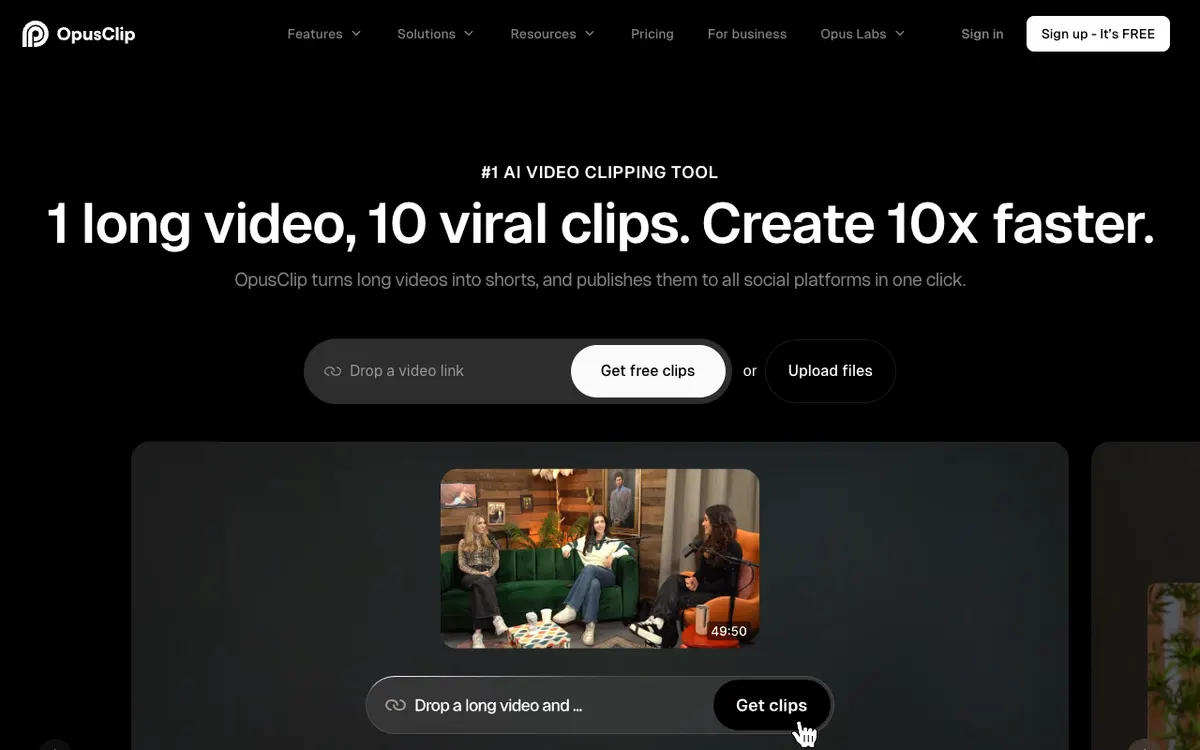 Opus Clip — one-click clipping with a virality score, billed per minute you import.
Opus Clip is the closest like-for-like swap for Klap. You paste a link or upload a file, and it returns vertical clips with animated captions, auto reframe and a virality score.
The meter is different. Its help center says processing costs 1 credit per minute of the video you import, and you can drag a timeframe slider to process only part of it.
That flips Klap’s maths. A 90-minute episode costs 90 credits whether it holds three good clips or thirty.
Pros
- Virality score on every paid plan, from Starter up
- Process only part of a video to save credits
- Prompt-to-clip and 1:1 or 16:9 exports on Pro
- Free plan posts one clip a day with no credit card
Cons
- Free and Starter export 9:16 only
- Free-plan exports expire after 3 days, and Starter exports after 30
- Prompt-to-clip waits until the $29/month Pro plan
Best for: Creators who like Klap’s one-click flow but post enough clips per video that a per-minute meter is cheaper.
Pricing: Free: 60 credits. Starter: $15/month, 150 credits. Pro: $29/month, 300 credits, unused credits roll over for 2 months. Business: custom. These are US list prices; Opus Clip shows lower regional prices in some countries (opus.pro/pricing, checked October 2026). For a deeper look, see our Opus Clip alternatives roundup.
3. Vizard
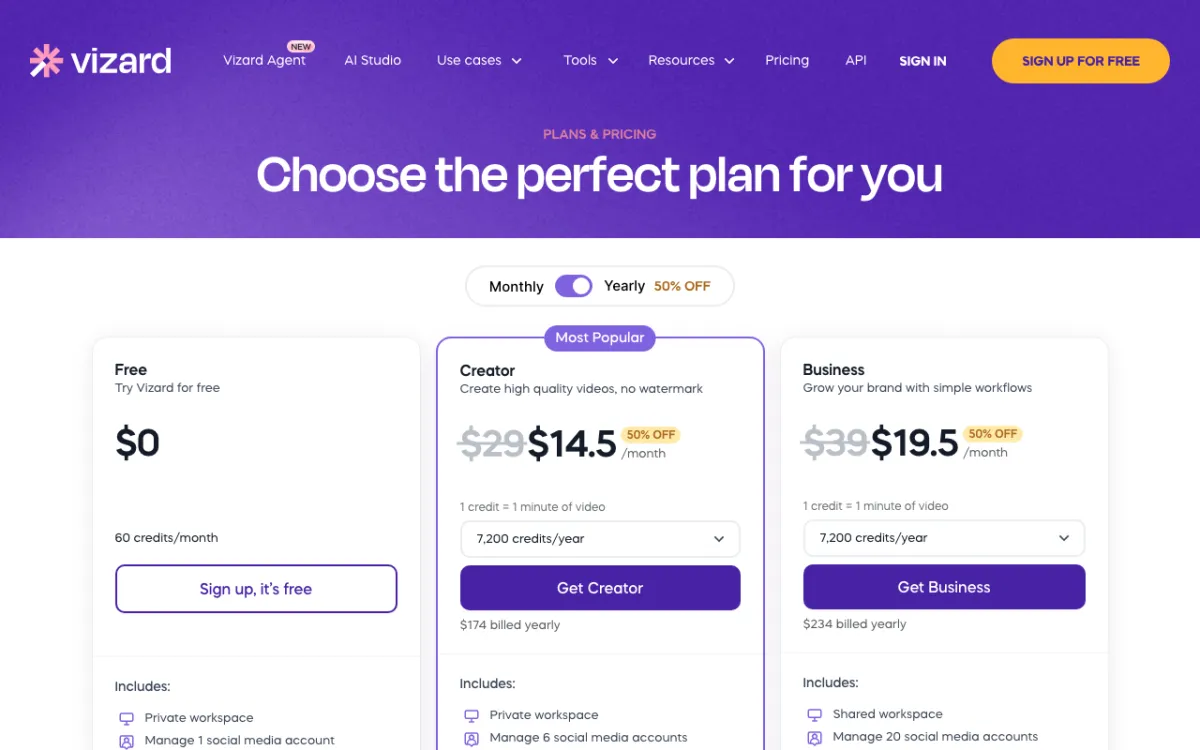 Vizard — AI clipping, auto reframe and a text-based editor, billed per upload minute.
Vizard is the cheapest Klap alternative per minute of source video. It finds highlights, reframes them to vertical, adds subtitles and AI B-roll, and schedules posts.
Creator is $29/month for at least 600 credits, and the pricing page states 1 credit = 1 minute of video. That’s about $0.05 a minute, roughly half of Opus Clip.
Paid plans accept uploads up to 600 minutes and 30 GB, and export in 4K. That makes it the safest pick for very long streams.
Pros
- About $0.05 per upload minute on monthly billing
- Uploads up to 600 minutes and 30 GB on paid plans
- 4K export and no watermark on Creator
- Subtitle translation and scheduling to 6 social accounts on Creator, 20 on Business
Cons
- Free plan caps uploads at 60 minutes and 1 GB, exports 720p with a watermark, and deletes after 3 days
- No per-clip virality score on the pricing page
- No brief before clipping; you clip first, then edit
Best for: Streamers and long-form podcasters who upload hours of footage and want the lowest cost per minute.
Pricing: Free: 60 credits/month. Creator: $29/month or $14.50/month billed yearly ($174/year), from 600 credits/month. Business: $39/month or $19.50/month billed yearly ($234/year), plus $5/month per extra seat (vizard.ai/pricing, checked October 2026). More options in our Vizard alternatives guide.
4. Submagic
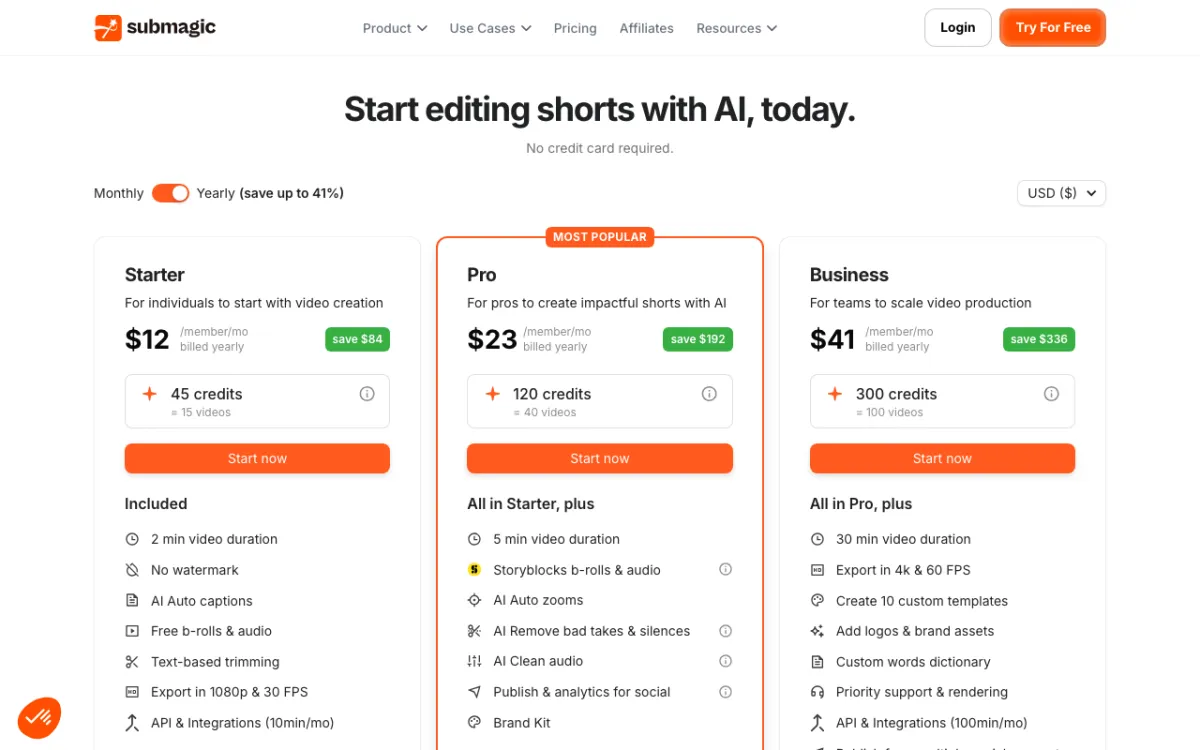 Submagic — caption styling first, with Magic Clips for cutting one video into several shorts.
Submagic is a caption-first shorts editor that added clipping, not a clipper that added captions. If the look of your captions matters more than which moment gets picked, start here.
The video length caps are the catch. Starter accepts videos up to 2 minutes, Pro 5 minutes and Business 30 minutes, so a full YouTube episode needs Business or a custom plan.
Pros
- Strongest caption styling in this list, with AI caption translation on every plan
- No watermark on any paid plan
- 4K 60 fps export on Business
- Free to try, no credit card
Cons
- Length caps of 2, 5 and 30 minutes rule out long videos on the cheaper plans
- Bills per video, so a long episode and a 30-second clip count the same
- No per-clip virality score on the pricing page
Best for: Creators who already cut short or mid-length videos and care most about caption style.
Pricing: Starter: $19/month or $12/month billed yearly, 15 videos. Pro: $39/month or $23/month billed yearly, 40 videos. Business: $69/month or $41/month billed yearly, 100 videos (submagic.co/pricing, checked October 2026). See how it stacks up in our Submagic alternatives roundup.
5. Spikes Studio
 Spikes Studio — an AI clipper built with streamers in mind, with a virality score on every plan.
Spikes Studio is an AI clip maker aimed at streamers and gamers. It says its moment detection was trained on hundreds of thousands of broadcasts, and it claims 1M+ users.
You paste a link or upload a file. It finds the moments, reframes to vertical, adds animated captions in 99+ languages and schedules posts to TikTok, YouTube, LinkedIn and Facebook from a content calendar.
Every plan lists an AI Curation Virality Score. Topic search, auto reframe and AI B-roll start on PRO+.
Pros
- Virality score even on the free plan
- Topic search on PRO+ lets you hunt for a subject across a video
- Annual PRO+ works out near $0.05 a minute, as cheap as Vizard
- Social scheduler, music and sound effects included on PRO+
Cons
- Free plan: 30 minutes a month, 720p, watermark, and no auto reframe
- Exports top out at 1080p on every plan
- Its FAQ says the web editor handles videos up to 5 minutes; max clipping length isn’t stated
Best for: Twitch and YouTube streamers who want gaming-aware clip picks and a scheduler in one tool.
Pricing: Free: up to 30 minutes/month. PRO+: $32.99/month for 300 minutes, or $14.09/month billed annually for 3,600 minutes a year. Enterprise: $115.99/month for 1,200 minutes, or $56.34/month billed annually (spikes.studio/pricing, checked October 2026).
6. Munch Studio
 Munch Studio — formerly getmunch, now a social media AI with video repurposing minutes in every plan.
Munch Studio is the tool many still call Munch, rebuilt around running your social media for you. It repurposes videos into clips, then writes posts, carousels and a content plan, and publishes them.
Clipping is one part of a bigger bundle. If you want shorts and also want the rest of your feed handled, it covers both.
Pros
- Clips plus posts, carousels, scripts and a content calendar in one plan
- 500 repurposing minutes a month on Essential, 1,000 on Premium
- Publishes to Instagram, Facebook, LinkedIn, YouTube and TikTok
- 7-day free trial
Cons
- About $0.12 per repurposing minute on monthly billing, the priciest per-minute plan here
- Clip-level controls are thin now that clipping isn’t the main product
- Pricing page doesn’t state watermark, export resolution or reframing details
Best for: Small businesses that want social media handled end to end, with clipping as one part of it.
Pricing: Essential: $58/month or $38/month billed annually ($456/year), 500 repurposing minutes. Premium: $85/month or $60/month billed annually ($720/year), 1,000 minutes. Multi-brand plans from $148/month (munchstudio.com/pricing, checked October 2026).
Klap alternatives compared
| Tool | How it bills | Approx. price per minute (monthly plan) | Virality score | Brief before clipping | Max source | Watermark-free from |
|---|---|---|---|---|---|---|
| Klap (baseline) | Per clip | $0.29 per clip (Basic) | Yes | No | Not listed | Not listed |
| Vidwip AI Clipping | Credits | Credit-based, free to start | Yes, 4 scores | Yes, 500 chars | 60 min, 2 GB | Free |
| Opus Clip | 1 credit/min | ~$0.10 (Starter, Pro) | Yes, from Starter | Pro and up | 10 GB file (Free) | $15/mo |
| Vizard | 1 credit/min | ~$0.05 (Creator) | Not listed | No | 600 min, 30 GB | $29/mo |
| Submagic | Per video | Per video, not per minute | Not listed | No | 2 / 5 / 30 min | $19/mo |
| Spikes Studio | Minutes | ~$0.11 (PRO+) | Yes, all plans | Topic search (PRO+) | Not listed | $32.99/mo |
| Munch Studio | Repurposing min | ~$0.12 (Essential) | Not listed | No | Plan minutes | Not listed |
All prices checked on each vendor’s pricing page in October 2026. Price per minute divides the monthly price by the minutes or credits it buys.
Annual billing roughly halves most of these.
How to choose the right Klap alternative
- You know which moments you want: Vidwip AI Clipping. Write the brief, get up to 5 ranked shorts with scores and post captions.
- You want Klap’s one-click flow on a per-minute meter: Opus Clip. Same paste-a-link start, plus a virality score.
- You upload hours of footage: Vizard. Lowest price per minute and 600-minute uploads.
- Captions are the whole point: Submagic. Best styling, but mind the length caps.
- You stream on Twitch or YouTube: Spikes Studio. Built for broadcasts, with a scheduler included.
- You want the whole social feed handled: Munch Studio.
Need subtitles in another language? Try the AI subtitle generator.
Making Shorts from a prompt instead of footage? Our faceless YouTube Shorts generator roundup covers that side.
Final verdict
If you’re tired of sorting a pile of one-click clips to find the three that work, flip the order. Tell Vidwip AI Clipping what to look for, and post the clip it ranks first.
If you like Klap’s flow and just want a different meter, Opus Clip is the closest swap and Vizard the cheapest. Submagic wins on captions, Spikes Studio on streams, and Munch Studio if you want someone to run the rest of your feed too.