
Only three of these five actually generate a faceless Short from a prompt: Revid.ai, AutoShorts.ai and Zebracat. OpusClip and Submagic finish footage you already have. AutoShorts.ai is the cheapest real autopilot at $19/month for three posts a week, and Zebracat's free plan is the only way to test a 9:16 format before paying — 5 videos, 30 seconds each, 720p, watermarked.
TL;DR
A faceless YouTube Shorts generator is judged on four things, and none of them appear on the feature grid: whether it frames natively at 9:16, whether the first three seconds earn a swipe, how much control you get over burned-in captions, and how many clips you can actually get out of one session.
Five tools, every number checked against the vendor’s own pricing page in September 2026:
- Revid.ai — best for running several faceless series at once. $39/month buys 2,000 AI credits, three Auto-Mode workers, publishing to TikTok, Instagram and YouTube, and 70+ language voiceovers. No free plan on the pricing page.
- AutoShorts.ai — cheapest genuine autopilot. $19/month posts three times a week with no watermark, HD, voice cloning and auto-post to channel. $69/month posts twice a day.
- Zebracat — the only free tier you can actually test a vertical format on. 5 videos, 30 seconds each, 720p, watermarked. Paid starts at $39/month for 15 videos.
- OpusClip — best if you already have long-form footage. $15/month adds a virality score, auto-reframe to 9:16, animated captions in 20+ languages, and auto-post to YouTube Shorts.
- Submagic — best burned-in caption styling, full stop. Free tier is 3 videos a month at 90 seconds; $19/month removes the watermark and gives 15 videos.
The split that matters: the first three generate a Short from a prompt. The last two finish a video you supply. Buying the wrong half is the most common mistake in this category.
What a faceless YouTube Shorts generator has to get right
The category name hides how different these products are. Some write a script, source visuals, voice it and publish it. Others never touch a script and only make footage you already have publishable.
Judge both halves on the same five questions.
Does it frame natively at 9:16? A tool that renders 16:9 and crops is not a Shorts tool. OpusClip’s entry plan is 9:16 only, which sounds like a limit and is actually the point.
What happens in the first three seconds? Retention on Shorts is decided before a viewer has processed the topic. Look for a hook feature by name — Submagic sells AI hook titles on its $39/month Pro plan, OpusClip scores clips for virality before you export.
How much caption control? Burned-in captions are not optional on a muted vertical feed. The gap between “auto captions” and “10 custom templates with your brand font” is the gap between generic and recognizable.
How many clips per session? Video-metered tools let you burn a month’s allowance in an afternoon. Schedule-metered tools will not, no matter how much you want them to.
What does one finished Short cost? Divide the plan price by the clips it actually releases. The number is often uglier than the headline price.
YouTube caps a Short at 3 minutes and accepts uploads at up to 1080p, per YouTube’s own Shorts documentation. Several tools on this list stop well short of that on their entry tiers.
The three that generate a Short from nothing
These write the script, pick or generate the visuals, voice it, caption it, and in two cases publish it.
1. Revid.ai — best for batch output across several series
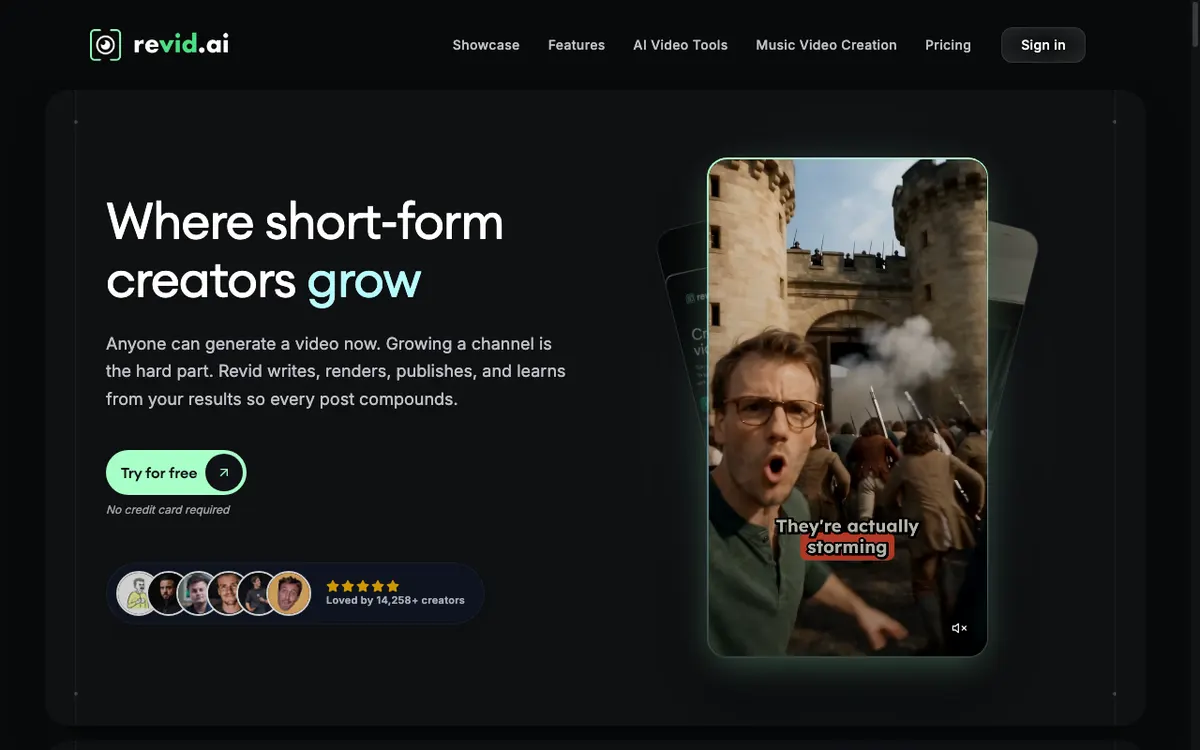 Revid.ai — writes, renders, publishes and reports back on short-form video
Revid.ai is a short-form generator built around a publishing loop rather than a single export. It writes the script, renders the video, posts it to TikTok, Instagram and YouTube, then feeds the post stats back so you can remix what worked.
The feature that decides this list is Auto-Mode workers. Each worker is an independent automation lane, so three workers means three faceless niches producing and publishing in parallel without you queuing them by hand.
The pricing structure is odd and worth reading carefully. Hobby lists at $39/month, and Growth lists at $99/month struck through to $39/month with a “discount locked in forever” label, which makes Hobby hard to justify at the same price (checked September 2026).
Pros
- Three Auto-Mode workers on the $39/month Growth plan, ten on the $199/month Ultra plan
- Publishes directly to TikTok, Instagram and YouTube, with post stats and one-click remix built in
- Renders up to 4K on Seedance 2.5 and other models, with 70+ language voiceovers
- API, MCP and CLI access included at the $39/month tier, which is unusual at that price
- Ultra adds custom voice creation and cloning, plus watching 50 channels for viral ideas
Cons
- No free plan appears on the pricing page — the homepage offers a trial, the plans start at $39/month
- Metered in AI credits (2,000/month on Growth), and the page does not translate credits into a clip count
- Heavy investment in avatars, face swaps and podcasts, which a faceless channel does not need
- Hobby and discounted Growth both land at $39/month, which makes the tier ladder confusing
Best for: running three or more faceless Shorts series in parallel from one account. Pricing: Hobby $39/month; Growth listed $99/month, shown at $39/month; Ultra $199/month with 12,000 credits (checked September 2026).
2. AutoShorts.ai — cheapest true set-and-forget Shorts channel
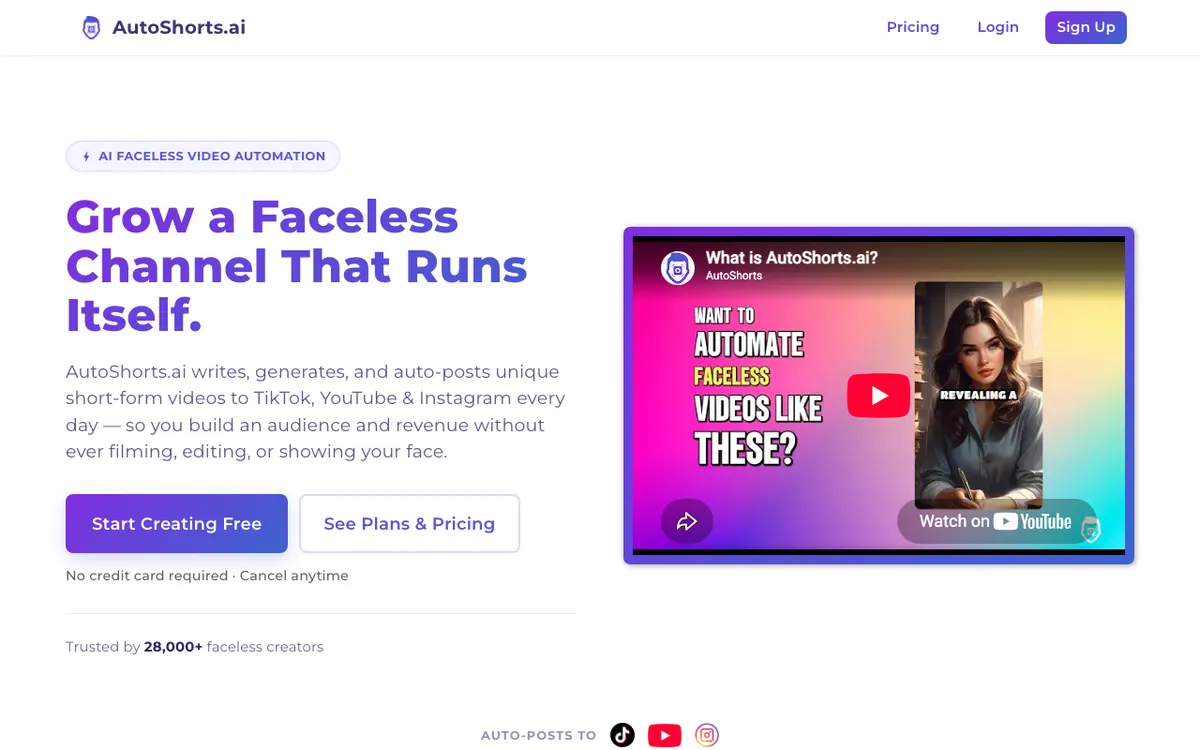 AutoShorts.ai — picks a series, generates on a cadence, and posts to the channel itself
AutoShorts.ai sells one idea and executes it cleanly: you pick a topic series, set a cadence, connect the channel, and it writes, generates and auto-posts short-form video to TikTok, YouTube and Instagram without you opening the app again.
That cadence is the product, and it is also the constraint. Plans are priced by posting frequency, not by a pool of videos, so you cannot sit down and batch out twenty clips in one evening.
Pricing is the most legible of any tool here. Starter is $19/month for three posts a week, Daily is $39/month for one a day, and Hardcore is $69/month for two a day, with a yearly toggle advertising two months free (checked September 2026).
Pros
- Every paid tier removes the watermark, adds HD resolution, background music and voice cloning
- Auto-post to channel is included from the $19/month Starter plan, not held back for a higher tier
- Hardcore’s two posts a day works out near 60 videos a month, the cheapest per-clip figure on this list
- Motion credits scale with the tier — 27 on Starter, 62 on Daily, 124 on Hardcore
- Edit and preview before publishing is available on every paid plan
Cons
- Each plan covers one video series; extra series are add-ons, so multiple niches cost more
- Schedule-bound by design — no burst mode, no batching ahead of a launch
- The free plan is 1 video with a watermark, no auto-post, no HD, and its pricing card read “Temporarily paused” when checked in September 2026
- Least creative control of the three generators here, which is the trade you are making
Best for: one faceless niche you want published daily without touching it. Pricing: Free $0 (1 video, currently paused); Starter $19/month; Daily $39/month; Hardcore $69/month (checked September 2026).
3. Zebracat — the only free tier worth testing a vertical format on
 Zebracat — text to video with auto-scheduling across social platforms
Zebracat turns text into social video and schedules it across platforms, positioning itself as an agent rather than an editor. For Shorts, the useful part is that it will produce a finished vertical clip from an idea and hand you edits afterward.
Its free plan is the most honest starting point in this roundup. Five videos total, 30 seconds each, 720p, watermarked, no card required — which is exactly enough to learn whether a niche and a voice style land before you spend anything.
Paid tiers are metered in videos plus generative AI credits, and the length caps climb with the tier: 2 minutes on Cat Mode at $39/month, 5 minutes on Super Cat at $99/month (checked September 2026).
Pros
- Free plan needs no card and produces 5 real videos at 30 seconds, which is Shorts length
- Standard AI voices cover 175+ languages on the entry plan, premium voices from Super Cat
- Three free edits per video on paid plans, so a bad scene does not cost a full regeneration
- Unlimited Cat at $199/month lifts the video cap entirely with 3,600 generative credits
- Watermark is removed on every paid tier, and 1080p export is standard from $39/month
Cons
- The 720p, 30-second, watermarked free plan is a trial, not a workflow
- Entry plan is $39/month for 15 videos — $2.60 a clip, the most expensive per-Short figure here
- 2-minute cap on the entry tier, well short of the 3 minutes YouTube allows
- Avatar and voice-clone features dominate the higher tiers, which faceless channels rarely use
Best for: testing whether a faceless format works before committing a budget. Pricing: Free (5 videos, 30 seconds, 720p, watermarked); Cat Mode $39/month or $23/month yearly; Super Cat $99/month; Unlimited Cat $199/month (checked September 2026).
The two that finish what you already have
Neither of these writes a script or generates footage. Both are better at the Shorts-specific craft than the generators are.
4. OpusClip — best when the source is long-form you already recorded
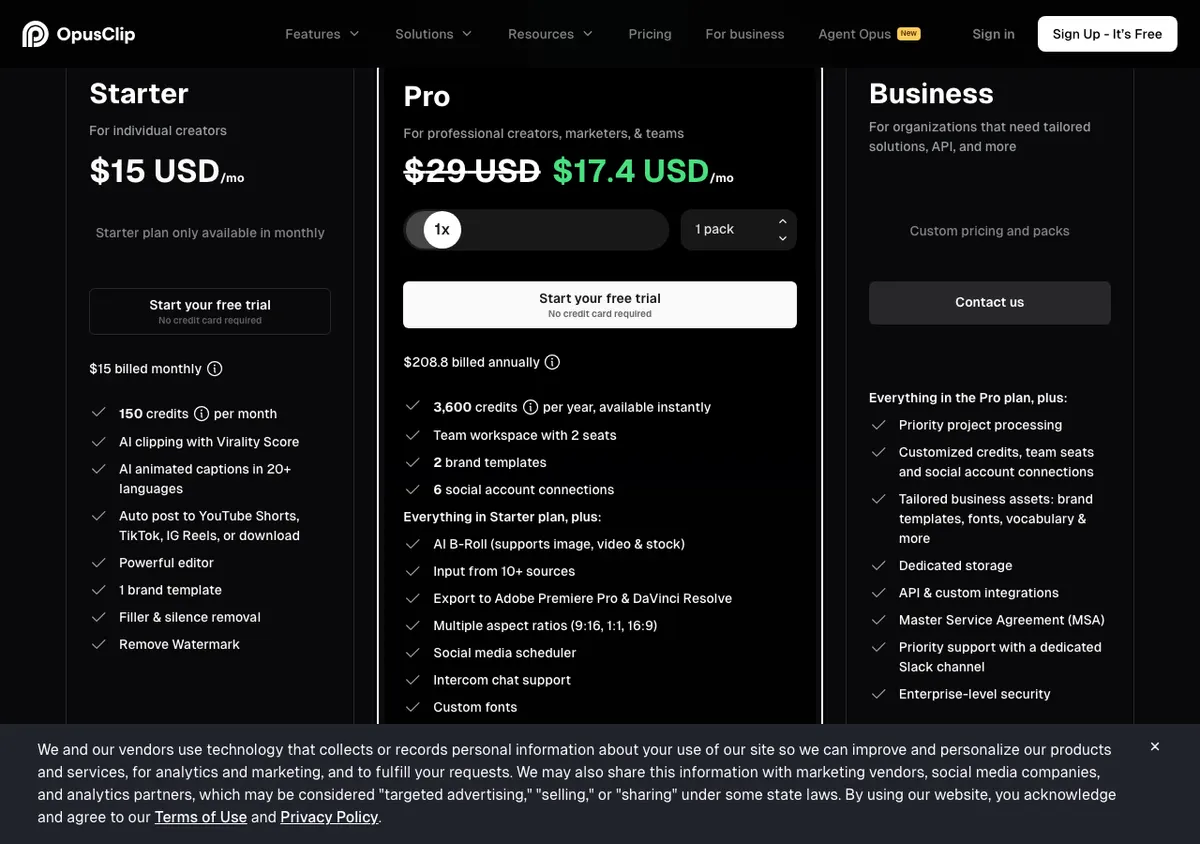 OpusClip — clips long video into vertical Shorts and scores each one before you post
OpusClip takes a long video and returns vertical clips, ranked. The ranking is the differentiator: a virality score tells you which cut has a hook worth posting, which is the closest thing on this list to a real answer for the first-three-seconds problem.
Reframing is automatic and, on the entry plan, exclusively 9:16. Captions are animated and cover 20+ languages, and the $15/month Starter tier posts finished clips straight to YouTube Shorts, TikTok and Instagram Reels.
The free tier is genuinely usable for evaluation but not for production: 60 credits a month, a watermark, no editing, and clips stop being exportable after 3 days (checked September 2026).
Pros
- Virality score on every paid plan, so you post the cut with the strongest opening
- Auto-post to YouTube Shorts, TikTok and IG Reels included at $15/month
- AI animated captions in 20+ languages, with emoji and keyword highlighting even on the free tier
- Pro at $29/month adds AI B-roll, a social scheduler, moving-object tracking and 9:16, 1:1 and 16:9 output
- Explicitly prices in USD on the page, with the currency printed next to every figure
Cons
- Generates nothing — no source video, no clips, so it is useless for a channel starting from scratch
- Free tier watermarks exports and expires clips after 3 days
- Starter is monthly-only, so the annual discount is locked behind the $29/month Pro tier
- Metered in credits rather than minutes or clips, so your real ceiling depends on upload length
Best for: podcasters, streamers and anyone with an archive of long video to mine. Pricing: Free $0 (60 credits/month, watermarked); Starter $15/month; Pro $29/month, discounted to $17.40/month, $208.80 billed annually; Business custom (checked September 2026).
5. Submagic — best burned-in caption styling on this list
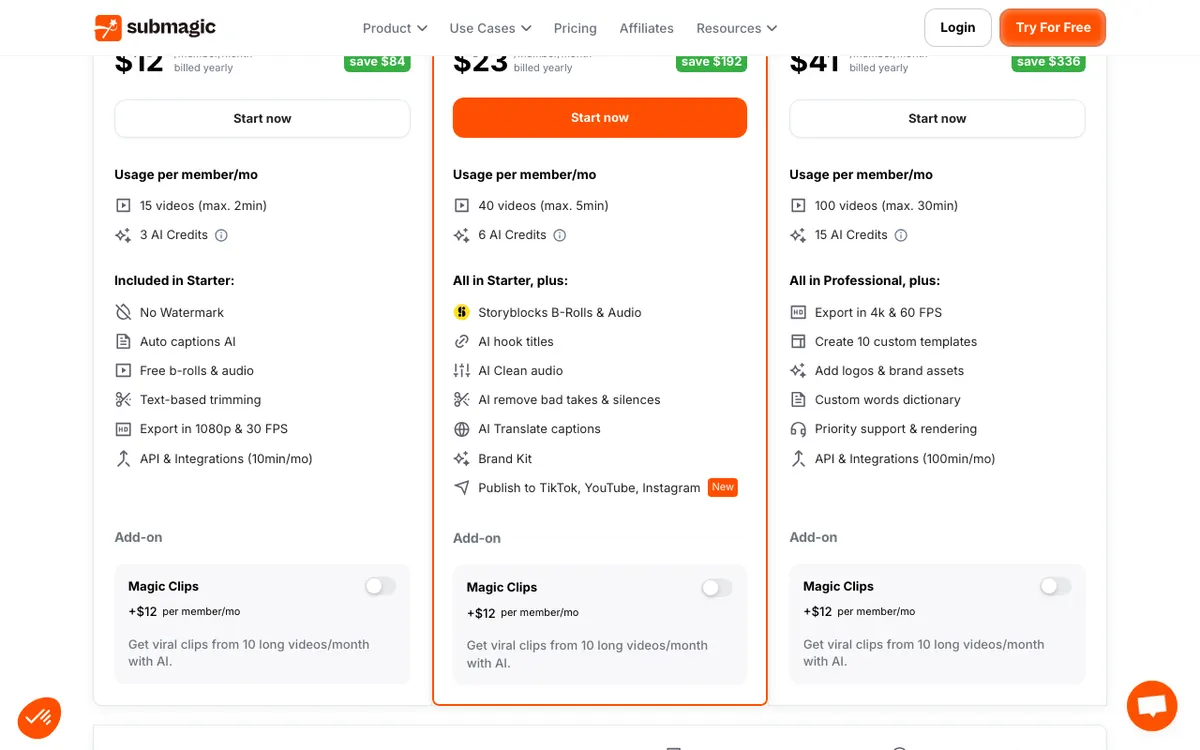 Submagic — caption styling, hook titles and clip finishing for short-form video
Submagic is a finishing layer, and it is the best one here. Its entire pitch is turning raw footage into a publishable Short fast, and caption styling is where it separates from every generator on this list.
The tiers are structured around caption sophistication. Starter at $19/month gives standard templates and auto captions; Pro at $39/month adds premium templates, three custom ones, AI hook titles and caption translation; Business at $69/month gives unlimited custom templates plus brand assets and 4K at 60fps.
There is a real free plan — 3 videos a month, 90 seconds each, 200 MB per file, with a Submagic watermark and starter templates (checked September 2026).
Pros
- Deepest caption control in the category: premium templates on Pro, unlimited custom templates on Business
- AI hook titles on Pro at $39/month, aimed directly at the opening-seconds problem
- Publish to TikTok, YouTube and Instagram from inside the tool on Pro and above
- Free b-rolls and audio on Starter; Storyblocks b-roll and audio from Pro
- Yearly billing is aggressive — $12/month on Starter, $23/month on Pro, $41/month on Business
Cons
- Writes no script and generates no footage, so it cannot start a faceless channel on its own
- 2-minute cap per video on the $19/month Starter plan, under YouTube’s 3-minute Shorts limit
- Magic Clips, the feature that pulls Shorts out of long video, is a paid add-on at +$19/month
- Free plan’s 90-second cap and watermark make it a demo rather than a workflow
Best for: channels where caption styling is the brand. Pricing: Free $0 (3 videos/month, 90 seconds); Starter $19/month or $12/month yearly; Pro $39/month or $23/month yearly; Business $69/month or $41/month yearly (checked September 2026).
Faceless YouTube Shorts generators compared
| Tool | Entry paid price | Free tier | Output at entry tier | Generates script and visuals | Auto-posts to Shorts |
|---|---|---|---|---|---|
| Revid.ai | $39/mo | None on the pricing page | 2,000 AI credits, 3 Auto-Mode workers | Yes | Yes — TikTok, Instagram, YouTube |
| AutoShorts.ai | $19/mo | 1 video, watermarked, paused Sept 2026 | 3 posts a week, roughly 13 a month | Yes | Yes — TikTok, YouTube, Instagram |
| Zebracat | $39/mo | 5 videos, 30s, 720p, watermarked | 15 videos a month, 2-minute cap | Yes | Auto-schedules across platforms |
| OpusClip | $15/mo | 60 credits/mo, watermark, 3-day expiry | 150 credits a month, 9:16 only | No — clips your own footage | Yes — Shorts, TikTok, Reels |
| Submagic | $19/mo | 3 videos/mo, 90s cap, watermarked | 15 videos a month, 2-minute cap | No — captions and trims your footage | On Pro at $39/mo |
All figures checked against each vendor’s pricing page in September 2026, in USD.
What one finished Short actually costs
Headline pricing hides the number that matters. Divide the plan by the clips it releases and the ranking shifts.
- AutoShorts.ai Hardcore — $69/month for two posts a day, roughly 60 a month, about $1.15 per Short
- AutoShorts.ai Daily — $39/month for about 30 a month, about $1.30 per Short
- AutoShorts.ai Starter — $19/month for about 13 a month, about $1.46 per Short
- Submagic Starter — $19/month for 15 videos, about $1.27 each, or about $0.80 each on yearly billing
- Zebracat Cat Mode — $39/month for 15 videos, about $2.60 each, or about $1.53 each on yearly billing
Revid.ai and OpusClip are excluded from that list on purpose. Both meter in credits without publishing a per-clip conversion, so any per-Short figure would be a guess.
That is a real evaluation signal, not a footnote. A tool that will not tell you what a clip costs is a tool that expects you to find out after you pay.
The first three seconds are the whole product
Everything after the hook is retention maintenance. On a vertical feed the viewer decides before the first sentence finishes.
Only two tools here address that directly. OpusClip scores clips for virality before export, so the cut with the strongest opening is identifiable rather than guessed. Submagic sells AI hook titles on its Pro plan, which writes the opening line as its own artifact.
The three generators produce a hook because a script has to start somewhere. That is not the same as optimizing one.
If you use a generator, treat the first line of every script as a manual edit. It is the cheapest quality improvement available and no tool on this list does it well enough to skip.
Captions are not a checkbox
Every tool here burns in captions. The differences are in styling depth, and styling depth is what makes a faceless channel look like a channel instead of a batch job.
Submagic’s ladder is the clearest illustration: starter templates on free, standard on $19/month, premium plus three custom templates on $39/month, unlimited custom templates with brand fonts and a custom words dictionary on $69/month.
OpusClip’s animated captions cover 20+ languages and add emoji and keyword highlighting, with custom font upload capped at two fonts on Pro.
The generators give you captions with fewer levers. If your niche is crowded, that is the setting that will make your Shorts look like everyone else’s.
For a wider look at caption and subtitle output beyond Shorts, our roundup of free AI video transcription tools covers the export formats these tools do not give you.
How to choose
Starting a channel from zero, one niche, hands-off. AutoShorts.ai at $19/month. It is the only tool here priced on posting cadence, and cadence is the hard part of a faceless channel.
Running several niches at once. Revid.ai at $39/month. Three Auto-Mode workers is three parallel series, and the API, MCP and CLI access means you can drive it from your own scripts.
Testing before you spend. Zebracat’s free plan. Five 30-second videos at 720p tells you whether the format works, and it costs nothing but a signup.
You already have long-form video. OpusClip at $15/month. Generating new footage when you have an archive is the expensive way to make Shorts.
Captions are your brand. Submagic. Pair it with whichever generator you pick — nothing else here matches its template control.
How this fits the rest of the faceless stack
This post is deliberately narrow: vertical 9:16, hook pacing, caption styling, batch output. The rest of the category splits along different lines.
- Faceless YouTube video generators — the same job at long-form runtimes, 8 to 20 minutes, where pacing and footage variety matter more than the opening three seconds.
- Free faceless video generators — where each free tier actually stops on watermarks, clip length and export resolution.
- Faceless video generator apps — installable phone and desktop tools rather than browser-based services.
- Open-source faceless video generators on GitHub — self-hosted pipelines you run yourself, for developers who want the API keys in their own account.
Narration is the other half of the job, and every tool on this list voices scripts with a synthetic read. Our comparison of AI video voiceover generators goes deeper on voice realism, and the free AI video voiceover tools roundup names the monthly limits on each free tier.
For commentary-style faceless formats, where the script carries the video rather than the footage, our best AI commentary generators comparison is the closer match. And if you plan to run the same Shorts in more than one language, AI video dubbing tools covers what re-voicing a finished clip costs.
Monetization is decided by the script, not the tool
Producing 60 Shorts a month is easy now. Getting them monetized is not.
YouTube renamed its repetitious content policy to inauthentic content in July 2025, and its channel monetization policies ask that content be your original creation and not be mass-produced, generic, repetitive or manipulative.
Read that against a tool that posts twice a day from a single template. The pattern the policy describes and the pattern an autopilot generator produces are close enough to matter.
The practical defense is the same one that makes Shorts watchable: a script written for that specific clip, and narration that sounds like a person had an opinion. That is the work the generator does not do for you.
Final verdict
Best faceless YouTube Shorts generator overall: Revid.ai at $39/month, on the strength of three parallel Auto-Mode workers, direct publishing to three platforms, and API access at the entry tier.
Best value: AutoShorts.ai at $19/month. Three posts a week, no watermark, HD, voice cloning and auto-post to channel is the most complete cheap autopilot in the category, and its Hardcore tier lands near $1.15 per finished Short.
Best free test: Zebracat. Five 30-second videos at 720p with no card is enough to validate a niche.
Best clipper: OpusClip at $15/month, if the raw material already exists.
Best finisher: Submagic, on caption styling nothing else here matches.
Pick one generator and one finisher. The single-tool workflow is what makes faceless Shorts look mass-produced, and that is the one thing the algorithm and the monetization policy both punish.