
Descript is the better AI editor: transcript-first editing, Underlord, Studio Sound and voice clones, with watermark-free exports from $16/month billed yearly. Riverside is the better recorder: 4K video and 48kHz audio on Pro, transcription in 100+ languages and live streaming from Grow. At $24/month billed yearly, both get you 4K, so pick on your bottleneck: editing goes to Descript, recording guests goes to Riverside.
Descript vs Riverside is the comparison most podcasters hit once a show outgrows Zoom and a free audio editor. Both now record remote guests, transcribe, edit by text and cut social clips with AI.
They still start from opposite ends.
Descript is an editor that learned to record. Riverside is a recorder that learned to edit.
This comparison scores them on what decides your workflow: remote recording quality, AI editing features, transcription accuracy and real price. Every plan and price below was checked on each vendor’s own pricing page on October 26, 2026.
TL;DR — who wins each round
| Dimension | Winner | Why |
|---|---|---|
| Remote recording quality | Riverside | 4K video and 48kHz audio on Pro, separate tracks, built for guests |
| AI editing | Descript | Transcript-first editor, Underlord, Studio Sound, Eye Contact, voice clones |
| Transcription | Riverside | 100+ languages and up to 99% claimed accuracy vs Descript’s 25 languages and up to 95% |
| Live streaming and webinars | Riverside | 1080p multistreaming on Grow, webinar tools on Webinar |
| AI voice and fixing flubs | Descript | Type a correction and regenerate the line in your cloned voice |
| Cheapest watermark-free plan | Descript | $16/month billed yearly vs $24 for Riverside Pro |
| Price for 4K exports | Tie | Descript Creator and Riverside Pro both cost $24/month billed yearly |
Pick Descript if editing eats your week: you cut long interviews, fix flubbed lines, and build YouTube videos from talking-head footage. Pick Riverside if recording is the risky part: remote guests on bad Wi-Fi, video podcasts in 4K, or shows you also stream live.
Descript vs Riverside: the short overview
Both tools record, transcribe, edit and export. The difference is which step the product was designed around.
Descript treats the transcript as the timeline: delete a sentence in the text, and the audio and video follow. Recording, through Descript Rooms, feeds that editor.
Riverside treats the recording session as the product. Each guest records locally at full quality while the call runs, then you edit, clip and publish from the same dashboard.
If your problem is “my episodes take 6 hours to edit”, look at Descript first. If your problem is “my guest’s audio sounded like a tin can”, look at Riverside first.
Descript deep dive
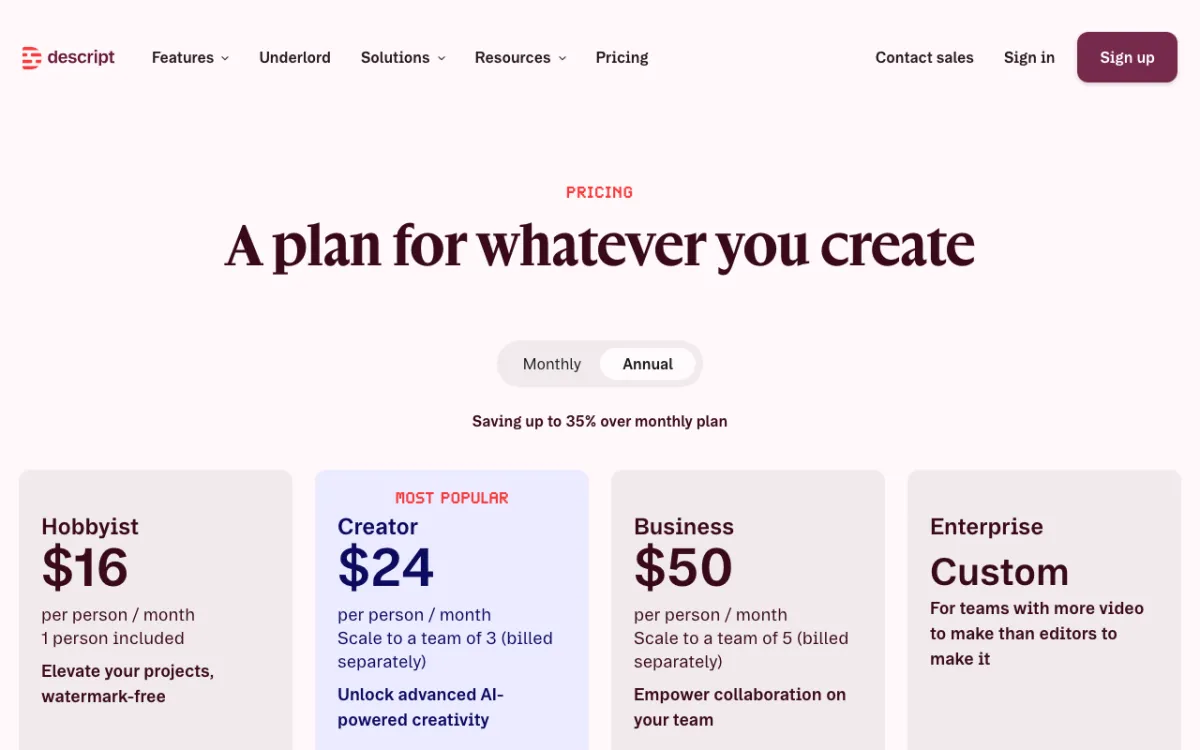 Descript — AI video and podcast editor that edits by transcript
Descript is an AI audio and video editor for podcasters and YouTubers, offering transcript-based editing and an AI co-editor from $16/month billed yearly. You edit words, not waveforms.
Underlord is the AI co-editor. You give it a prompt, and it handles tasks like adding captions, splitting clips, building social cuts, adding zooms, translating subtitles and applying Studio Sound.
The rest of the AI kit targets the problems podcasters actually have. Studio Sound cleans up room echo and noise, Eye Contact fixes a guest reading notes, and AI speech regenerates a flubbed line in a cloned voice.
Descript Rooms is the remote recorder. Everyone records locally in up to 4K, files upload as you go, and each participant gets a separate file.
On descript.com/pricing (checked October 26, 2026), the plans look like this:
| Plan | Yearly billing | Monthly billing | Media hours | AI credits | Export | Rooms recording |
|---|---|---|---|---|---|---|
| Free | $0 | $0 | 1 hr/month | 100 one-time | 720p, watermark | 2 hrs |
| Hobbyist | $16/month | $24/month | 10 hrs/month | 400/month | 1080p | 5 hrs |
| Creator | $24/month | $35/month | 30 hrs/month | 800/month | 4K | 15 hrs |
| Business | $50/month | $65/month | 40 hrs/month | 1,500/month | 4K | 25 hrs |
Prices are per person. Enterprise is custom and adds SSO and SCIM.
Pros
- Transcript-first editing is still the fastest way to cut a long interview
- Underlord runs multi-step edits from one prompt
- Studio Sound and Eye Contact fix bad audio and wandering eyes after the fact
- AI speech and voice clones patch a flubbed line without a re-record
- Cheapest watermark-free entry at $16/month billed yearly
Cons
- Rooms recording is capped per plan: 5 hours on Hobbyist, 15 on Creator
- Transcription covers 25 languages on the pricing page, far fewer than Riverside’s 100+
- 4K export needs Creator; Hobbyist stops at 1080p
- AI credits run out fast if you lean on Underlord, since cost varies by task
- No live streaming or webinar tools
Best for: Solo podcasters and YouTubers whose bottleneck is editing, not recording.
Riverside deep dive
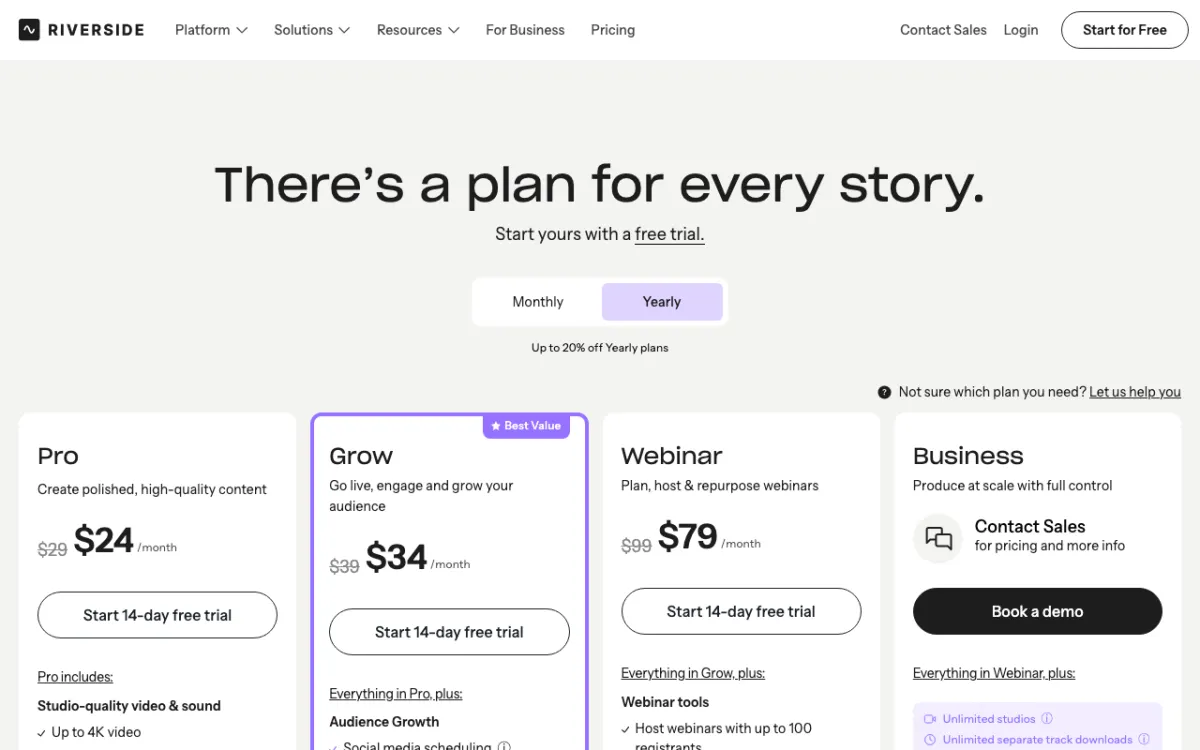 Riverside — remote podcast and video recorder with AI editing and clips
Riverside is a remote recording studio for podcasters and video creators, offering 4K video and 48kHz audio recording with AI editing from $24/month billed yearly. Each guest records locally, so a shaky connection doesn’t wreck the master files.
The AI layer has grown fast.
Magic Audio removes background noise and reverb, balances levels, and enhances voices across separate tracks. Magic Clips turns an episode into short social clips.
AI Co-Creator edits by chat inside the editor. Riverside’s own demos show prompts like cutting pauses and filler words, adding background music with automatic fades, and inserting B-roll from a description, per its Co-Creator help article.
Riverside says Magic Clips, Magic Audio and Co-Creator don’t consume AI credits. Credits power extras like AI Translation, AI B-Roll and Animated Clips, and Pro starts with 2,000.
On riverside.com/pricing (checked October 26, 2026), the plans look like this:
| Plan | Yearly billing | Monthly billing | Separate-track downloads | Export | Audio | Watermark |
|---|---|---|---|---|---|---|
| Free | $0 | $0 | 2 hrs recording, one-off | 720p | 44.1kHz | Yes |
| Pro | $24/month | $29/month | 15 hrs/month | Up to 4K | 48kHz | No |
| Grow | $34/month | $39/month | 20 hrs/month | Up to 4K | 48kHz | No |
| Webinar | $79/month | $99/month | 25 hrs/month | Up to 4K | 48kHz | No |
| Business | Custom | Custom | Unlimited | Up to 4K | 48kHz | No |
Riverside’s FAQ says recording itself is unlimited and the cap applies to separate-track downloads. Its comparison table also lists 5 recording hours on Pro and 15 on Grow, so confirm the limit for your plan before a long season.
Pros
- 4K video and 48kHz audio on Pro, recorded locally per guest
- Transcription in 100+ languages with a claimed accuracy of up to 99%
- Magic Audio, Magic Clips and Co-Creator don’t burn AI credits
- Host teleprompter, 1080p live streaming and multistreaming on Grow
- AI Translation voices and lip-syncs recordings in 30+ languages
Cons
- First paid plan costs $24/month billed yearly, $8 more than Descript Hobbyist
- Download and recording caps are stated inconsistently on the pricing page
- The editor is shallower than Descript for heavy cutting and scene work
- AI Translation is listed as Business-only on its own page
- Free plan is a 2-hour one-off grant, not a monthly allowance
Best for: Interview shows and video podcasts with remote guests, plus creators who stream or run webinars.
Head-to-head comparison table
| Feature | Descript | Riverside |
|---|---|---|
| Core strength | Editing by transcript | Remote recording |
| Remote recording | Rooms, up to 4K, separate files, 10 participants | Studio, up to 4K, 48kHz on Pro, separate tracks |
| Recording limits | 2 / 5 / 15 / 25 hrs per month by plan | Pro: 15 hrs separate-track downloads per month |
| AI editing | Underlord co-editor, filler word removal, scenes, layouts | AI Co-Creator chat editing, unlimited text-based editing |
| Audio cleanup | Studio Sound | Magic Audio |
| AI voice | Text to speech, regenerate, voice clones | Voice cloning inside AI Translation |
| Transcription | 25 languages (pricing page), up to 95% accuracy | 100+ languages, up to 99% accuracy |
| Translation | Transcript, captions or audio into 30+ languages | Voice and lip sync in 30+ languages (Business) |
| Social clips | Underlord social cuts | Magic Clips |
| Live streaming | No | 1080p multistreaming from Grow |
| Free plan | 1 media hr/month, 720p, watermark | 2 hrs one-off, 720p, watermark |
| Cheapest watermark-free | $16/month yearly (1080p) | $24/month yearly (4K) |
Key differences that change your pick
Remote recording quality
Riverside wins on recording, and it isn’t close for interview shows. Pro records up to 4K video and 48kHz audio locally for each guest, and the free plan’s 44.1kHz audio is a clear step down from that.
Descript Rooms also records locally in up to 4K with a separate file per participant. The gap is in hours and tooling: Rooms caps recording at 5 hours a month on Hobbyist, and Riverside adds a teleprompter, producer mode and live streaming.
AI editing features
Descript wins on editing depth. The transcript is the timeline, so cutting a 90-minute interview feels like editing a document.
Underlord and AI speech go further than Riverside today. You can fix a misspoken word by typing the right one, and the line regenerates in the speaker’s voice.
Riverside has closed much of the gap with unlimited text-based editing and Co-Creator. For most episodes that need trims, filler-word cuts and clips, it is enough.
Transcription accuracy and languages
Riverside makes the stronger claim. Its transcription page lists 100+ languages and up to 99% accuracy, with speakers labeled from separate tracks and TXT or SRT export.
Descript’s transcription page claims up to 95% accuracy. Its pricing page lists 25 languages while its FAQ says 30+, so check your language before you buy.
Both numbers are vendor claims. Run one real episode through each free plan and count the corrections.
Pricing and value
Descript is cheaper to start. Hobbyist removes the watermark for $16/month billed yearly, but caps exports at 1080p.
At 4K the two tie. Descript Creator and Riverside Pro both cost $24/month billed yearly, or $35 and $29 on monthly billing.
Monthly billing favors Riverside by $6 at the 4K tier. Yearly billing makes them equal, so pick on workflow, not price.
Learning curve
Riverside is easier on day one. You send a link, record, and Magic Clips gives you shorts without opening a timeline.
Descript asks more of you up front, because scenes, layers and Underlord prompts take an afternoon to learn. The payoff is a faster edit on every episode after that.
Which one should you pick?
- Solo YouTuber or narrator: Descript. You record yourself, so Riverside’s guest tooling is wasted, and the editor saves the most hours.
- Interview podcast with remote guests: Riverside. Local 48kHz tracks per guest protect the one thing you can’t fix later.
- Video podcast in 4K on a budget: Either, at $24/month billed yearly. Pick Riverside if guests are remote, Descript if you record in one room.
- Live shows and webinars: Riverside Grow or Webinar. Descript has no streaming.
- Multilingual show: Riverside for transcription in 100+ languages. Descript if you only need translated captions in 30+.
- Heavy editor with a team: Descript Business at $50/month per person billed yearly, with 1,500 AI credits each.
Many shows use both: record in Riverside, then edit in Descript. That works, but you pay two subscriptions and export twice, so only do it if each tool clearly earns its slot.
Still shortlisting? See our guides to the best Descript alternatives and Riverside alternatives cover Zencastr, StreamYard, Adobe Premiere and more.
For podcast-first studios, see the Podcastle alternatives list.
If transcripts matter more than the editor, compare accuracy and price in our AI video transcription tools ranking. If your goal is cutting long recordings into shorts, the Opus Clip alternatives guide goes deeper on clip tools.
Conclusion: Descript for editing, Riverside for recording
Descript vs Riverside comes down to your bottleneck. Descript is the better AI editor, and Riverside is the better AI recorder.
If you edit more hours than you record, choose Descript and start on Hobbyist at $16/month billed yearly. If remote guests and 4K video podcasts drive your show, choose Riverside Pro at $24/month billed yearly.
Test both free plans on the same episode before you pay. The tool that saves you the most hours on that one episode is your answer.