
Writecream's AI commentary generator is a free, no-login script writer — 71 languages, 14 tones, output in about three seconds. It is genuinely useful for drafting commentary copy. It is not a commentary video tool: it never sees your footage, the widget returns text you copy out, and voicing happens in a separate tool capped at 4 voice-overs on Free and 100 a month on the $29 Unlimited plan.
TL;DR
Writecream’s AI commentary generator is a free, no-login text tool that writes commentary copy in 71 languages and 14 tones, in about three seconds. As a script writer it earns its place — the ceremony-free access is rare and the drafts are usable.
As a commentary generator it is only half the job. It never sees your video, it returns text rather than a finished audio or video file, and voicing lives in a separate tool that gives Free accounts four voice-overs total.
What is Writecream?
Writecream is an AI writing platform, not a video tool. It launched around cold-email icebreakers and grew into a workspace of 75+ generators covering blog posts, ad copy, product descriptions, podcast scripts, and voice-overs.
The AI commentary generator is one of those generators. It sits on a public URL in the “Free Tools” section, alongside dozens of siblings like the sports play-by-play generator and the AI voiceover generator.
That lineage matters for what you should expect. Writecream is a text company that added a text-to-speech step, and the commentary tool inherits that shape exactly.
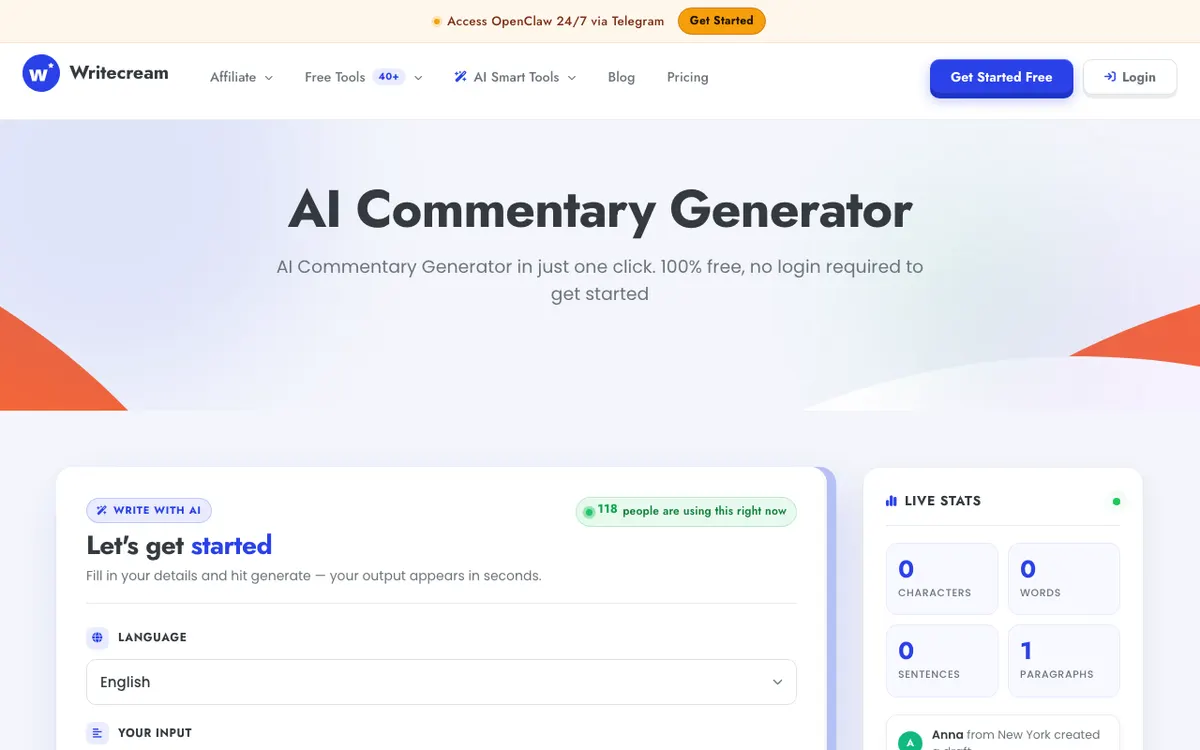 The Writecream AI commentary generator — a language dropdown, a tone dropdown, a word count slider, and a text box. No upload field anywhere.
The platform holds a 4.8 out of 5 rating across 346 verified reviews on Capterra, which is a strong score for a tool at this price. The recurring complaints in those reviews — credit tracking, thin free trial, uneven non-English output — line up with what the commentary tool actually does.
How the Writecream AI commentary generator works
The Writecream AI commentary generator takes a written description of a moment and returns commentary text about it. That is the entire mechanism, and it is worth stating plainly because the category name implies more.
You get four inputs:
- Language — a dropdown with 71 options, English through Welsh
- Tone — 14 presets: Default, Friendly, Formal, Casual, Professional, Diplomatic, Confident, Academic, Simplified, Bold, Empathetic, Engaging, Direct, Persuasive
- Your input — free text, with an on-page nudge to “Be descriptive — clearer input gives sharper output”
- Word count — a slider
Hit Generate and the output panel fills in roughly three seconds. The page advertises “~3s average” and “Unlimited tries”, and in testing the generation time held.
Then you copy the text out. There is no voice picker on this page, no audio player, and no export.
That last point deserves a flag, because Writecream’s own copy on the same page says you can “copy the generated commentary or download the audio file for immediate use.” The widget shipping on that URL offers a Copy button and nothing else. The audio step is a different tool.
Where the audio actually comes from
Voicing happens in Writecream’s AI Voiceover Generator, a separate free-tool page with the same shape: paste text, pick a language, generate.
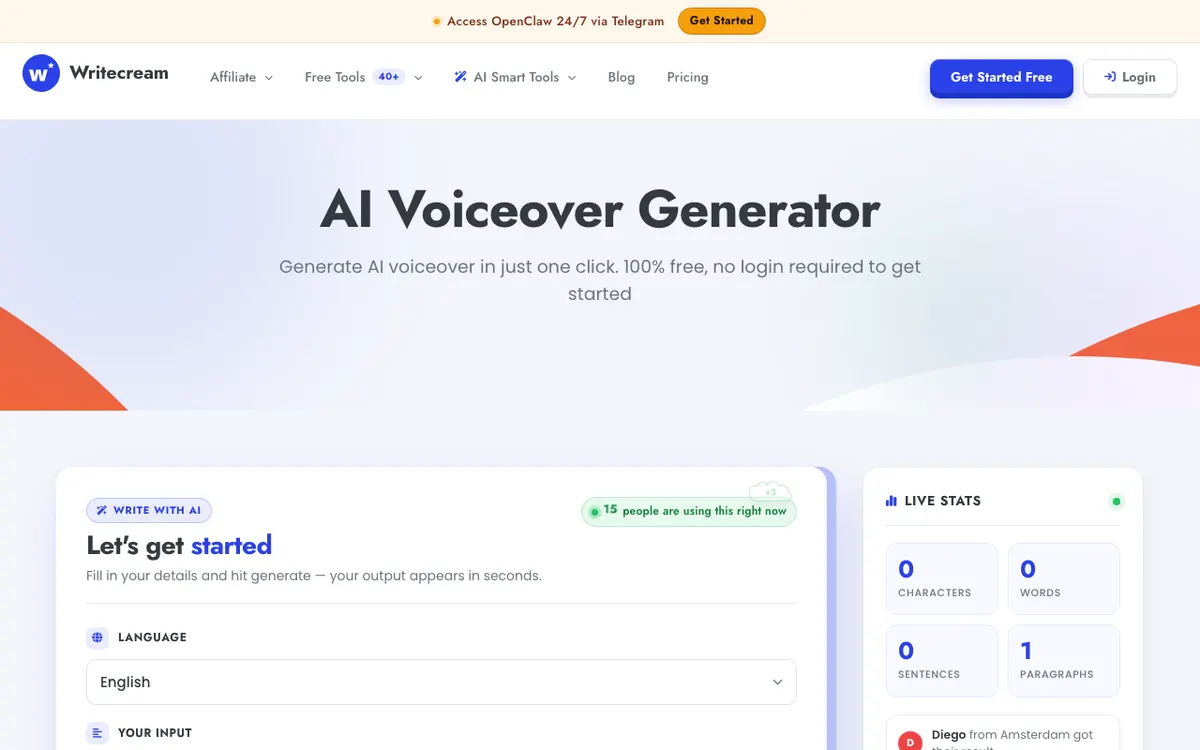 Writecream’s AI Voiceover Generator — the second stop if you want your commentary spoken. It exports MP3 or WAV, not video.
It claims “dozens of lifelike AI voices across languages and styles” without publishing a count, and exports “as an MP3 or WAV file ready for use in any media project.”
So the real workflow is two tabs and a manual handoff: write in one tool, paste into the other, download the audio, then time it against your footage in an editor you supply yourself.
Writecream pricing: plans, credits, and what you actually pay
Writecream publishes three plans on its homepage. All prices below are the USD figures printed on the vendor’s own page, checked September 2026.
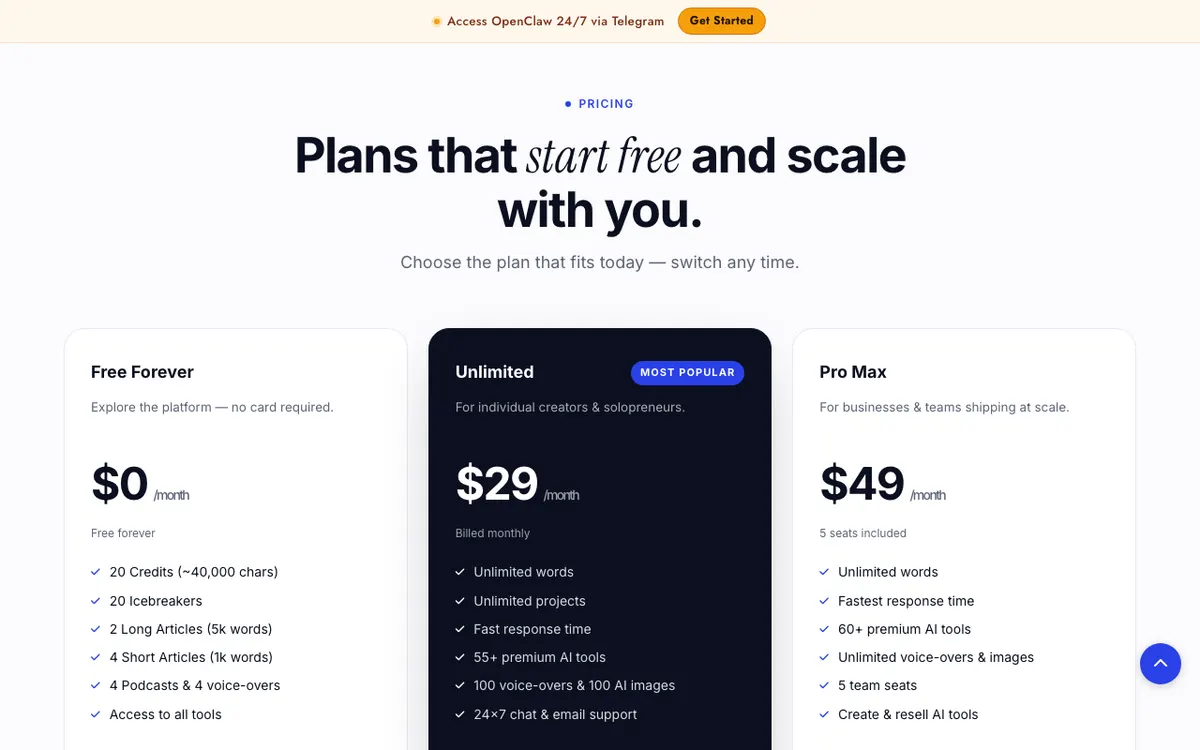 Writecream’s pricing section — $0, $29 and $49 per month, billed monthly with no annual rate printed.
| Plan | Price | Credits / words | Voice-overs | Notable |
|---|---|---|---|---|
| Free Forever | $0/month | 20 credits (~40,000 chars) | 4 | 2 long articles (5k words), 4 short articles, 20 icebreakers, access to all tools |
| Unlimited | $29/month | Unlimited words and projects | 100/month | 55+ premium AI tools, 100 AI images, 24×7 chat and email support |
| Pro Max | $49/month | Unlimited words | Unlimited | 60+ tools, 5 team seats, create and resell AI tools |
Three things about that table are easy to miss.
A credit is roughly 2,000 characters, so the Free plan’s 20 credits amount to about 40,000 characters of generated text. For commentary scripts that is a lot of drafts — commentary copy is short.
Voice-overs are the real free ceiling, not words. Free Forever gives you four. Not four minutes; four generations. If your commentary needs a spoken take, the free tier runs out on your fourth attempt.
There is no annual discount printed. Both paid tiers bill monthly at the rate shown. Writecream offers a 14-day refund window through chat or support.
What you actually pay per finished minute
This is where the comparison gets awkward, because Writecream does not sell finished minutes. It sells generations.
On the $29 Unlimited plan, 100 voice-overs a month is the constraint. If each commentary clip is one voice-over, that is 100 clips for $29, or about $0.29 per generated audio file — cheap, provided every generation is a keeper and provided you do the syncing yourself.
If you re-generate three times to get a read you like, the effective rate triples. And none of that includes the editor you still need to lay the audio over video, which is the step Writecream never touches.
For a wider view of how per-minute pricing works across this category, we broke it down in our roundup of the best AI commentary generators.
Writecream key features
The features that matter for commentary work, in order of how much they actually help:
- No-login access. The commentary tool, the sports play-by-play tool and the voiceover tool all run without an account. This is genuinely uncommon and it is the single best thing about the product.
- 71 languages on the commentary tool. The dropdown is deep, covering Bengali, Amharic, Uzbek, Catalan and Welsh alongside the majors.
- 14 tone presets. Bold, Empathetic and Persuasive produce noticeably different copy from Default. The presets do work.
- Word count slider. You set target length before generating rather than trimming after.
- A dedicated sports variant. The play-by-play generator is tuned for sport-specific calls and takes the sport as an input.
- MP3 and WAV export from the separate voiceover tool, with no format lock-in.
- 75+ tools in one account. If you also write ad copy, cold emails and product descriptions, the $29 plan covers all of it rather than one job.
Writecream pros: what it does well
The free access is real
Most tools in this category advertise “free” and mean “free trial behind a signup wall.” Writecream’s commentary widget genuinely loads and generates with nothing entered. You can evaluate the output quality before you decide whether the company deserves your email address.
That alone puts it ahead of most of the free options we tested in our free AI commentary generators roundup.
It is fast enough to iterate
Three-second generations change how you work. You can run five tones against the same input and pick, rather than committing to the first draft because regenerating costs a minute of waiting.
The tone presets are not decoration
Fourteen presets sounds like list-padding. In practice, Bold and Academic return commentary with genuinely different sentence lengths, vocabulary and energy. For a category where most tools give you a single voice, this is useful range.
The language list is deeper than most
Seventy-one languages on a free tool with no account is more coverage than several paid competitors publish. If you write commentary in a language the big tools ignore, this may be the only free option that lists it.
The price is honest for what it is
At $29/month for unlimited text across 55+ tools, Writecream is priced as a writing platform, not a video platform. Judged against other AI writers rather than against video tools, that is a fair number — and the 4.8 Capterra score reflects users who bought it for writing and got writing.
Writecream cons: where it falls short
It never sees your footage
There is no upload field. The model writes from your text description, so the commentary describes what you told it happened, not what actually happens on screen.
For a highlight reel, a gameplay clip or a product walkthrough, that means you are still doing the hardest part: watching the video, noting the beats, and describing them accurately enough for the model to work from.
The output is text, not a finished asset
You leave the commentary generator with words in a clipboard. Turning that into published video takes a second Writecream tool for the voice, then a third-party editor for the timing.
Three tools, two manual handoffs, no timeline. That is a workflow, not a generator.
The free voice-over ceiling is four
Twenty text credits sound generous. Four voice-overs do not. Anyone evaluating the audio quality seriously will burn through the free allowance in one sitting, which is exactly the “limited free trial” complaint that recurs in Capterra reviews.
Voice quality is not published
Writecream says “dozens of lifelike AI voices” and never gives a count, a model name, or a sample library you can browse before generating. Compared to a tool that publishes its voice library, this is a black box — and voice quality is the thing most likely to make or break commentary.
Non-English output is uneven
Seventy-one languages in a dropdown is a claim about coverage, not quality. Capterra reviewers specifically flag weaker non-English generation, German included. Treat the long tail of that list as a starting draft.
No video export, at any tier
Not on Free, not on Unlimited, not on Pro Max. Writecream has no video renderer, so resolution, watermarks and 4K are not features it withholds — they are features it does not have. If your deliverable is an MP4, Writecream is one input to it, never the output.
Writecream vs alternatives
Four tools, four different answers to “who writes it and who voices it.” Prices checked September 2026 against each vendor’s own page.
| Tool | Writes from footage? | Output | Free tier | Entry price |
|---|---|---|---|---|
| Writecream | No — text prompt only | Commentary text; MP3/WAV via a separate tool | 20 credits, 4 voice-overs, no login | $29/month (Unlimited) |
| ElevenLabs | No — you bring the script | Audio only | 10k credits/month, no commercial license | $6/month (Starter) |
| Descript | No — you write in the editor | Video, up to 4K on Creator | 60 min/month, 720p, watermarked | $16/month (Hobbyist) |
| Vidwip | Yes — AI watches the video | Narrated video, up to 1080p | Free to start, no card, small Vidwip badge | $25/month (Starter) |
Pick ElevenLabs if you have the script and the only thing you need is a voice that does not sound synthetic. Its voice library is the best in this comparison and $6/month for the commercial license is the cheapest serious option. See their pricing page for the full tier list.
Pick Descript if you need the editing timeline in the same window as the narration. The Free tier watermarks at 720p and caps you at 60 minutes a month; 4K watermark-free export starts on the $24/month Creator plan, per Descript’s pricing page.
Pick Writecream if the writing is the bottleneck and you already own the rest of the pipeline.
Where Vidwip fits
Vidwip does not ship a commentary generator, and this is not the section to pretend otherwise. What it ships is the adjacent job: AI Video Voiceover watches your footage, writes the narration scene by scene from what is actually on screen, and voices it — then renders the narrated video.
That closes the two gaps this review keeps returning to. The AI sees the video, so you are not describing your own clip back to a text box. And the output is a rendered video rather than an audio file you still have to place on a timeline.
The numbers, from the pricing page: 60 credits per minute of finished video, where 1 credit = $0.01, so $0.60 per finished minute. Vidwip is free to start with no card. Starter is $25/month for 2,500 credits, Pro is $99/month for 10,000. Full rates are on the pricing page.
Two things are worth being precise about, because most tools in this space are not. Free accounts get the same 190+ voices, the same 74 languages, and the same models as paid accounts — the free tier is metered by credits, not crippled by feature locks.
The one mark on free output is a small Vidwip badge in the corner, which paid plans drop. Paid plans also add credits, batches of up to 5 videos (10 on Pro) and more renders at once: 4 on Starter, 10 on Pro, 1 on Free.
The honest limit: the free start covers a short clip. That is enough to judge the output, not enough to run a channel on. If you want the fuller comparison, we ranked the options in AI video voiceover generators and the free tools specifically.
Who should use Writecream?
Use it if you are stuck on the words. Commentary writing is a real bottleneck, and a free tool that returns 14 tonal variants in three seconds solves it without an account.
Use it if you write in an unusual language. Seventy-one options with no signup is coverage most paid tools cannot match, even allowing for uneven quality outside the majors.
Use it if you already own a writing budget. At $29/month across 75+ generators, Writecream is priced as a writing platform. If commentary is one of ten writing jobs you do, the maths works.
Skip it if you need finished video. No upload, no timeline, no renderer, no video export at any price. Writecream will always be an input to your video, never the video.
Skip it if voice quality is the deciding factor. An unpublished voice count and four free generations is not enough to evaluate before you pay. ElevenLabs publishes its library; use that instead.
Skip it if the commentary has to match the footage. A model working from your written description cannot hit beats it was never shown.
Verdict
Writecream’s AI commentary generator is a good free writing tool wearing a video tool’s job title. Rated as what it is — a fast, multilingual, no-login script generator — it is one of the more useful free tools in this category, and the 4.8 Capterra rating across 346 reviews is earned.
Rated as what the name promises, it stops at the halfway line. It writes commentary; it does not watch your video, voice it in the same place, or hand you a file you can publish.
If the script is your bottleneck, open it right now — it costs nothing and asks for nothing. If the finished video is your bottleneck, you need a tool that watches the footage and renders the result, and Writecream is not built to be that.