
An AI commentary generator does four things: samples the footage, decides which moments deserve a line, writes those lines against a timeline, and voices them. Most tools sold under that name only do the last one — they read a script you supply and never look at the video. The hard part is not the writing. It is landing each line on the beat it describes, which is why AI commentary still loses to a human on live sport and still cannot name a player it has never been told about.
TL;DR
An AI commentary generator turns footage into spoken narration. The complete version samples the video, picks the moments worth a line, writes those lines against a timeline, and voices them.
Most tools sold under the name only do the voicing. They read a script you already wrote, and they never look at the video at all.
The genuinely hard part is timing. A line has to be written for a moment, started before that moment, and finished on it — and every second of narration eats roughly 2.5 words of your budget.
Where it still fails is narrow and predictable: naming a specific person, reading an on-screen scoreboard, and reacting to something the model already knows is coming.
What “commentary” actually means, and why the genre changes everything
“Commentary” is four different jobs wearing one word. Pick the wrong one and the output sounds off even when every sentence is grammatical.
Play-by-play describes the action as it happens, in near-real time. Short clauses, present tense, high word rate, heavy on nouns and verbs — “picks it up at the halfway line, turns, plays it wide.” Its whole value is synchrony; a play-by-play line that lands two seconds late is worse than silence.
Colour fills the gaps between plays with context, history, and opinion. Longer sentences, past tense, lower urgency. It is the only one of the four an AI can write comfortably today, because it does not need to be anchored to a frame.
Reaction is a person responding to the clip — surprise, disbelief, a joke. It depends on the commentator not knowing what happens next, which is exactly the thing a model that has already processed the whole file cannot fake convincingly.
Explainer narration walks the viewer through what they are seeing so they understand it. Screen recordings, tutorials, walkthroughs, product demos. It is the most forgiving genre for AI, because clarity matters more than timing and the pace is set by the narration rather than the footage.
Before you evaluate any tool, decide which of the four you need. A generator that is excellent at explainer narration will sound flat on a highlight reel, and a hype-tuned e-sports voice will wreck a software walkthrough.
How an AI commentary generator gets from footage to a finished script
A footage-aware AI commentary generator runs four stages. Understanding them tells you exactly what a given tool is and is not doing.
Stage 1 — decode and sample
Video is too dense to read whole. A 10-minute clip at 30fps is 18,000 frames, and no model reads them all.
So the file gets sampled. Google’s Gemini API video documentation states the default plainly: video is sampled at 1 frame per second, costing roughly 100 tokens per second of video at low media resolution — about 66 tokens for the frame and 32 for the audio. That budget is why a model with a 1M-token context can take a three-hour video at low resolution but only an hour at high.
One frame per second means 29 out of every 30 frames are discarded. For a walkthrough where the screen changes slowly, that loses nothing. For a fighting game combo or a cricket delivery, it can miss the entire event.
Better tools sample adaptively instead of uniformly — computing a frame-to-frame difference score and spending frames where the picture actually changes. That is the single biggest quality difference between two tools running the same underlying model.
Stage 2 — detect the moments worth talking about
Sampling gives the model a filmstrip. Event detection decides which frames deserve a sentence.
This is a spotting problem, and it is old enough to have benchmarks. SoccerNet-Caption, the reference dataset for this task, pairs 36,894 timestamped commentaries with 715.9 hours of broadcast soccer, and defines the job as spotting every instant where a comment belongs and then generating it.
General-purpose tools do this with the vision model alone. Purpose-built sports systems bolt on other signals entirely: crowd noise, gesture recognition, and structured match data from a scoring feed.
Stage 3 — write lines against a timeline
Now the model writes. The output is not an essay — it is a list of {timestamp, line} pairs, each one budgeted to fit the gap before the next.
This is where a lot of tools quietly give up. They generate a continuous script and let the voice engine run it end to end, which produces narration that is about the video without ever being aligned to it.
Stage 4 — voice and mix
The script goes to text-to-speech, and the result gets ducked under or over the original audio. Good implementations preserve the source audio at low level, because gameplay sound and crowd noise carry information the narration is commenting on.
The limit most tools do not advertise
Here is the thing worth knowing before you spend money: most products marketed as an AI commentary generator never see your video.
They come in two shapes. Voice engines take a script and read it — that is ElevenLabs and most of its resellers. Script writers take a text description and write commentary copy — that is Writecream, which has no upload field anywhere in its commentary tool, as we found in our Writecream AI commentary generator review.
A third shape reads the audio track or an existing transcript and writes from that. It is closer, and it is genuinely useful for talking-head footage, but it is still blind to anything that happens silently on screen. Our ranking of the best AI commentary generators splits the category on exactly this line, and the free tools roundup shows how few of the no-cost options clear it.
The test takes ten seconds. Look for a video upload field. If the tool only accepts text, you are buying stages 3 and 4, not stages 1 and 2.
Why timing to on-screen action is the hard part
Writing a good sentence about a goal is easy. Landing it on the goal is not.
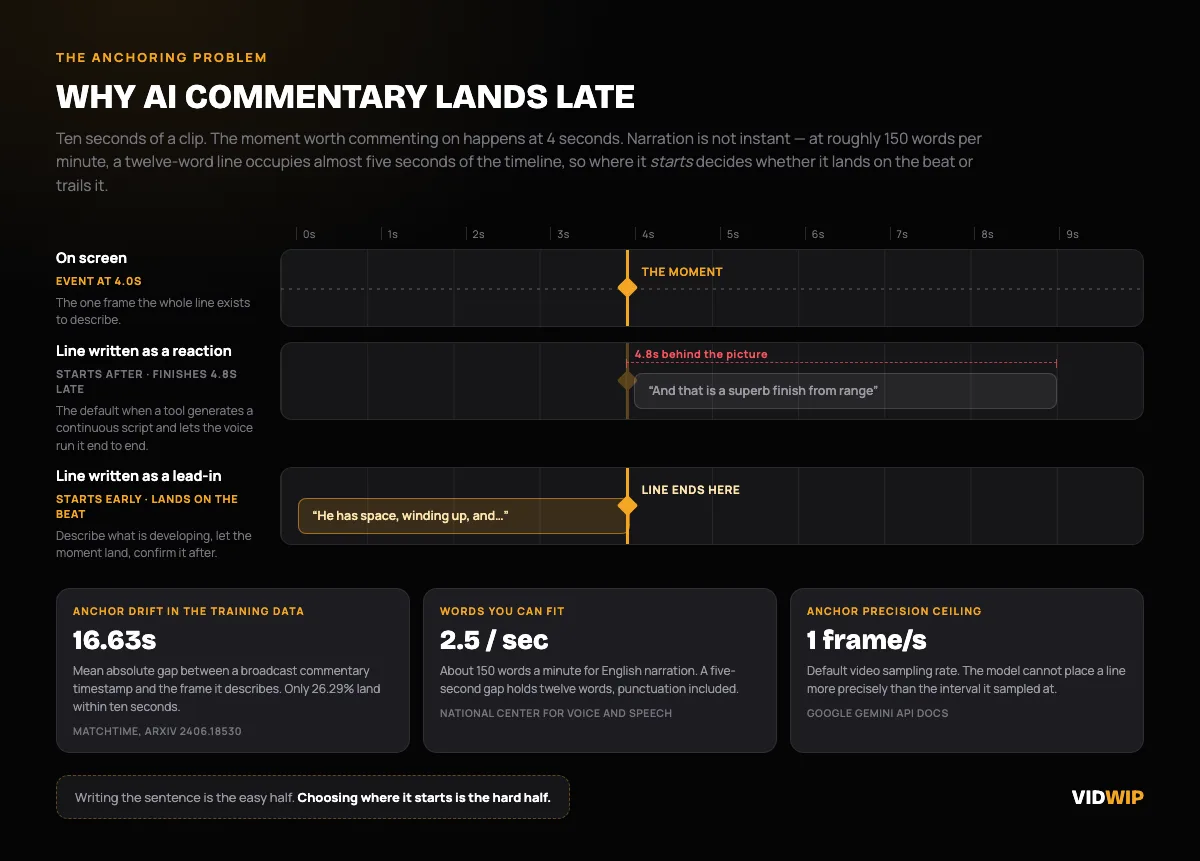 The anchoring problem: narration takes real time to speak, so a line written for a moment has to start before it.
Three separate things fight you.
The anchor itself is fuzzy. The MatchTime researchers hand-aligned 3,267 commentary-video pairs across 49 matches and measured how far the original timestamps sat from the frames they described. The mean absolute offset was 16.63 seconds. Only 26.29% of commentary landed within ten seconds of its own event, and offsets ranged from 108 seconds early to 152 seconds late.
That is human commentary, in a professional broadcast, in the training data. A model learning from it inherits the drift.
Speech takes time. The National Center for Voice and Speech puts the average English conversational rate at about 150 words per minute, and broadcast narration sits in the 150–160 range. That is 2.5 words a second. A twelve-word line runs just under five seconds — so if you want it to finish on the moment, it has to start five seconds before it.
Sampling resolution caps precision. If the model only sees one frame per second, it cannot anchor a line more precisely than one second. On a slow tutorial that is invisible. On a highlight it is the difference between calling the shot and calling the replay.
The practical fix is to write for lead-in rather than reaction. State what is developing, let the moment land, then confirm it. That is what human play-by-play does, and it is a prompt instruction you can give most tools directly.
How to write commentary that sounds spoken, not written
AI-generated commentary usually fails the ear before it fails the facts. It reads like prose because it was written like prose.
Cut every sentence to one idea. Spoken language does not nest clauses. “He picks it up on the left, and after beating two defenders who had been pressing high, curls it in” is a written sentence. “Picks it up on the left. Beats two. Curls it in.” is a spoken one.
Vary line length hard. Real commentary runs three words, then eleven, then two. Uniform sentence length is the single loudest tell that a machine wrote it.
Use contractions and fragments. “That is a remarkable piece of skill” is a caption. “That’s ridiculous” is commentary.
Kill the transitions. “Additionally”, “furthermore”, “as we can see” — none of these exist in speech. If the script has them, strip them before voicing.
Read it out loud at 150 wpm with a stopwatch. If it does not fit the gap, it does not fit the gap. Most tools let you edit the copy before generating audio, and that edit pass is worth more than switching tools.
Write the numbers as they are said. “Twenty-one to nineteen” not “21-19”. TTS engines mostly get this right now, but mostly is not always, and a botched score reading is the most audible error there is.
Picking a voice and an energy level that fits the genre
Voice choice is not decoration. It sets the ceiling on how believable the commentary is, and the right answer is different per genre.
| Genre | Energy | What to look for | Common mistake |
|---|---|---|---|
| Play-by-play | High, rising | Fast baseline rate, clean consonants under speed | Picking a “hype” voice that is loud but flat |
| Colour | Medium, conversational | Natural pauses, warm mid-range | Same voice as the play-by-play |
| Reaction | Variable, informal | Breath, laughter, imperfect delivery | Studio-clean read over a chaotic clip |
| Explainer | Low-medium, steady | Clarity at pace, consistent tone across long runs | Over-energetic delivery on a technical walkthrough |
| Gameplay | Medium-high | Holds up over 10+ minutes without fatigue | Voice that sounds great for 30 seconds and grating at five minutes |
Two rules that hold across all of them.
Match the voice to the footage’s own energy, not to the platform. A hype voice over slow footage reads as sarcasm.
Test the long form before committing. Every synthetic voice sounds good for fifteen seconds. The ones that survive ten minutes are far fewer, and a thirty-second sample will not tell you which is which. If you are also localising the same clip, check the language list before the voice list — coverage varies far more than quality does, as our AI video voiceover generator guide gets into.
Where AI commentary still clearly fails
Three failures are consistent across every tool in the category in 2026. None of them is close to solved.
Naming a specific person
Vision models identify a jersey number, sometimes. They do not identify a player, because they have no roster.
Purpose-built systems solve this by joining a structured data feed — a lineup, a scoring feed, a team sheet — to the vision output. General-purpose commentary tools have no such feed, so they either omit names entirely or hallucinate them, and hallucinating a name is much worse than saying “the striker.”
If you need names, supply them. Every decent tool accepts context in the prompt, and a pasted list of who is in the clip fixes most of the problem.
Reading a scoreboard
An on-screen scoreboard is small text, often semi-transparent, over moving footage, sampled once a second. It is close to the worst possible OCR target.
Models routinely misread it, and — this is the dangerous part — they misread it confidently. The commentary then narrates a score that is wrong, in a voice that sounds certain.
Assume the score is wrong until you check it. Never let an unattended pipeline publish a clip where the narration states a number that came off the screen.
Reacting to a surprise
This one is structural, not a bug. The model processes the entire clip before writing the first line, so it always knows the ending.
Human commentary derives its energy from genuine ignorance of what happens next. AI can imitate the vocabulary of surprise but not its timing — the involuntary half-second of nothing before “oh my word.” That gap is why AI commentary sits on highlight packages rather than in the booth: at Wimbledon, the IBM-powered system was deployed on matches that had no human commentary at all, filling silence rather than competing with a person.
There is a fourth, smaller one worth naming: transcript-driven tools inherit transcription errors. OpenAI’s Whisper large-v3 sits around 2.7% word error rate on clean read English and climbs to roughly 8–12% on real-world meetings, podcasts and phone audio, and every one of those errors propagates into the commentary. Our AI video transcription tools comparison covers what that step actually costs you.
Where Vidwip fits, and where it does not
Vidwip does not ship a commentary generator. There is no sports mode, no e-sports voice pack, and nothing that runs live.
What it does ship is the mechanism this whole post describes, aimed at one genre. AI Video Voiceover watches your footage, writes the narration copy scene by scene from what is actually on screen, and reads it in the voice you pick. Upload MP4, MOV or WebM up to 2 GB, or paste a link.
The genre it is built for is explainer narration — screen recordings, software demos, tutorials, walkthroughs. That is the forgiving end of the commentary spectrum, where clarity beats synchrony and the narration sets the pace.
Say the limit plainly: it is not a play-by-play engine. It will not name a player, read a scoreboard, or call a match. Run it on gameplay footage and you get narration written about what it sees, not commentary timed to the action — and on live sport it does nothing at all, because it works on files you upload, not a stream.
The numbers, since they are the part people ask for. Voiceover meters at 60 credits per minute of finished video, and 1 credit is $0.01 — so $0.60 per finished minute, or $3.00 for a five-minute clip. Vidwip is free to start, with no credit card.
Free accounts get the same 190+ voices, the same 74 languages, and the same models as paid ones. Free-plan renders carry a small Vidwip badge, and paid plans have no watermark.
Most videos render in under 5 minutes, at up to 1080p, with burned-in captions if you want them. Full rates are on the pricing page.
If your footage is a screen recording that needs a voice, that is a direct fit. If it is a highlight reel that needs play-by-play, buy a tool built for that — our comparison of commentary generators names them.
How to start
Work backwards from the genre, not from the tool list.
- Name the genre. Play-by-play, colour, reaction, or explainer. This decides everything downstream.
- Check for an upload field. No upload, no footage awareness, no timing. That is a script tool, and it should be priced like one.
- Test on your hardest 30 seconds. Not your easiest. Fast cuts, small on-screen text, overlapping audio — whatever your worst case is.
- Edit the script before you voice it. Cut to one idea per line, vary the lengths, and time it at 150 words per minute against the gaps.
- Check every number the narration says. Scores, timers, stats. This is the single most common published error in AI commentary.
The category is improving fast on stages 1 and 2 and barely moving on the surprise problem. For explainer narration it is already good enough to ship unedited. For live sport, it is still filling silence rather than replacing anyone — and it is worth knowing which of those two jobs you are actually hiring it for.