
ChatGPT is the best free AI summary generator for anything you can paste, because free text chats are unlimited while uploads are the metered part. Gemini Notebook wins long documents at up to 50 sources per notebook and 500,000 words per source. QuillBot is the fastest one-click option but stops at 600 words. NoteGPT takes the widest range of inputs and publishes no free ceiling at all.
TL;DR — the ranking at a glance
Every free AI summary generator here will hand you a summary in seconds. What separates them is how much text you can feed one before it stops, and whether the summary survives contact with a 40-page document.
Ranked on the two things that actually break: the input ceiling, and whether the summary keeps the argument or just the topics.
| # | Tool | Best at | The free ceiling |
|---|---|---|---|
| 1 | ChatGPT | Anything you can paste | Unlimited text chats · uploads are metered |
| 2 | Gemini Notebook | Long documents with citations | 50 sources/notebook · 500,000 words per source |
| 3 | QuillBot Summarizer | A one-click article summary | 600 words per summary |
| 4 | NoteGPT | The widest range of input types | 100,000 characters · free quota unpublished |
All pricing and limits checked September 2026.
What a free AI summary generator actually does
Two different machines answer to the same name, and the difference decides which one you want.
Extractive summarizers score the sentences in your text and return the highest-ranked ones, unchanged. Fast, cheap, and literal — but the result reads like a highlighter pass, not a summary.
Abstractive summarizers run a language model over the text and write new sentences. They compress better and they can restate an argument, at the cost of occasionally restating something the source never said.
Everything on this list is abstractive in 2026. The extractive era ended when running a small language model got cheaper than maintaining a sentence-ranking pipeline.
The second thing worth knowing: none of these tools reads a video. They read a transcript of one.
That distinction is covered in more depth in our ranking of AI video readers and summarizers, and it is the reason a silent screen recording summarizes to nothing.
How these free AI summary generators were ranked
Four criteria, in this order:
- Input ceiling. The real number, in the unit the tool counts in. A 600-word cap and a 500,000-word cap are the same product category and completely different tools.
- Output quality. Whether the summary carries the author’s argument or only the subjects they touched. Opinion pieces and analysis are where the cheap tools fall apart.
- What it accepts. Paste, upload, or a link. The gap between “paste your text” and “drop in a PDF” is where most free tiers put their wall.
- What “free” means. A published allowance you can plan around is a different product from an undocumented one you discover by hitting it.
1. ChatGPT
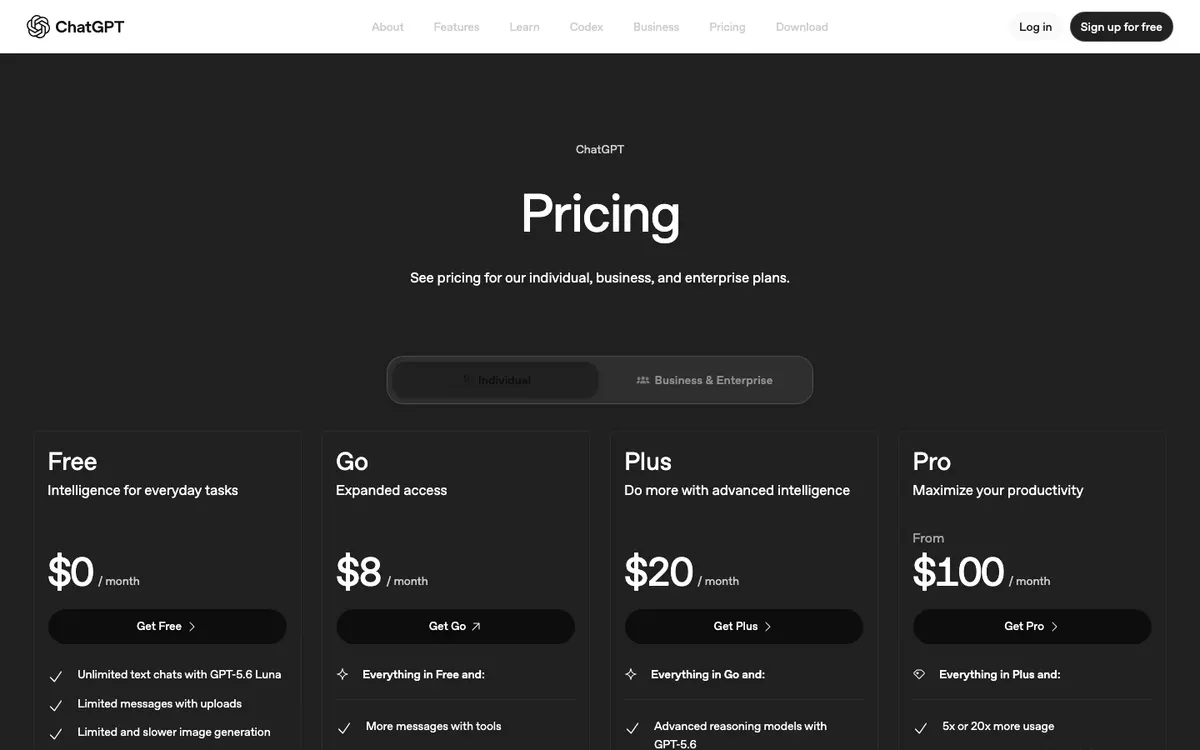 ChatGPT — free text chats are unlimited; uploads are the part that gets metered
ChatGPT is the best free AI summary generator for anything you can paste, because the free plan runs unlimited text chats and you dictate the output shape in the prompt.
OpenAI’s pricing page lists the Free plan at $0/month with “Unlimited text chats with GPT-5.6 Luna” and, one line below, “Limited messages with uploads” (checked September 2026). Read those two lines together and the strategy writes itself.
Paste the text and you are inside the unlimited lane. Upload the PDF and you are spending a rationed resource on a job the paste would have done.
That also makes it the only tool here where the summary format is fully yours. Ask for five bullets, a one-paragraph abstract, a table of decisions and owners, or a version aimed at someone who missed the meeting — same input, no settings menu.
Pros
- Unlimited free text chats, so pasted articles and transcripts are effectively uncapped
- Best output quality of the four on argumentative and analytical sources
- You control length, format, and audience through the prompt, not a dropdown
- Follow-up questions work on the same text — summarize, then interrogate
- No word or character counter in the chat box
Cons
- File uploads are explicitly limited on Free, and that is where most document work lives
- Free runs GPT-5.6 Luna; the advanced reasoning models sit behind Plus at $20/month
- Memory and context are listed as “limited” on Free, so very long pastes get truncated silently
- No citations — nothing tells you which part of the source a claim came from
- Requires an account
Best for: Pasted articles, meeting transcripts, and email threads where you want the summary shaped to a specific reader. Pricing: Free $0/month. Go $8/month, Plus $20/month, Pro from $100/month (checked September 2026).
2. Gemini Notebook
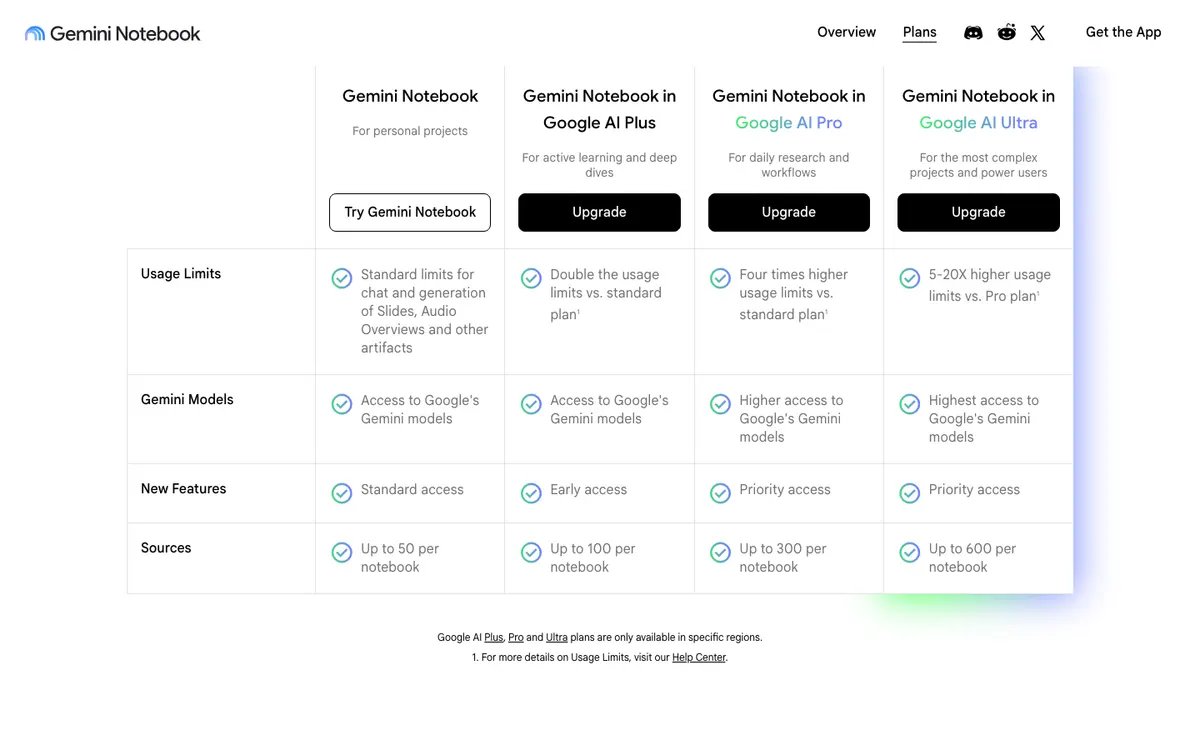 Gemini Notebook — the free tier allows up to 50 sources per notebook
Gemini Notebook is the strongest free option for long documents, because it summarizes across many sources at once and puts a clickable citation behind every claim it makes.
The plans page gives the free tier standard usage limits, access to Google’s Gemini models, and up to 50 sources per notebook (checked September 2026). Paid tiers raise that to 100 sources on AI Plus, 300 on AI Pro, and 600 on Ultra.
Each source can run to 500,000 words or 200MB for a local upload, per Google’s own source limits. That is the highest free input ceiling of anything on this list, by a wide margin.
One change worth planning around: Google’s help centre states that from September 2, 2026 Gemini Notebook moved to compute-based usage limits. The old fixed daily query count is gone, which means the free allowance now stretches or shrinks with how heavy your questions are.
Pros
- Up to 500,000 words per source and 50 sources in one notebook, free
- Every answer carries an inline citation you can click back to the passage
- Summarizes across sources — five reports at once, not five separate summaries
- Accepts PDFs, Docs, web pages, and public captioned YouTube videos as sources
- Audio Overviews and Slides are generated from the same sources at no cost
Cons
- Compute-based limits since September 2, 2026 mean there is no number to plan against
- YouTube sources import as transcripts only, and the video must be public and captioned
- Setup cost is real — you build a notebook before you get a summary
- No speaker labels in imported transcripts
- Paid tiers are only available in specific regions, per Google’s own footnote
Best for: Research, reports, and any summary that someone is going to challenge you on. Pricing: Free with a Google account. Paid access arrives through Google AI Plus, Pro, and Ultra subscriptions (checked September 2026).
3. QuillBot Summarizer
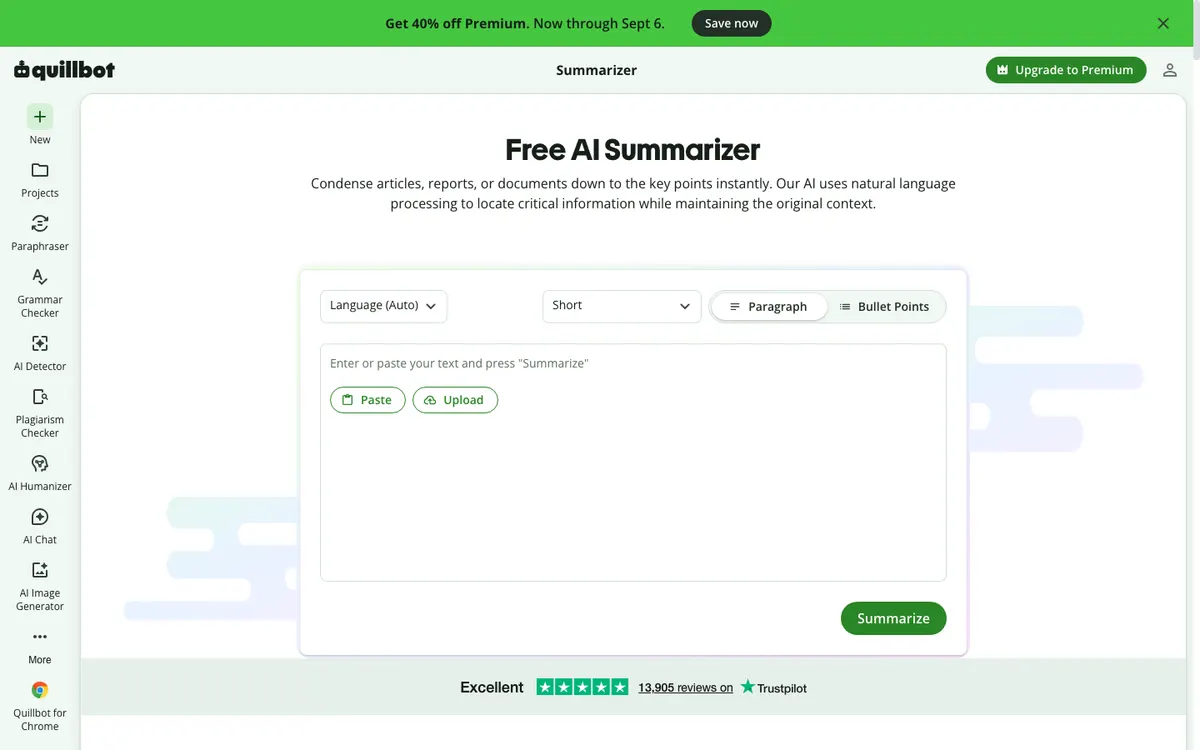 QuillBot Summarizer — paste, pick paragraph or bullets, done, no account
QuillBot’s Summarizer is the fastest free AI summary generator for a single article, and the only one here that works with no account at all.
Paste your text, choose paragraph or bullet points, set the length, and press Summarize. There is no notebook to build and no chat to steer — which is exactly the point when you are triaging ten articles.
The wall is hard and it is printed on the page: “Summarize up to 600 words of text for free” (checked September 2026). Six hundred words is roughly one page, or about four minutes of speech.
So it is an article tool, not a document tool. Feeding it a 20-page report means chopping the report into thirty pieces and summarizing the summaries, which is where accuracy goes to die.
Pros
- No sign-up, no email, no wall before your first summary
- Paragraph or bullet-point output, with an adjustable length control
- Paste or upload a file directly on the free tool
- Language auto-detection built in
- Rated Excellent on Trustpilot across 13,905 reviews at the time of checking
Cons
- 600 words per summary on free, the tightest cap of the four by a factor of 25
- No citations and no way to ask a follow-up question
- Output is a summary and nothing else — no notes, no action items, no restructuring
- Heavily upsold; the page pushes Premium in three places
- Long transcripts are effectively out of reach
Best for: Triaging articles, abstracts, and single-page documents when speed matters more than depth. Pricing: Free with a 600-word cap, no account required. Premium raises the limit (checked September 2026).
4. NoteGPT AI Text Summarizer
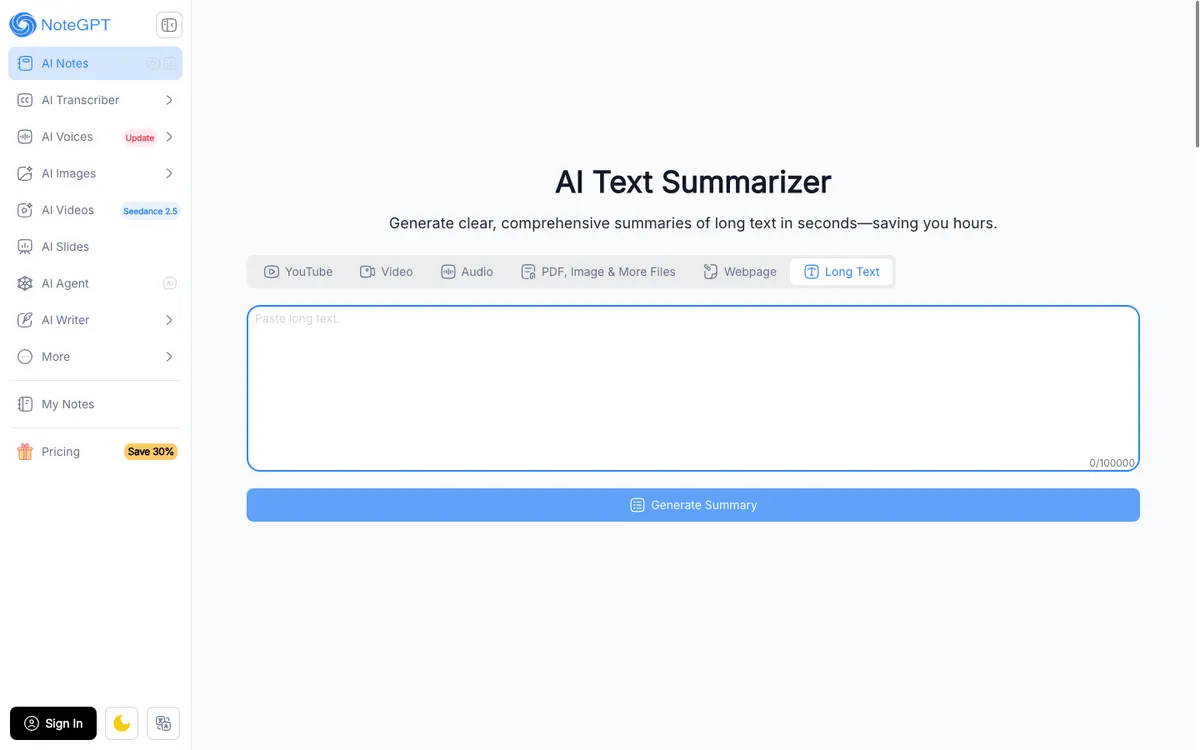 NoteGPT — six input types on one screen, and a 100,000-character text box
NoteGPT’s AI Text Summarizer accepts more kinds of input than anything else here: YouTube links, video files, audio files, PDFs and images, web pages, and pasted text, all from one row of tabs.
The Long Text box counts up to 100,000 characters, roughly 15,000 words. That sits between QuillBot’s page and Gemini Notebook’s book, and covers most real transcripts in a single pass.
Here is the problem, and it is the reason this ranks fourth. NoteGPT’s pricing page lists only three paid plans — Pro at $9.99/month, Unlimited at $29/month, and Max at $99/month — with no free column at all (checked September 2026).
Their FAQ says only that “NoteGPT is available for free, allowing you to enjoy its features without any cost.” No number, anywhere.
You find the ceiling by hitting it mid-task, which is the one thing a free tier should never do.
Pros
- Six input types on one screen: YouTube, video, audio, PDF and images, web pages, pasted text
- 100,000-character text box, about 15,000 words per pass
- YouTube links with subtitles are processed without a download step
- Output options go beyond a summary: key points, highlights, keywords, and Q&A
- The company claims over 80 million learners on its pricing page
Cons
- No published free allowance anywhere on the pricing page or in the FAQ
- Requires sign-in before it will generate
- Paid plans meter in two currencies at once — “Basic Quotas” and “Premium Credits”
- No citations back to the source text
- The interface is crowded with unrelated tools, from image generators to voice cloning
Best for: Mixed source material — a YouTube link, a PDF, and a transcript in the same session. Pricing: Free tier exists but is unquantified. Pro $9.99/month, Unlimited $29/month, Max $99/month (checked September 2026).
Free AI summary generators compared
| Tool | Max input on free | Accepts | Sign-up | Citations | Paid from |
|---|---|---|---|---|---|
| ChatGPT | Unlimited text chats; uploads limited | Paste, limited uploads | Yes | No | $8/month |
| Gemini Notebook | 50 sources · 500,000 words each | PDF, Docs, web, YouTube | Yes | Yes | Google AI plans |
| QuillBot | 600 words per summary | Paste, upload | No | No | Premium |
| NoteGPT | 100,000 characters | YouTube, video, audio, PDF, web, text | Yes | No | $9.99/month |
How to choose the right free AI summary generator
Match the tool to the source, not to the review score.
- One article, right now, no account. QuillBot. Six hundred words covers most articles and you are done in ten seconds.
- A meeting transcript or an email thread. ChatGPT, pasted as text. Unlimited free chats mean length costs you nothing, and you can ask it to pull out only the decisions.
- A stack of PDFs you will be quoted on. Gemini Notebook. The citations are the feature; everything else is table stakes.
- A YouTube link you do not want to watch. Gemini Notebook if the video is public and captioned, NoteGPT if it is not.
- A recording with no usable transcript yet. Transcribe first, then summarize. Our roundup of free AI video transcription tools covers the free ceilings on that step.
The limits nobody prints on the landing page
Five things that decide whether a free summary generator works for your job, and none of them appear in the hero section.
The unit is different on every tool. QuillBot counts words, NoteGPT counts characters, Gemini Notebook counts sources and compute, ChatGPT counts uploads. Comparing “free tiers” without converting the units tells you nothing.
Uploading is the metered action, not summarizing. On ChatGPT’s free plan, pasting text is unlimited while messages with uploads are limited. The same summary costs nothing one way and a rationed message the other.
Compute-based limits cannot be planned around. Since September 2, 2026 Gemini Notebook meters by compute rather than a query count. That is fairer, and it means you cannot budget your day against a number.
A summary of a transcript is not a summary of a video. Anything shown on screen and never said out loud is invisible to all four tools. Our comparison of the best AI video readers covers the handful of models that read frames instead.
Free almost never means anonymous. Three of the four require an account before the first summary. QuillBot is the exception, and it pays for that with the tightest cap on the list.
Final verdict
For most people the answer is two tools, not one.
Use ChatGPT for everything you can paste. Unlimited free text chats plus prompt-level control over the output makes it the strongest general-purpose free AI summary generator in 2026, and the upload limit stops mattering the moment you copy the text instead.
Use Gemini Notebook when the summary has to hold up. Fifty sources per notebook, 500,000 words each, and a citation on every claim is a research tool given away free.
Keep QuillBot bookmarked for the ten-second article summary, and reach for NoteGPT when the input is a YouTube link or an audio file and you want it handled in one place. Just do not build a workflow on an allowance the vendor will not name.
If the source is a YouTube video, how to use a free AI summary generator on any YouTube video covers the transcript route that costs nothing and the prompts that force timestamps into the output.
If the summary is the first step rather than the last — a script, a set of show notes, a walkthrough you plan to record — the next decision is what you turn it into. Our guides to AI video transcription tools and free AI video reader tools cover the steps on either side of that.