
An AI video reader has two possible input channels: the audio track and the picture. Almost every tool sold as one reads only the first, which is why a silent screen recording produces an empty summary. The tools that do read frames sample about one per second and pay roughly 258 tokens for each, so the picture costs 30 to 90 times more than the transcript of the same recording.
TL;DR
An AI video reader converts a video into text you can search, quote, or ask questions about. The catch is that the phrase covers two very different machines, and the marketing rarely tells you which one you bought.
Audio-only readers transcribe the speech and throw the pixels away. Multimodal readers also sample frames — typically one per second — and describe what is on screen.
The second kind costs far more to run. Google’s own numbers put a high-resolution frame at 258 tokens against 32 tokens for a second of audio, which is why 1 fps became the industry default rather than a considered choice.
Everything below is the mechanism: what gets read, what gets discarded, what it costs, and the four failure modes that show up in real work.
What an AI video reader is
An AI video reader is any system that ingests video and outputs text — transcript, summary, timestamped notes, or a direct answer to a question about the footage.
That is the whole category. “Reader”, “summarizer”, “video AI”, and “video understanding” all describe the same output shape with different marketing on top.
What actually separates them is input. A video file carries two independent signals, and a reader may consume one or both.
The audio track is a continuous waveform, and it is read continuously. The picture is 24 to 60 still images per second, and no production system reads all of them.
The two channels an AI video reader can read
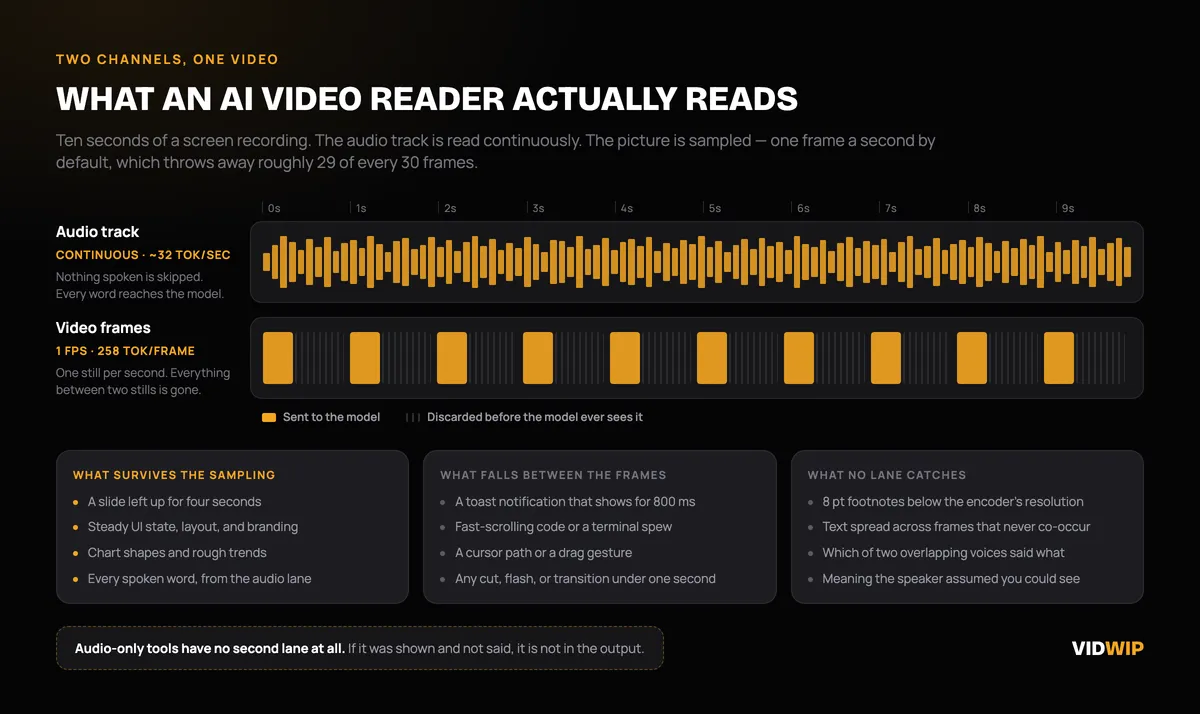 The audio track is read whole. The picture is sampled, and most of it never reaches the model.
Channel one is speech. The audio is demuxed, resampled, and run through an automatic speech recognition model, which produces words, punctuation, speaker turns, and timecodes. This is a mature pipeline with five distinct stages, and it is covered end to end in our guide to how AI video transcription works.
Channel two is the picture. Frames are pulled at some interval, pushed through a vision encoder, and turned into tokens that sit in the model’s context next to the transcript.
Only channel two can tell you what a slide said, what state a UI was in, or what a chart was doing. Only channel two works at all on a recording with no narration.
Here is the part that matters commercially: most products marketed as an AI video reader ship with channel one only. They call it reading a video because the input is a video file, not because anything looked at the video.
The test takes a minute. Upload a 60-second silent screen recording. An audio-only tool returns nothing, because there was nothing to transcribe.
Why most tools only read the audio
Transcription was solved first, and it is cheap. Speech recognition has been production-grade for years and runs at a small fraction of the cost of vision inference.
It is also accurate enough to sell. Independent benchmarking by Artificial Analysis puts Whisper Large v3 at about 4.1% word error rate on roughly eight hours of real-world audio spanning accents, domain jargon, and difficult acoustics.
The same page shows the same model at 10.1% word error rate on a different hosting provider. Accuracy is a property of the deployment, not just the model — a useful thing to remember before trusting any vendor’s quoted number.
So the economics push hard in one direction. Add a summarization pass over a transcript and you have a product that looks like a video reader, costs almost nothing, and works fine on webinars and meetings where all the meaning is spoken.
It fails the moment the meaning is on screen. That distinction is the single most useful thing to know when you compare tools, and it drives the whole ranking in our breakdown of the best AI video readers.
Frame sampling, and why 1 fps is the default
Frame sampling is the decision about how many stills to pull out of a video before handing it to a model. Every multimodal reader makes this choice, and almost all of them make the same one.
Google’s Gemini API documentation states that frames are extracted at 1 FPS and placed into context, with a timestamp attached so the model can reason about ordering. The API exposes a custom fps parameter, but 1 is what you get unless you ask otherwise.
At that rate a 30 fps source has 29 of every 30 frames discarded before the model sees anything. The model is not skimming the video — it is looking at a contact sheet of stills and inferring the rest.
For steady content that is fine. A slide left up for four seconds appears in four samples, and a static UI is captured perfectly well.
For anything fast it is not. A toast notification that shows for 800 milliseconds, a scrolling terminal, a cursor drag, a cut under a second — all of it can land between two samples and vanish.
That gap has been measured. The ICML paper Improving LLM Video Understanding with 16 Frames Per Second trained a model at 16 fps and reported accuracy on gymnastics footage rising from 48.5% at 1 fps to 64.1% at 16, with a 13.5% gain over comparable models on TemporalBench.
The authors put it plainly: low-frame-rate sampling captures a video’s overall theme and context, but fails to preserve rapidly changing visual cues. That is a fair one-line summary of what every mainstream reader is doing to your footage right now.
The token math that sets every limit
Frames are expensive, and the price explains every ceiling you will run into.
Google’s documentation gives the rates directly. A high media resolution frame costs 258 tokens, a low resolution frame costs 66, and audio costs 32 tokens per second. Rolled up, that is roughly 300 tokens per second of video at high resolution and about 100 at low.
| Channel | Cost per second of video |
|---|---|
| Audio only | ~32 tokens |
| Frames at 1 fps, low resolution | 66 tokens (+ audio) |
| Frames at 1 fps, high resolution | 258 tokens (+ audio) |
| Full video, high resolution | ~300 tokens |
| Full video, low resolution | ~100 tokens |
Run a real recording through it. A 45-minute product walkthrough is 2,700 seconds.
Its spoken transcript is about 6,750 words at a normal speaking pace, which lands near 9,000 tokens. The same 45 minutes as sampled frames is 270,000 tokens at low resolution and 810,000 at high.
So the picture costs somewhere between 30 and 90 times what the words cost. That single ratio explains the free-tier limits, the per-file length caps, and the “video too long” errors documented across every option in our roundup of free AI video reader tools.
It also sets the length ceiling. Google puts a 1M-token context at about three hours of video at low media resolution, or roughly one hour at high resolution — and sampling at 2 fps instead of 1 would halve both figures.
Reading screen text is not the same as understanding a scene
These are two different capabilities and tools conflate them constantly.
OCR is transcribing the characters visible in a frame — a slide heading, a menu label, a value in a cell. Scene understanding is describing what is happening: someone opened settings, the chart trended down, the build failed.
Frame-reading models attempt both, and they are markedly worse at the first than most people assume. On MME-VideoOCR, a benchmark of 1,464 videos and 2,000 annotated question-answer pairs across 44 scenarios, the best model tested — Gemini 2.5 Pro — scored 73.7% accuracy.
Roughly one answer in four was wrong, on the single task these models are most often trusted with.
The failure pattern is worse than the headline. Most models fell to around 20% on cross-frame text understanding, meaning text that has to be assembled from several frames rather than read out of one.
And the benchmark authors flag a specific behavior worth internalizing: models frequently convert visibly misspelled text into contextually plausible forms. The model does not read a serial number, a variable name, or an unusual product SKU — it reads something that looks like one and writes down the word it expected.
If you are pulling IDs, code, or figures off a screen, verify every one against the frame. This is exactly where a confident-sounding output does the most damage.
Where AI video readers still fail
Four failure modes account for nearly everything that goes wrong.
Fast on-screen text. Anything that appears and disappears inside a second is invisible at default sampling. Scrolling code, terminal output, rapid slide advances, and animated overlays all fall through.
Dense slides at low resolution. Small type is lost before the model gets a chance at it. Encoders downscale frames, and 8 pt footnotes, dense tables, and axis labels frequently do not survive the resize.
Long recordings. The token math above bites hard past an hour. Tools respond by lowering the resolution, dropping the frame rate, or chunking the video — and the sections that get compressed are the ones the model then gets wrong.
Crosstalk and overlapping speakers. Diarization degrades fast when two people talk at once, and the summary inherits every attribution error underneath it. A decision assigned to the wrong person is worse than no summary.
Then there is the failure with no honest fix: hallucinated summaries. Summarization sits on top of the transcript, and the summarizer can add things the source never said.
The HalluLens benchmark measured summarization hallucination rates on the HHEM evaluation at 1.5% for GPT-4o, 3.9% for Llama-3.1-405B-Instruct, and 4.6% for Claude-3-5-Sonnet. Low, but never zero, and the invented lines read exactly like the accurate ones.
The gap between speech and vision is stark in the aggregate too. On Video-MME-v2 — 800 videos, 3,200 annotated question-answer pairs, over 3,300 human-hours of construction — the strongest model measured, Gemini-3-Pro, scored 49.4% under grouped scoring, which its authors describe as a substantial gap from human experts.
Speech recognition is a 4% error problem. Video understanding is a coin flip.
Choosing based on where your meaning lives
The decision is not which tool is best. It is where the substance of your video actually sits.
If your meaning is in the speech, use an audio-only tool and stop paying for frames. Podcasts, interviews, sales calls, webinars, and talking-head lectures are fully served by a transcript plus a summary pass, and audio-only tools are faster, cheaper, and more accurate at exactly that.
If your meaning is on the screen, you need frame sampling and you should test it before you commit. Silent screen recordings, code walkthroughs, dashboard reviews, and slide-heavy decks are unreadable to an audio-only tool.
If your meaning is in the motion, expect to do the work yourself. Sports, gestures, UI animation, and anything measured in fractions of a second are below the sampling floor of every mainstream reader.
Three practical rules follow from all of it.
- Run the silent-clip test first. Sixty seconds of unnarrated screen recording separates real frame readers from transcript wrappers in under a minute.
- Keep the transcript beside the summary. Every summary claim should be checkable against a timestamp, and the difference in summary quality by source type is broken down in our comparison of AI video readers and summarizers.
- Verify anything the tool says it saw. Numbers, names, IDs, and code read off a frame are the least reliable output these systems produce, and text-only summarizers carry the same limits on any source.
The short version
An AI video reader is a text machine with one or two inputs. Find out which before you trust it with anything.
Speech is close to solved at roughly 4% word error rate. Frames are sampled once a second, cost 30 to 90 times more than the words, and produce OCR that is wrong about a quarter of the time.
Match the tool to where your meaning lives, test it on your own footage, and never quote an on-screen figure you have not checked against the frame.
One last distinction, because it trips people up constantly. Reading a video produces text about it; it never produces new audio — turning a recording into another language is dubbing, a different job with a different set of tools.