
AI video transcription is a five-stage pipeline, not one model: audio extraction, acoustic recognition, language modelling for punctuation, diarization for speaker labels, and forced alignment for timestamps. Raw transcription costs $0.0025–$0.006 per minute at the API layer in September 2026. Everything you pay above that is the software wrapped around it.
TL;DR
AI video transcription is a pipeline, not a single model. Audio is pulled out of the video, an acoustic model turns sound into tokens, a language model adds punctuation and casing, a diarizer labels the speakers, and forced alignment stamps every word with a timecode.
Here is what matters before you pick a tool or a budget:
- Accuracy is measured in WER, not marketing percentages. A 5% word error rate over an hour of speech is roughly 450 wrong words.
- Speaker labels come from a separate, weaker model. The leading open diarization pipeline still posts 18.8% error on meeting audio.
- Word-level timestamps are a third stage again. Whisper’s own timestamps are the least reliable part of its output.
- Raw transcription is nearly free. $0.0025 to $0.006 per minute at the API layer in September 2026.
- What you actually pay for is the software around it — the editor, the exports, the speaker cleanup, the translation.
- Degradation is predictable, not random. Accents, crosstalk, jargon, and cheap microphones are the four failure modes.
What AI video transcription actually is
AI video transcription is the automatic conversion of speech inside a video file into timestamped, punctuated text, produced by machine-learning speech recognition rather than a human typist.
It returns three things, and they are worth separating in your head. Plain text you can search. A timed caption file (SRT or VTT) you can burn onto video. And speaker-attributed segments that say who said what, when.
Most confusion about transcription quality comes from treating those three as one output. They are produced by different models, they fail in different ways, and they are priced differently.
This guide covers the mechanism end to end, what accuracy numbers actually mean, where quality collapses, and what the market charges in 2026. If you want tools rather than theory, our comparison of the best AI video transcription tools ranks four paid options and the free AI video transcription tools guide covers what you can get without a card.
How AI video transcription works, step by step
Five stages run in sequence. Every commercial transcription product is some arrangement of these, whether it says so or not.
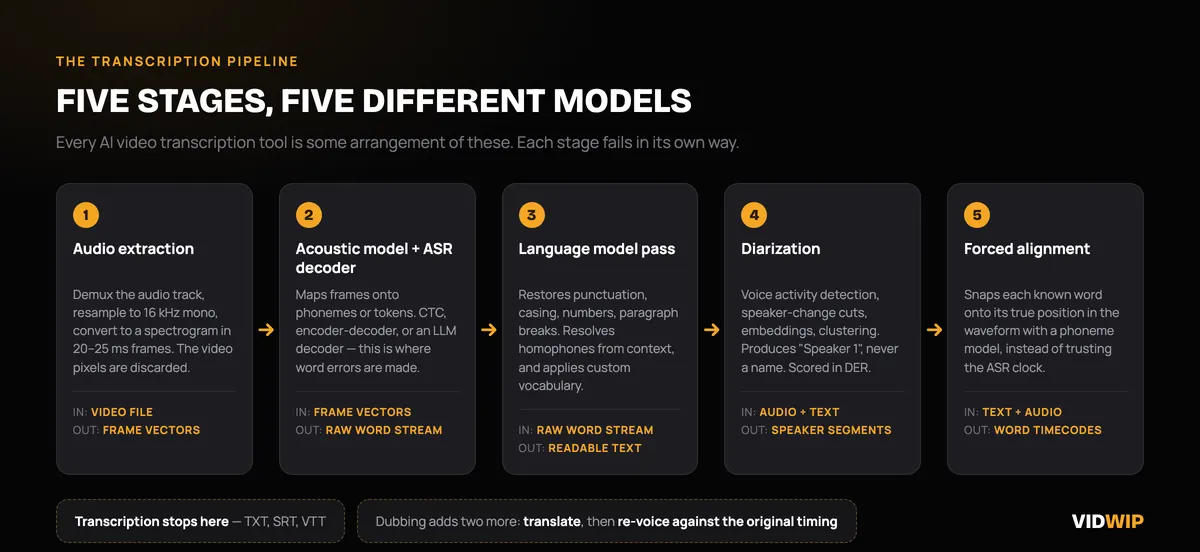 The five stages of an AI video transcription pipeline, and what each one hands the next.
Stage 1 — Audio extraction and feature encoding
The video container is opened and the audio track is demuxed out. Video pixels are discarded entirely — a transcription model never sees your footage.
The audio is then resampled, usually to 16 kHz mono, and converted into a spectrogram: a picture of which frequencies carry energy at which moment. Modern encoders slice that spectrogram into short frames, typically 20 to 25 milliseconds each, and turn every frame into a vector.
This is why audio quality dominates accuracy. Everything downstream reads this representation, and a clipped or noisy spectrogram cannot be repaired later.
Stage 2 — Acoustic modelling and the ASR decoder
The acoustic model maps those frame vectors onto sound units — phonemes, sub-word pieces, or tokens depending on the architecture. This is the automatic speech recognition (ASR) core, and it is where the deep learning happens.
Three architectures dominate in 2026. CTC models predict a token per frame independently and are fast but context-blind. Encoder-decoder models such as Whisper carry an implicit language model in the decoder. And a newer class hands the decoding job to a full pretrained large language model, which brings strong text priors to the guessing.
That last design is the interesting one, and it has a cost. A model with strong text priors is very good at producing fluent, plausible English. It is also very good at producing fluent, plausible English that nobody said.
Stage 3 — Punctuation, casing, and formatting
Raw ASR output is a stream of lowercase words with no sentence boundaries. A separate language modelling pass restores punctuation, capitalisation, paragraph breaks, and number formatting — turning “we shipped it on the third at two hundred and forty units” into “We shipped it on the 3rd at 240 units.”
The same pass resolves homophones from context. “Write” versus “right” versus “rite” is not an acoustic decision at all; the audio is identical. It is a language decision made after the fact.
This stage is also where custom vocabulary lists get applied. If you feed a tool your product names, speaker names, and internal acronyms, this is the layer that uses them.
Stage 4 — Diarization for speaker labels
Diarization answers “who spoke when”, and it is a genuinely separate problem from “what was said”. A diarizer runs voice activity detection, cuts the audio at speaker change points, converts each segment into a speaker embedding, then clusters those embeddings so that segments from one voice land in one bucket.
Only then are the buckets mapped onto the transcript. The clustering does not know names — it produces “Speaker 1” and “Speaker 2” and waits for you to rename them.
Diarization is scored with diarization error rate (DER), which sums missed speech, false alarms, and speaker confusion. The pyannote speaker-diarization-3.1 model card publishes its benchmark openly: 11.3% DER on VoxConverse v0.3, 18.8% on AMI headset mix, 21.7% on DIHARD 3 full, and 50.0% on AVA-AVD. That last number is not a typo. Diarizing conversational audiovisual content with background noise and overlapping speech remains close to a coin flip.
The practical rule: the more people talking over each other, the more speaker cleanup you will do by hand.
Stage 5 — Forced alignment for timestamps
Forced alignment takes a transcript you already have and finds exactly where each word sits in the audio. It runs a phoneme recognition model over the waveform, then aligns the known text against the recognised sounds — snapping every word onto its true position instead of guessing.
This matters because ASR models are bad at their own timing. Whisper emits timestamps as predicted tokens, which drift on long-form audio. The WhisperX paper from Oxford’s VGG lab quantified the gap: on Switchboard telephone speech, WhisperX alignment hit 93.2% precision and 65.4% recall against Whisper’s own 85.4% and 62.8%; on AMI meeting audio, 84.1% and 60.3% against 78.9% and 52.1%.
If your captions drift out of sync a few minutes into a long video, this is the stage that failed. Any tool that produces genuinely word-level highlighting is running a forced aligner, not trusting the ASR clock.
What WER actually means
Word error rate is the standard accuracy metric for speech recognition. Take the machine transcript, compare it to a human reference, and count three kinds of mistake:
- Substitutions — a word transcribed as a different word.
- Deletions — a spoken word missing from the transcript.
- Insertions — a word in the transcript that nobody said.
Add those, divide by the number of words in the reference, and that is WER. Lower is better, and 0% is a perfect match.
Two things about WER get lost in marketing copy.
First, WER has no ceiling. Because insertions are counted in the numerator but the denominator is fixed to the reference length, a model that hallucinates can score above 100%. “Accuracy” quoted as 100 − WER is therefore a convenience, not a real percentage of anything.
Second, WER is dataset-specific and nearly meaningless without the dataset named. OpenAI’s own Whisper large-v3 model card describes the release as showing “10% to 20% reduction of errors compared to Whisper large-v2” across a wide variety of languages — a relative improvement, deliberately not a single headline accuracy figure. Vendors quoting “99% accurate” with no corpus attached are describing their best recording, not yours.
Here is what WER means in practice. Speech runs roughly 130 to 150 words per minute, so an hour of video contains around 8,000 to 9,000 words:
| WER | Errors per hour of speech | What it feels like |
|---|---|---|
| 2% | ~170 words | Publishable with a skim |
| 5% | ~450 words | One error every 20 words. Needs a real pass |
| 10% | ~900 words | Usable as a search index, not as a caption |
| 20%+ | ~1,800 words | Faster to retype than to fix |
The gap between 5% and 10% WER is not a small quality difference. It is the difference between editing a transcript and rewriting one.
Where AI transcription accuracy falls apart
Accuracy degrades along four predictable axes. None of them are surprises, which means all of them can be planned around.
Accents and dialects. Training corpora are unevenly distributed, so the acoustic model has heard far fewer hours of some speech patterns than others. A 2026 arXiv benchmark, “Do LLM Decoders Listen Fairly?”, evaluated nine models across roughly 43,000 utterances on five demographic axes using Common Voice 24 and Meta’s Fair-Speech. It found Whisper’s insertion rate on Indian-accented speech following a non-monotonic path — worse at large-v3 (9.62%) than at smaller sizes — which is the signature of a model hallucinating where the audio is unfamiliar rather than simply mis-hearing it.
Crosstalk and overlapping speech. When two people talk at once, the spectrogram contains both voices and the model must pick one. Diarization degrades at the same time, which is why panel discussions and unstructured meetings produce both the worst word accuracy and the worst speaker labels in the same file.
Domain jargon and proper nouns. Drug names, ticker symbols, engineering acronyms, and people’s names are the words a general model has seen least and the words that matter most. This is the one failure mode you can substantially fix: almost every serious tool accepts a custom vocabulary list, and feeding it twenty terms before you upload is the highest-leverage five minutes in the whole workflow.
Poor audio and silence. Room reverb, a laptop microphone across a table, compressed phone recordings, and long silent stretches all hurt. Silence is the sneaky one — the same 2026 benchmark found that injecting silence amplified Whisper’s accent bias by up to 4.64x, and that under chunk masking the model entered repetition loops accounting for 86% of 51,797 insertions. A model with nothing to hear does not stay quiet. It fills the gap.
The takeaway is not “AI transcription is unreliable”. It is that transcription quality is a property of your recording at least as much as your vendor. A $60 USB microphone moves WER further than switching between the top three APIs.
What AI video transcription costs in 2026
Transcription pricing splits into three tiers that differ by roughly three orders of magnitude. All figures below were checked in September 2026 and quoted in USD from each vendor’s own pricing page.
Tier 1 — Developer APIs
This is the raw cost of turning speech into text, with no interface attached.
| Provider | Model / mode | Price | Per hour |
|---|---|---|---|
| AssemblyAI | Universal-2, async | $0.15/hr | $0.15 |
| AssemblyAI | Universal-3.5 Pro, async | $0.21/hr | $0.21 |
| Deepgram | Nova-3 pre-recorded, monolingual | $0.0043/min | ~$0.26 |
| Deepgram | Nova-3 pre-recorded, multilingual | $0.0052/min | ~$0.31 |
| OpenAI | gpt-4o-mini-transcribe | $0.003/min | $0.18 |
| OpenAI | whisper-1 and gpt-4o-transcribe | $0.006/min | $0.36 |
| Amazon Transcribe | Batch, US East (N. Virginia) | $0.006/min | $0.36 |
Add-ons are cheap but not free. AssemblyAI lists async speaker diarization at +$0.02/hr; Deepgram includes diarization at no extra charge on pre-recorded audio. Streaming costs more than batch everywhere — Deepgram’s Nova-3 streaming list rate is $0.0077/min against $0.0043 pre-recorded.
At these rates, transcribing a 60-minute video costs between 15 and 36 cents. That is the number to hold in your head when a subscription quotes you $10 an hour.
Tier 2 — Consumer transcription apps
You are not paying for ASR here. You are paying for the editor, the exports, the integrations, and the fact that someone else runs the pipeline.
| Tool | Plan | Price | Effective rate |
|---|---|---|---|
| Sonix | Pay-as-you-go | $10/hr | $0.17/min |
| Sonix | Core | $25/mo, 5 hrs included | $5.00/hr |
| Sonix | Pro | $80/mo, 40 hrs included | $2.00/hr |
| Rev | Free | 45 min/month | $0 |
| Rev | Essentials | $25.49/seat/mo, 5,000 min | ~$0.005/min |
| Rev | Pro | $47.99/seat/mo, 10,000 min | ~$0.005/min |
Note the shape of it. Pay-as-you-go pricing runs 20 to 40 times the API cost, while a high-volume subscription can land within a rounding error of it. If you transcribe constantly, subscriptions are close to raw cost. If you transcribe twice a month, you are paying a large convenience premium per minute — which may still be the right call.
Tier 3 — Human transcription
Rev lists human transcription at $1.99/min, human captions starting at $1.99/min, and global subtitles between $6.49 and $15.99 per minute depending on language.
That is roughly 800 times the cheapest API rate. You buy it for the cases where a wrong word is expensive: legal records, medical documentation, regulated filings, and anything going in front of a court or a regulator.
For everything else — a course, a podcast, a product walkthrough, a team meeting — AI plus fifteen minutes of your own editing beats it on cost by a margin that is not close.
What this means for you
Match the tier to the consequence of an error.
- Search and internal notes. Cheapest API or a free tier. 10% WER is fine when nobody reads the transcript top to bottom.
- Published captions. Mid-tier tool with a real editor and SRT/VTT export. Budget an editing pass at roughly a quarter of the video’s runtime.
- Multi-speaker recordings. Assume you will fix speaker labels manually. Record each participant on a separate track if you can — it turns a diarization problem into no problem at all.
- Specialist vocabulary. Load a custom vocabulary list before you upload, every time.
- Legal or medical. Pay a human. The maths only looks expensive until one error costs you.
And if the transcript is a means to an end rather than the deliverable — translation, dubbing, repurposing — check whether the downstream tool already transcribes. Paying twice for the same ASR pass is the most common wasted line item in this category. Our guides to AI video dubbing tools and free AI video dubbing tools cover which ones do, and the AI video readers and summarizers roundup covers the tools that transcribe in order to summarise.
Where transcription sits inside a dubbing workflow
If the reason you want a transcript is to publish the video in another language, transcription is not a product you buy. It is stage one of five, and it happens where you cannot see it.
Dubbing runs the same pipeline described above — extract, recognise, punctuate, align — then adds two stages. Translation of the aligned transcript, and re-voicing in the target language against the original timing, so the new audio lands where the old audio did.
That is how Vidwip’s AI Video Dubbing works. Vidwip does not sell a standalone transcription tool and is not one; transcription is a step inside dubbing, billed as part of the dub rather than by the transcript.
The rate is 240 credits per minute of source video, per target language, on the v1 model — 1 credit is $0.01, so $2.40 a minute. AI Audio Dubbing is 240 credits a minute, or $2.40.
That is not comparable to a $0.006 transcription API call, and it should not be read that way. It buys a finished, timed, voiced audio track in a new language, not a text file.
Vidwip is free to start, with no credit card. Free accounts reach the same engines and languages as paid ones, up to 94 on the Advanced engine, and no dub carries a watermark on any plan.
Paid plans add credits, up to 5 languages per run on Starter or 10 on Pro, and more dubs at once: 4 on Starter, 10 on Pro, 1 on Free. Full rates are on the pricing page.
The short version
AI video transcription is five models pretending to be one product. Knowing which stage produced a given failure tells you exactly what to fix: bad words mean bad audio or an unfamiliar accent, bad speaker labels mean a diarization limit you cannot argue with, and drifting captions mean nobody ran a forced aligner.
The economics are simpler than the mechanism. Speech-to-text itself costs cents an hour and has done for a while. Everything above that price is software, and the honest question is not “which tool is most accurate” but “how much of my editing time does this tool actually remove”.
Two follow-ons from here. If the video is on YouTube, how to transcribe a YouTube video with AI covers the four routes, starting with the free transcript panel most people never open. And if the transcript is a means to an end, AI video transcription and summary has the prompt patterns that turn one into meeting notes, tutorial steps, or interview highlights.
Get the recording right first. A clean track, one speaker per channel, and a twenty-word vocabulary list will beat any vendor switch you are considering.