
Grok Imagine 1.5 is one of the cheapest ways to get image-to-video with native, lip-synced sound. The API costs $0.14 a second at 720p ($8.40 a minute), 1.5 Lite costs $0.03 ($1.80 a minute), and native 1080p arrived on July 31. The catch: it now ranks 8th on Arena's image-to-video board, clips stop at 15 seconds, and there is no multi-shot mode, so longer scenes are stitched in an editor.
Grok Imagine 1.5 review: the short verdict
This Grok Imagine 1.5 review covers the video model from SpaceX Super Intelligence (the lab that was called xAI until 2026) and its two siblings, 1.5 Lite and 1.5 Fast. We went through every spec, price and leaderboard entry on November 2, 2026, and we did not generate clips of our own, so this is a researched review rather than a hands-on test.
The short version: Grok Imagine 1.5 is one of the cheapest ways to turn an image into a video with native, lip-synced sound. It is no longer the best-looking model on the public leaderboards, and that matters more than the launch headlines suggest.
| Category | Score | Why |
|---|---|---|
| Image-to-video control | 8.5/10 | Pins first, last and up to 4 mid-video frames; up to 14 reference images |
| Audio and lip sync | 8/10 | Dialogue, effects and ambience in one pass; 3 preset voices |
| Resolution | 7.5/10 | Native 1080p since July 31, but references still cap at 720p |
| Multi-shot scenes | 5/10 | No multi-shot mode, 15-second cap, no extension on 1.5 |
| Price | 9/10 | $0.14 a second at 720p; Lite from $0.02 |
| Image quality vs rivals | 6.5/10 | 8th on Arena, 13th on Artificial Analysis for image-to-video |
| Overall | 7.5/10 | Great value with sound; not the top shot-maker any more |
Use it if you animate product photos, portraits or storyboards and want sound without a second tool. Skip it if you need the most realistic shot money can buy, takes longer than 15 seconds, or your own cloned voice.
What is Grok Imagine 1.5?
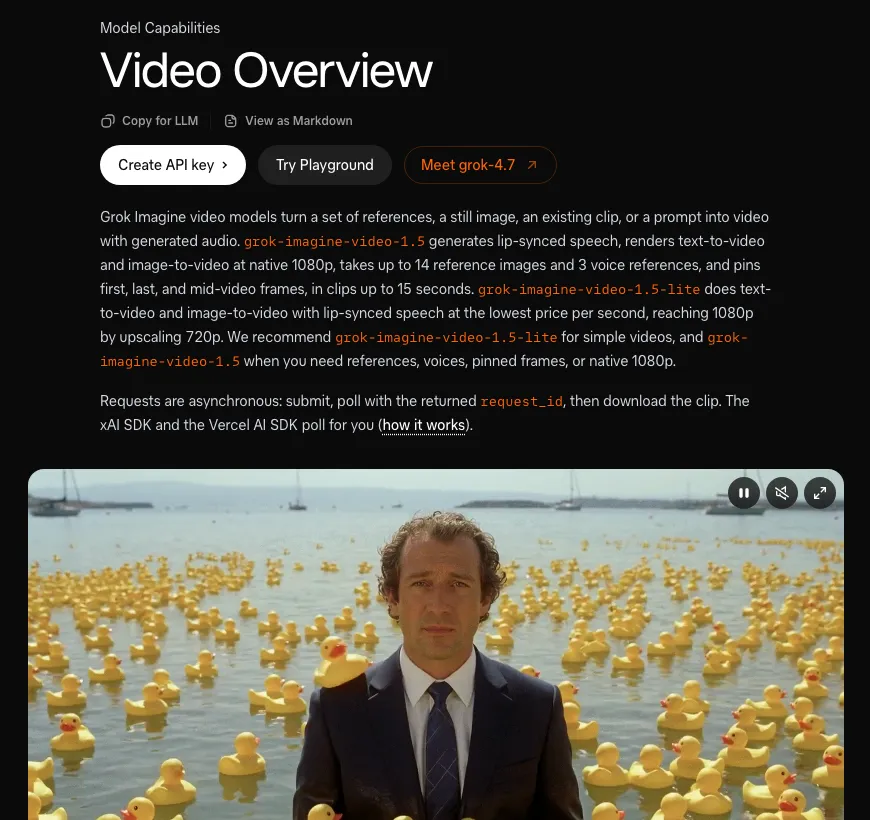 The Grok Imagine video overview in the xAI API docs, checked November 2, 2026
Grok Imagine Video 1.5 is an image-to-video and text-to-video model for creators and developers, making 1 to 15 second clips with native audio from $0.08 a second on the API. You give it a still or a prompt, describe the motion and sound, and pick a length and resolution.
Its maker has changed names twice this year. SpaceX acquired xAI on February 2, 2026, then rebranded it SpaceXAI in July and SpaceX Super Intelligence (SpaceXSI) in October, according to Wikipedia’s company history.
The developer side still says xAI. The model lives in the xAI API, its docs sit at docs.x.ai, and keys are still XAI_API_KEY.
Grok Imagine 1.5 release timeline
- Preview: shipped first as
grok-imagine-video-1.5-preview, an alias the docs still list. - June 16, 2026: xAI’s announcement made 1.5 generally available on the API and rolled out Video 1.5 Fast in the Grok app.
- July 31, 2026: the API release notes added text-to-video, reference-to-video with preset voices, and native 1080p.
- Later: 1.5 Lite joined as the budget tier. The docs still tag it “New”.
Grok Imagine 1.5 vs 1.5 Lite vs 1.5 Fast
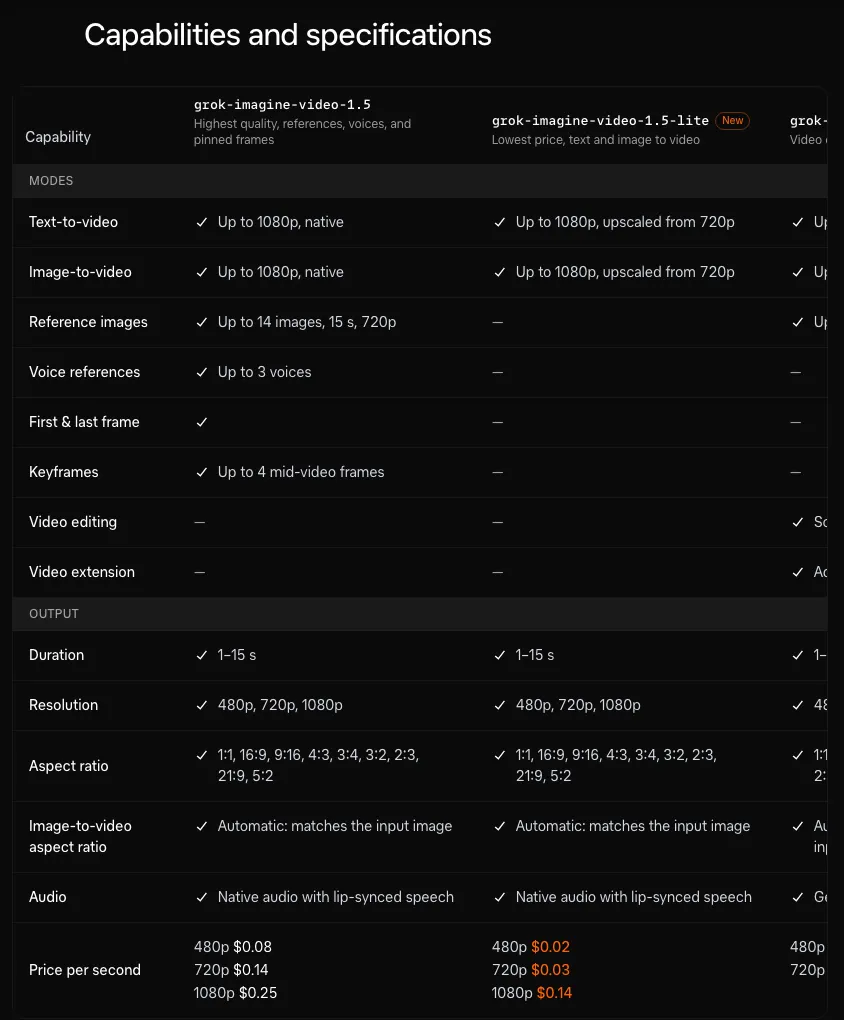 Capabilities and specifications for 1.5 and 1.5 Lite in the xAI docs
Three products share the 1.5 name, and they are not interchangeable. 1.5 is the controllable one, Lite is the cheap one, and Fast is the quick one inside the Grok app.
| Grok Imagine 1.5 | Grok Imagine 1.5 Lite | Grok Imagine 1.5 Fast | |
|---|---|---|---|
| Where it runs | xAI API | xAI API | grok.com/imagine, iOS and Android apps |
| Modes | Text, image and reference to video | Text and image to video | Not published as an API model |
| Top resolution | 1080p native (720p with references) | 1080p, upscaled from 720p | xAI’s speed claim is for 720p |
| Clip length | 1 to 15 s | 1 to 15 s | Not published |
| Audio | Native, with lip-synced speech | Native, with lip-synced speech | Not published |
| Reference images | Up to 14 | None | Not published |
| Preset voices | Up to 3 characters | None | Not published |
| Pinned frames | First, last and up to 4 keyframes | None | Not published |
| API price at 720p | $0.14 a second | $0.03 a second | No API |
| Best for | Control and native 1080p | Cheap drafts and simple shots | Fast iteration in the app |
Every API model takes nine aspect ratios: 1:1, 16:9, 9:16, 4:3, 3:4, 3:2, 2:3, 21:9 and 5:2. In image-to-video, the output always matches the shape of your input image.
The video overview gives the rule of thumb itself: use Lite for simple videos, and 1.5 when you need references, voices, pinned frames or native 1080p.
Grok Imagine 1.5 pricing: API cost per second and per minute
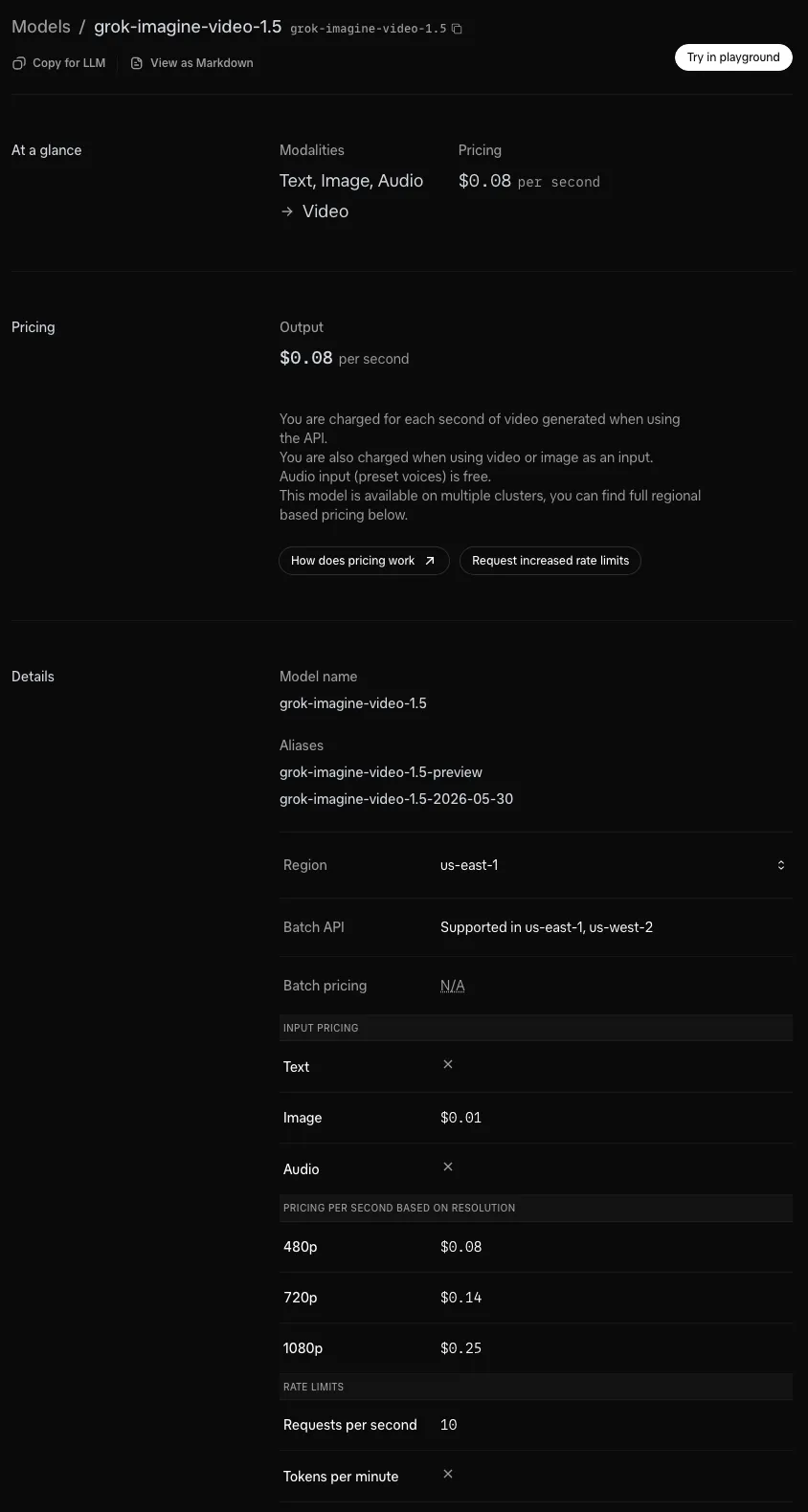 The grok-imagine-video-1.5 model page, checked November 2, 2026
The API bills each second of video you generate, and resolution sets the rate. Here are the published prices from the 1.5 model page and the 1.5 Lite model page, checked November 2, 2026:
| Model | 480p | 720p | 1080p |
|---|---|---|---|
| Grok Imagine Video 1.5 | $0.08/s ($4.80/min) | $0.14/s ($8.40/min) | $0.25/s ($15.00/min) |
| Grok Imagine Video 1.5 Lite | $0.02/s ($1.20/min) | $0.03/s ($1.80/min) | $0.14/s ($8.40/min, upscaled) |
| Grok Imagine Video (1.0) | $0.05/s ($3.00/min) | $0.07/s ($4.20/min) | Not offered |
The headline “$0.08 per second” on the 1.5 page is the 480p rate. Most people will render at 720p or 1080p, so budget for $0.14 or $0.25.
What a clip actually costs
- 10-second 720p image-to-video on 1.5: $1.40, plus $0.01 for the input image
- 15-second 1080p clip on 1.5: $3.75
- 10-second 720p clip on Lite: $0.30
- 8-second 1080p clip on Lite: $1.12, the same per-second rate as 1.5 at 720p
Two smaller charges apply. Each input image costs $0.01, while preset voices are free.
The Batch API takes video jobs but bills them at the standard rate, and video isn’t eligible for priority processing. The default limit is 10 requests per second.
The $4.20 a minute you see in other reviews
Some reviews quote Grok Imagine 1.5 at about $4.20 a minute for 720p. That number matches the original Grok Imagine Video’s 720p rate of $0.07 a second, not 1.5.
At today’s prices, 1.5 at 720p costs $8.40 a minute. Lite at 720p costs $1.80.
Grok app plans
Video 1.5 Fast runs in the Grok app, which is sold as a subscription rather than per second. SpaceXSI’s own plan pages wouldn’t load for us, and third-party guides disagree on current prices and video caps, so check grok.com before you subscribe.
Grok Imagine 1.5 key features
Image-to-video fidelity
xAI launched 1.5 as its best image-to-video model yet. The still you pass in becomes the first frame, and your prompt describes what happens next.
You get more control than most image-to-video models offer:
- Pinned frames: set the first frame, the last frame and up to four keyframes at chosen timestamps. Keyframes snap to a 1/3-second grid.
- Loops: pass the same image as first and last frame and the clip comes back to where it started.
- Reference images: up to 14 per request set characters, products and locations without fixing the first frame. xAI’s reference-to-video demo stages 12 catalog products in one living room.
xAI captions one of its own product examples “Label text stays exact”. That is a vendor claim, but it is the right thing to test if you sell packaged goods.
Independent hands-on testing backs up the likeness part. Curious Refuge’s review found image references kept a fairly convincing likeness when characters moved into new settings.
Lip-synced audio in one pass
Both 1.5 and 1.5 Lite generate sound with the picture, including lip-synced speech. xAI says effects, ambience and dialogue land in the same pass, with clearer, better-synced speech than the previous model.
On 1.5, reference_audios gives up to three characters a preset voice. Voice references from your own recordings are limited to trusted partners on request, so self-serve voice cloning is off the table.
The voices are the weak spot in practice. Curious Refuge found the voice references sounded more like audiobook narration than natural performance.
If talking heads are the whole job, compare dedicated tools in our best AI lip sync tools roundup first.
Multi-shot scenes and stitching
There is no multi-shot mode in the Grok Imagine API. Each request returns one clip of up to 15 seconds.
A single prompt can still cut. xAI’s dialogue example runs a wide shot, then cuts over one character’s shoulder, all inside one 15-second 720p clip.
For anything longer, you stitch. xAI’s own showcase makes several generations from one character image and one voice, then edits them together, and reference images keep the cast consistent between clips.
Two limits make that harder than it sounds:
- No extension on 1.5. Video extension, which adds 2 to 10 seconds to a clip, only exists on the original Grok Imagine Video.
- Continuity is on you. Curious Refuge found multi-shot scenes felt awkward, with timing and continuity problems.
In the Grok app, xAI added Projects and parallel agents alongside 1.5. Those help you batch shots, but they are not an editor.
Resolution: the 720p ceiling, mostly gone
Early reviews called 720p the ceiling, and many still do. Since July 31, 2026, text-to-video and image-to-video on 1.5 render at native 1080p.
Three places still stop at 720p:
- Reference-to-video on 1.5, whether you use images, voices or both
- 1.5 Lite, which renders at 720p and upscales to reach 1080p
- Some third-party apps, Vidwip included, which run both models at 720p
One detail matters for prompt writers. Text-to-video on 1.5 runs as text-to-image, then image-to-video, so the first frame decides a lot.
Speed
Speed is the Fast variant’s whole pitch. xAI says Video 1.5 Fast makes a 6-second 720p clip in about 25 seconds, down from 40+ seconds on its previous model.
That is xAI’s number, not an independent benchmark. Curious Refuge saw most of its videos render in about 60 seconds.
Where Grok Imagine 1.5 ranks now
Grok Imagine 1.5 launched near the top of the charts. GIGAZINE reported the preview placing first and second on several AI video benchmarks in June.
Five months later, newer models have passed it. Here is where it sits on the two big blind-vote leaderboards, checked November 2, 2026:
| Leaderboard | Grok Imagine 1.5 | Grok Imagine 1.5 Lite | Current #1 |
|---|---|---|---|
| Arena image-to-video | 8th of 48, score 1456 (137,459 votes) | Not listed | MiniMax H3, 1495 |
| Artificial Analysis image-to-video | 13th, Elo 1052 | 19th, Elo 999 | Seedance 2.5, Elo 1153 |
| Artificial Analysis text-to-video | 13th, Elo 1059 | 20th, Elo 991 | Wan 3.0, Elo 1175 |
Top 10 on Arena out of 48 models is still respectable. But “the #1 image-to-video model” is a June headline, not a November fact.
Grok Imagine 1.5 pros: what it does well
- Price per second. $0.14 at 720p on 1.5 and $0.03 on Lite, billed only for the seconds you generate.
- Sound included. Dialogue, effects and ambience come out of the same pass as the picture.
- Frame control. First, last and four keyframes, plus loops, give you more say over motion than a prompt alone.
- References at scale. Up to 14 images per request, which suits product catalogs and recurring characters.
- Native 1080p. Since July 31, on text-to-video and image-to-video.
- Flexible lengths and shapes. Any length from 1 to 15 seconds, in nine aspect ratios.
Grok Imagine 1.5 cons: where it falls short
- No longer a leaderboard leader. 8th on Arena and 13th on Artificial Analysis for image-to-video.
- 15 seconds, then stitch. No multi-shot mode, and no extension on 1.5.
- References cap at 720p. The feature that keeps characters consistent is the one that can’t go to 1080p.
- No self-serve voice cloning. Own-audio voice references are for trusted partners only.
- Lite’s 1080p is upscaled. Pay $0.14 a second for Lite at 1080p and you get an upscaled 720p render.
- Confusing naming. xAI, SpaceXAI and SpaceXSI all appear on the same product, and Fast isn’t listed in the API.
Grok Imagine 1.5 vs alternatives
If you mainly want the best-looking shot, three models rank above Grok Imagine 1.5 on both image-to-video boards. All of them, plus both Grok models, run in Vidwip’s AI Video Generator, so the last column shows what a second costs there (1 credit = $0.01):
| Model | Arena image-to-video | Artificial Analysis image-to-video | Length in Vidwip | Vidwip credits per second |
|---|---|---|---|---|
| Seedance 2.5 | 4th, 1477 | 1st, 1153 | 4 to 30 s | 60 |
| Wan 3.0 | 3rd, 1480 | 9th, 1111 | 2 to 30 s | 28 |
| Seedance 2.0 | 5th, 1475 | 3rd, 1136 | 4 to 15 s | 51 |
| Grok Imagine 1.5 | 8th, 1456 | 13th, 1052 | 1 to 15 s | 38 |
| Grok Imagine 1.5 Lite | Not listed | 19th, 999 | 1 to 15 s | 10 |
Wan 3.0 is the standout. It ranks above Grok Imagine 1.5 on both boards, runs up to 30 seconds, and costs fewer credits per second in Vidwip.
Seedance 2.5 is the quality pick if budget allows. Our Seedance alternatives guide covers the rest of that field, and best text-to-video AI ranks the full set of tools.
Running Grok Imagine 1.5 without the API
You don’t need to write code to use Grok Imagine 1.5. Vidwip runs Grok Imagine 1.5 and 1.5 Lite next to 14 other video models: you describe the shot, pick a model, a length from 1 to 15 seconds and a shape, and the clip lands on your timeline.
In Vidwip, both Grok models render at 720p with sound, in 16:9, 9:16, 1:1, 4:3 or 3:4. Lite costs 10 credits a second ($0.10) and 1.5 costs 38 ($0.38).
That is more per second than the raw xAI API. What you get for it is no integration work, a timeline to stitch shots on, and the same credits for Seedance, Wan, Veo and Kling, so you can run one prompt on two models and keep the better take.
AI video needs a paid plan, from $25 a month. Clips carry no watermark, and the AI video cost page prices any shot before you sign up.
Paid plans start at $25 a month for 2,500 credits on the pricing page. The full roster, with each model’s lengths and resolution, is on the models page.
Who should use Grok Imagine 1.5?
- Developers building video features: yes. Per-second billing, async jobs, a Batch API and Lite at $0.03 a second make it easy to ship.
- E-commerce and product teams: yes, for 1.5. Up to 14 reference images and pinned frames suit catalog shots, and one of xAI’s own examples is about keeping a product label exact.
- Storyboard and previz work: yes. Pin a first and last frame on the API and let the model fill the motion, or sketch ideas quickly in the app with 1.5 Fast.
- Short-form creators who want sound: maybe. Native audio saves a step, but test the voices before you build a series around them.
- Filmmakers chasing the best shot: no. Seedance 2.5 and Wan 3.0 rank higher, and our Kling AI alternatives list covers more options.
- Anyone needing their own voice: no. Own-audio voice references are partner-only, so look at Google Veo alternatives for other models with native dialogue.
Conclusion: is Grok Imagine 1.5 worth it?
Yes, for value. Grok Imagine 1.5 gives you image-to-video with lip-synced sound, frame-level control and native 1080p for $0.14 to $0.25 a second, and Lite drafts the same idea for $0.03.
It is not the model to pick for the single most realistic shot any more. Treat 1.5 Lite as your draft pass, 1.5 as your controllable finisher, and stitch longer scenes in an editor.
Start with Lite on the API, or try it in the Grok app with Fast. If you would rather compare it against Seedance, Wan and Veo without juggling accounts, run the same prompt across them in Vidwip’s AI Video Generator.