
The best text-to-video AI in 2026 is a model menu, not one model: Wan 3.0, MiniMax H3 and Seedance 2.5 lead the blind-vote Artificial Analysis leaderboard. Vidwip runs 16 models, Wan 3.0 and Seedance 2.5 among them, on one timeline; Google Flow wins on dialogue, Kling 4.0 on 30-second 4K takes, and Pika on price at $0.37 per 5-second Wan 3.0 clip.
The best text-to-video AI in 2026 isn’t one model. It’s whichever tool lets you pick the right model for the shot.
The leaderboard moved fast this year. OpenAI shut Sora down, Runway’s Gen-4.5 slipped from #1, and Alibaba’s Wan 3.0 now tops the blind-vote rankings.
This guide ranks the 8 text-to-video AI tools worth your money right now. We didn’t run our own render tests; we ranked on public blind-vote scores, each vendor’s own specs and live pricing, all checked on October 26, 2026.
TL;DR: the best text-to-video AI tools at a glance
| # | Tool | Best for | Standout | Entry price |
|---|---|---|---|---|
| 1 | Vidwip AI Video Generator | Many models, one timeline | 16 models, shots of 1–30 s | From $25/month |
| 2 | Google Flow (Veo 3.1, Gemini Omni) | Dialogue and sound | Lip-synced speech in the shot | Free, 50 credits a day |
| 3 | Kling 4.0 | Long 4K takes | 30 s per generation, 10 keyframes | $10/month list |
| 4 | Runway Gen-4.5 | Directed, cinematic shots | Aleph 2.0 editing, ProRes on Max | $15/month |
| 5 | Pika | Most clips per dollar | Wan 3.0 at $0.37 per 5-second clip | $10/month |
| 6 | Wan 3.0 | Top-ranked model, low cost | #1 on Artificial Analysis | Free, then $10/month |
| 7 | Hailuo AI (MiniMax H3) | Faces and close-ups | Up to 2K with sound | From $9.99/month |
| 8 | Luma Dream Machine | Cheap drafts, many models | Ray3.14 Draft at 4 credits a second | $30/month |
Short version: pick Vidwip if you want the top models and an editor in one tab. Pick Google Flow for talking scenes, Kling 4.0 for long 4K takes, and Pika or Wan if price per clip decides it.
How we ranked these text-to-video AI tools
We didn’t hand-test these tools. Ranking eight tools on our own handful of prompts would just measure our taste.
So we used three public signals instead:
- Quality: the Artificial Analysis text-to-video leaderboard, where voters compare two clips from the same prompt without knowing which model made them
- Specs: clip length, resolution and sound, from each vendor’s own pages
- Cost: live pricing pages, turned into a cost per 5-second clip wherever the vendor publishes a per-model rate
Here’s how the leaderboard stood on October 26, 2026:
| Rank | Model | Maker | Elo |
|---|---|---|---|
| 1 | Wan 3.0 | Alibaba | 1,175 |
| 4 | MiniMax H3 (768p) | MiniMax | 1,158 |
| 5 | Seedance 2.5 | ByteDance | 1,158 |
| 10 | Gemini Omni Flash 1.1 | 1,130 | |
| 17 | Kling 3.0 Omni 1080p (Pro) | Kuaishou | 1,020 |
| 18 | Kling 3.0 1080p (Pro) | Kuaishou | 1,000 |
| 21–24 | Veo 3.1 | 963 |
Two newcomers, Utopai X and HeyGen Video 1, sit at #2 and #3. Runway Gen-4.5 and Pika 2.5 don’t appear among the 30 models listed, and Kling 4.0 isn’t ranked yet.
What to look for in a text-to-video AI generator
Model choice. The top three models are Wan 3.0, MiniMax H3 and Seedance 2.5, and most platforms now rent them out. A tool that lets you switch models per shot beats one locked to its own.
Clip length. Kling 4.0, Wan 3.0 and Seedance 2.5 reach 30 seconds in one take. Veo 3.1 stops at 8 seconds and Runway Gen-4.5 at 10.
Sound. Veo 3.1, Gemini Omni, Kling 4.0 and MiniMax H3 make sound with the picture. Others add it as a separate step, or not at all.
Cost per clip, not per month. Credits hide the real price. A 5-second clip runs from $0.25 to $4.20 across the tools below, depending on the model.
Commercial rights and watermarks. Pika’s Free plan has no commercial license. On Wan, watermark-free downloads start on Pro, not Free.
1. Vidwip AI Video Generator
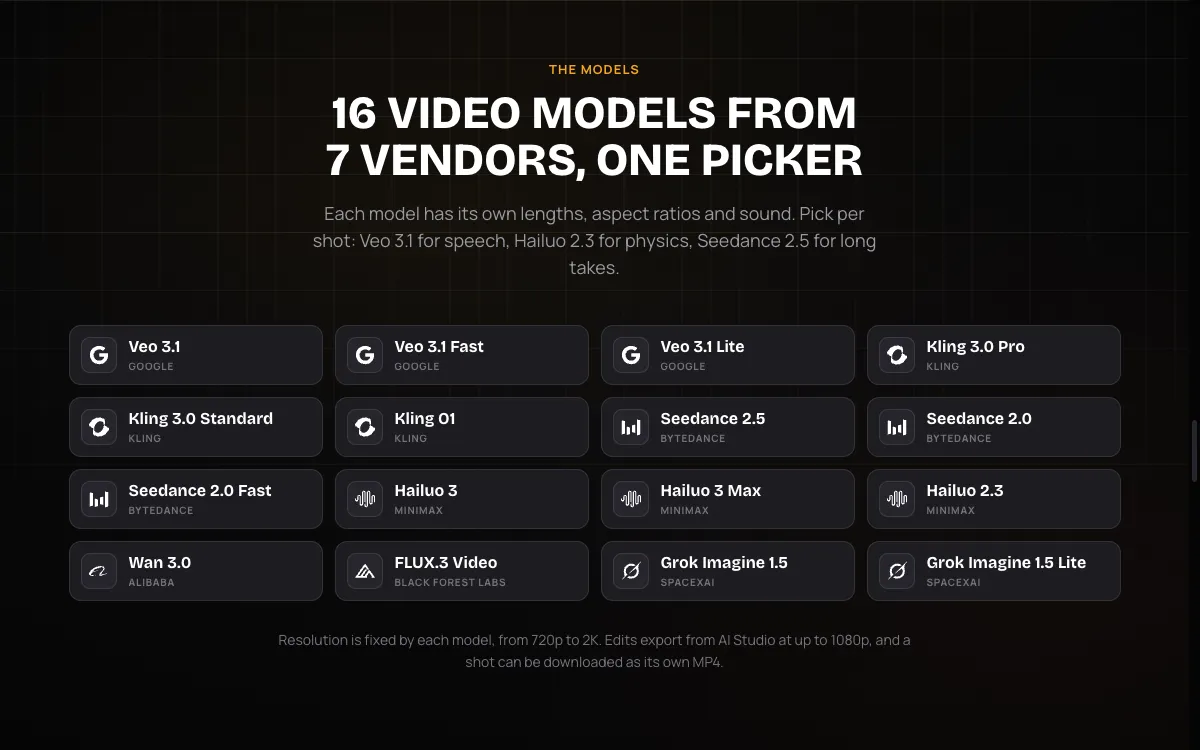 Vidwip AI Video Generator: 16 video models from 7 vendors in one picker
Vidwip AI Video Generator is a multi-model text-to-video tool for creators who want the top models and an editor in one tab. You describe a shot, pick a model, a length and an aspect ratio, and the clip lands on the AI Studio timeline.
The roster is the point. It runs 16 models, including Veo 3.1, Kling 3.0 Pro, Seedance 2.5, Hailuo 3, Wan 3.0, FLUX.3 Video and Grok Imagine 1.5, and no paid plan locks a model.
That covers the current leaderboard’s #1 (Wan 3.0) and its tied #4 and #5 (Hailuo 3, sold by MiniMax as H3, and Seedance 2.5). When one model fumbles a shot, you run the same prompt on another without opening a second account.
Shots run 1 to 30 seconds, depending on the model, in 16:9, 9:16, 1:1 and more. 14 of the 16 models make sound with the picture.
Not happy with one clip? Select it, write a new prompt, and the new take replaces it while the rest of your cut stays put.
You can also voice the edit. AI Video Voiceover writes and narrates a script on the same timeline, with 190+ voices and voiceover in 74 languages.
Pros
- 16 models on one credit balance, including the top three on Artificial Analysis
- Shots from 1 to 30 seconds, with sound on 14 of 16 models
- Every shot lands on a timeline; regenerate one shot in place
- Photo to video on every model, with an end frame on most
- No watermark on exports, on any plan
Cons
- Edits export at up to 1080p, with no 4K
- Kling 4.0 isn’t in the picker yet; the Kling models are 3.0 Pro, 3.0 Standard and O1
- Model output runs 720p to 2K, set by each model
- Credits are shared with every other Vidwip tool, so heavy generation drains the same balance
Best for: creators who want to try the same idea on several top models, then cut the shots into a finished video. Pricing: AI video needs a paid plan. Starter $25/month ($20 yearly) for 2,500 credits, Pro $99/month ($79 yearly) for 10,000, Enterprise custom. The picker shows each shot’s credit cost before you generate (Vidwip pricing).
2. Google Flow (Veo 3.1 and Gemini Omni)
 Google Flow: Google’s studio for Veo 3.1 and Gemini Omni, free with 50 daily credits
Google Flow is Google’s AI video studio, and the best text-to-video tool for scenes where people talk. It runs Veo 3.1 and the newer Gemini Omni.
Veo 3.1 generates dialogue, sound effects and ambient noise with the picture. Google says it “excels in physics, realism and prompt adherence,” and it outputs 1080p or 4K.
Gemini Omni is the model Google is pushing now. It does text, image and reference to video, edits a clip through conversation, and makes synced dialogue, effects and music; Omni Flash 1.1 ranks #10 on Artificial Analysis, well above Veo 3.1.
Flow wraps both in tools for longer work. Video Extension continues a clip, Scenebuilder strings shots into a scene, and Ingredients to Video steers a shot with your own references.
Pros
- Lip-synced dialogue, sound effects and music generated with the picture
- Two Google models in one studio, with conversational editing on Omni
- Video Extension and Scenebuilder for multi-shot scenes
- Free to start with 50 daily credits, no subscription
Cons
- Veo 3.1 makes 8 seconds per generation at most
- Features vary by Google AI plan, platform and region, and prices vary by market
- Flow’s pricing section doesn’t list a credit cost per model or per clip
- Veo 3.1 is expensive elsewhere: about $4.20 per 5-second clip with audio on Luma Plus
Best for: dialogue scenes, ads with a spokesperson, and anything where the lips have to match the words. Pricing: Free with 50 daily Flow credits. Google AI Plus $4.99/month adds 200 monthly credits, Google AI Pro $19.99/month adds 1,000, and Google AI Ultra $99.99/month adds 10,000 (25,000 on the $199.99 tier). Checked October 26, 2026 on Flow’s pricing section.
For other tools with built-in sound, see our Google Veo alternatives.
3. Kling 4.0
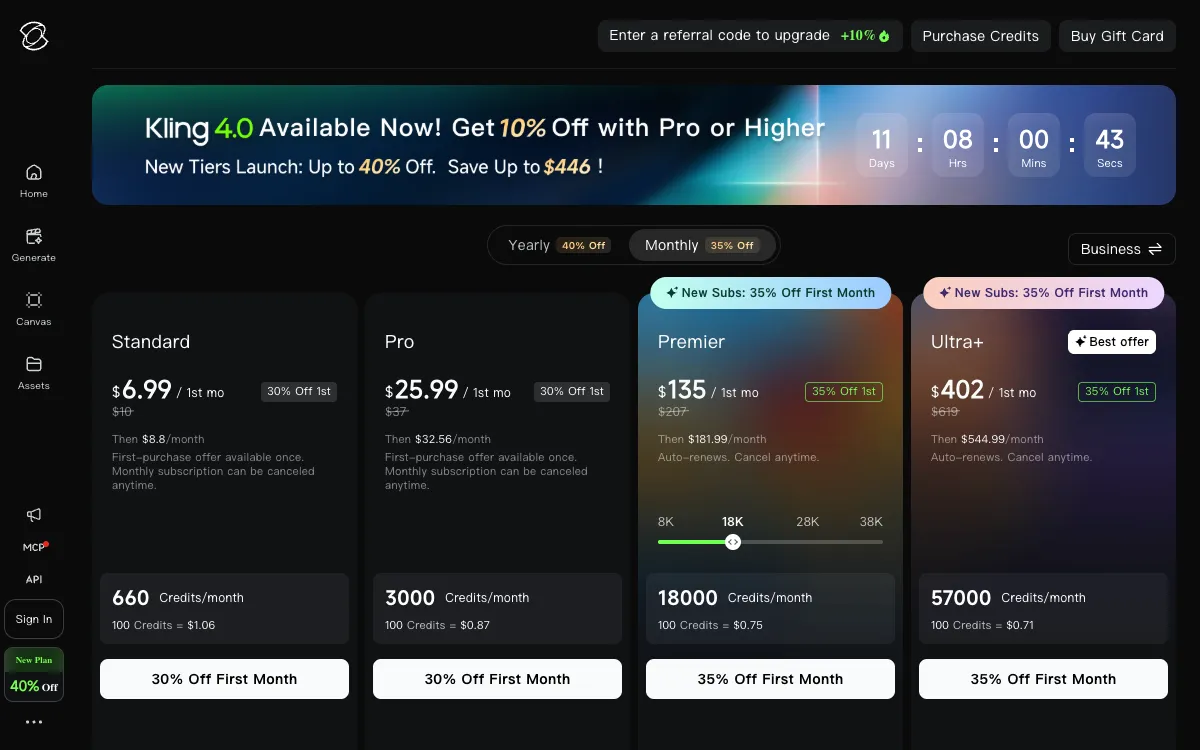 Kling AI: Kling 4.0 is live, with Standard, Pro, Premier and Ultra+ plans
Kling 4.0 is Kuaishou’s newest model and the best text-to-video pick for long, high-resolution takes. Kling’s own page lists native 30-second generation, multiple keyframes and Omni reference.
That’s double Kling 3.0’s 15 seconds per generation. You can pin up to 10 keyframe images along one take and attach up to 15 reference items, including video and a voice.
Output runs at 720p, 1080p or 4K, with stereo sound and lip sync. Kling says 10-bit HDR is coming soon.
Kling 3.0 is still around, and it’s the version other platforms rent out. Vidwip, Runway and Luma all carry Kling 3.0, which ranks #17 and #18 on Artificial Analysis in its two 1080p Pro versions.
Pros
- Up to 30 seconds in one generation, tied for the longest here
- Up to 10 keyframes and 15 reference items per take
- 4K output with stereo sound and lip sync
- Paid plans include commercial use and watermark removal
Cons
- No per-second Kling 4.0 rate on the public plans page
- First-month prices are promotional; renewals cost more
- Kling 4.0 isn’t ranked on Artificial Analysis yet, so there’s no blind-vote score to compare
Best for: 30-second product or story takes that need fixed moments, and 4K delivery. Pricing: Standard $10/month list for 660 credits ($6.99 first month, then $8.80), Pro $37/month list for 3,000 credits ($25.99 first month, then $32.56), with Premier and Ultra+ above. Checked October 26, 2026 on Kling’s membership page.
Want Kling-style motion elsewhere? Our Kling AI alternatives compare eight options.
4. Runway Gen-4.5
 Runway: Gen-4.5, Aleph 2.0 and third-party models on one credit plan
Runway is the text-to-video tool for filmmakers and agencies who direct the camera. Its flagship, Gen-4.5, launched on December 1, 2025 at #1 on Artificial Analysis with 1,247 Elo.
It isn’t on top anymore. Gen-4.5 doesn’t appear among the 30 models on the current leaderboard, though Elo scores shift as new models join, so the two numbers aren’t directly comparable.
Gen-4.5 renders 2 to 10 seconds per generation at 720p, for 12 credits a second. Runway is candid about its weak spots: effects can appear before their causes, objects can vanish between frames, and actions succeed more often than they should.
Around the model sits a production kit. Aleph 2.0 edits existing footage by prompt, Standard adds 4K upscaling and music, voice and sound effects, and Max adds HDR, ProRes and image-sequence exports.
Pros
- Fine control: Gen-4.5 text and image to video, plus Aleph 2.0 for editing footage
- Pro delivery formats on Max: HDR, ProRes and PNG sequences
- Kling 3.0 and Seedance models on the same credits
- Max plan credits roll over for one month
Cons
- A 5-second Gen-4.5 clip costs 60 credits, about $1.44 on monthly Standard
- Gen-4.5 renders at 720p; you upscale to 4K after the fact
- Free plan is 125 one-time credits, and Gen-4.5 needs Standard or higher
Best for: directed, cinematic shots that go into a grading and editing pipeline. Pricing: Free (125 one-time credits), Standard $15/month or $12 yearly (625 credits), Pro $35 or $28 (2,250), Max $95 or $76 (9,500). Checked October 26, 2026 on Runway’s pricing page.
5. Pika
 Pika: Pika 2.5, Wan 3.0, Seedance 2.5 and MiniMax H3 behind 25+ apps
Pika is the text-to-video tool that gets you the most clips for the money. Since its September 17, 2026 relaunch, every plan opens every model, and credits cost about $0.011 each on every paid plan.
That makes it the cheapest way to run the #1 model. Wan 3.0 costs 33 credits per 5-second 720p clip, about $0.37 on the $10 Starter plan.
Pika’s own model, Pika 2.5, renders up to 1080p: 5 seconds from text, or 5 to 10 from an image. Its Video Studio app builds a single clip or a multi-shot video up to 30 seconds with sound, and you can @mention up to 50 characters, products or styles to keep them consistent.
Pros
- Wan 3.0 at about $0.37 per 5-second clip on Starter
- Three of the current top five models: Wan 3.0, MiniMax H3 and Seedance 2.5
- Video Studio builds multi-shot videos up to 30 seconds with sound
- Watermark-free downloads on every plan, including Free
Cons
- Free plan has no monthly credits and no commercial license
- Pika’s pricing page doesn’t list an in-app credit cost for Pika 2.5
- No ProRes, HDR or image-sequence exports listed
- Only 2 parallel video generations on Free and Starter
Best for: social creators and marketers who need a lot of short clips. Pricing: Free (packs only, $1 per 60 credits), Starter $10/month or $8 yearly (900 credits), Creator $35 or $28 (3,150), Fancy from $95 or $76 (8,550+). Checked October 26, 2026 on Pika’s pricing page.
Torn between the last two? Our Runway vs Pika comparison goes model by model and clip by clip.
6. Wan 3.0
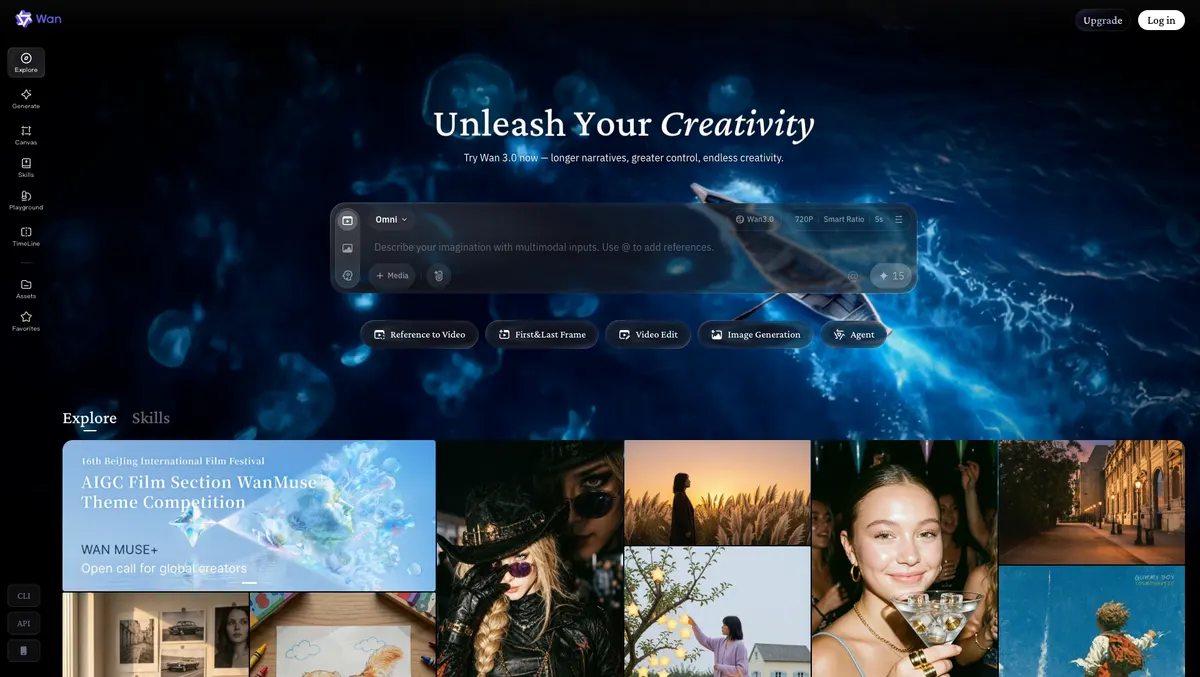 Wan: Alibaba’s studio for Wan 3.0, the #1 model on Artificial Analysis
Wan 3.0 is Alibaba’s text-to-video model, and the top-ranked one right now at 1,175 Elo on Artificial Analysis. Its own studio is also the cheapest way to run it.
Wan’s create page quotes 15 credits for a 5-second 720p shot. On the Pro plan, that’s about $0.50 billed monthly, or $0.25 billed yearly.
Wan 3.0 runs 2 to 30 seconds per generation. The studio adds Reference to Video, First & Last Frame and Video Edit modes, plus a TimeLine for putting shots in order.
Pros
- #1 on the blind-vote Artificial Analysis text-to-video leaderboard
- About $0.25 per 5-second 720p clip on yearly Pro
- 2 to 30 seconds per generation
- Reference, first-and-last-frame and video edit modes in one studio
Cons
- 10- to 30-second videos, 1080p and watermark-free downloads start on Pro, not Free
- Free plan runs one video at a time
- A Wan subscription covers create.wan.video only; the API is a separate purchase
Best for: high-volume drafts and long takes where cost per second matters more than 4K. Pricing: Free with daily check-in credits. Pro $10/month, or $5/month billed yearly, for 300 credits. Premium $40/month, or $20/month yearly, for 1,200 credits. Checked October 26, 2026 on Wan’s pricing page.
7. Hailuo AI (MiniMax H3)
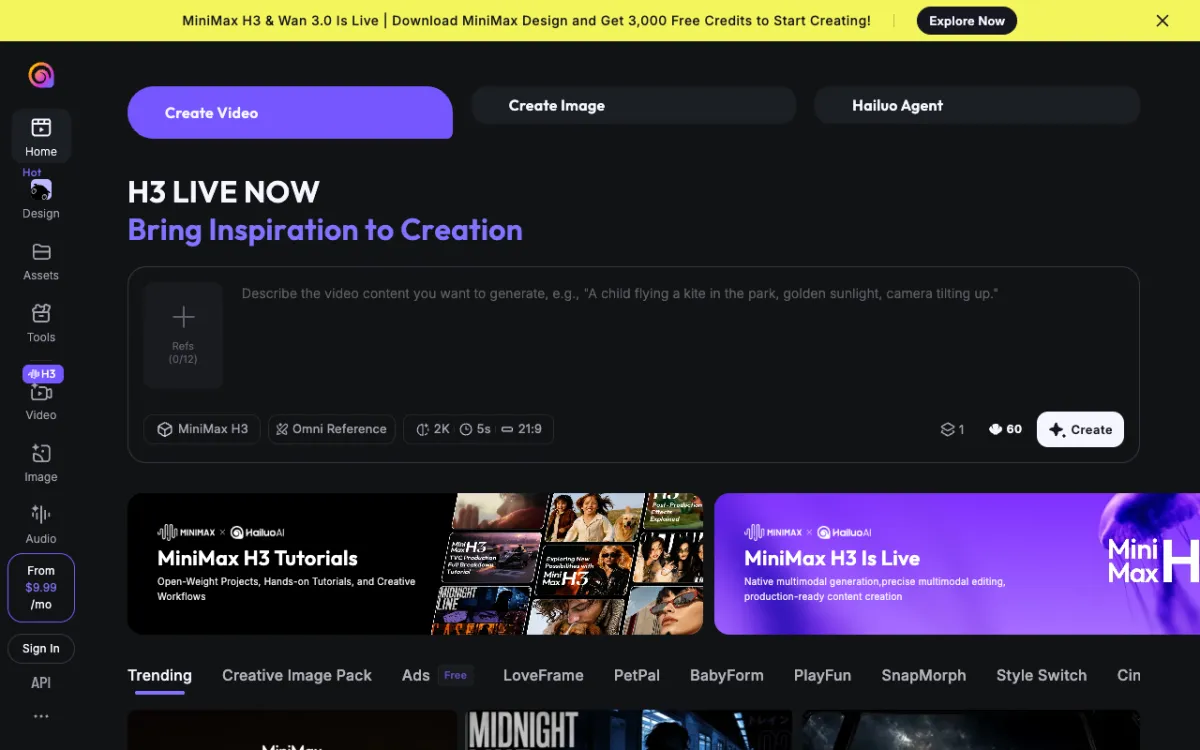 Hailuo AI: MiniMax’s studio for MiniMax H3, at up to 2K with sound
Hailuo AI is MiniMax’s video studio, and its MiniMax H3 model is the pick for faces and product close-ups. H3 ties for #4 on Artificial Analysis at 1,158 Elo.
It renders up to 2K with sound, and one generation runs 5 to 15 seconds. The create page takes up to 12 reference images and quotes 60 credits for a 5-second 2K shot.
H3 is cheap through other platforms too. On Luma Plus it costs 28 credits a second at 768p, about $0.42 per 5-second clip; Vidwip and Pika carry it as well.
Pros
- Tied #4 on Artificial Analysis, ahead of Kling 3.0 and Veo 3.1
- Up to 2K output with sound
- Up to 12 reference images per generation
- New users get free credits to start
Cons
- 15-second ceiling, half of Kling 4.0 and Wan 3.0
- Only the starting price is public to a signed-out visitor
- No timeline editor for assembling a finished video
Best for: faces, portraits and product close-ups where resolution decides whether the shot holds. Pricing: From $9.99/month. Checked October 26, 2026 on hailuoai.video.
8. Luma Dream Machine
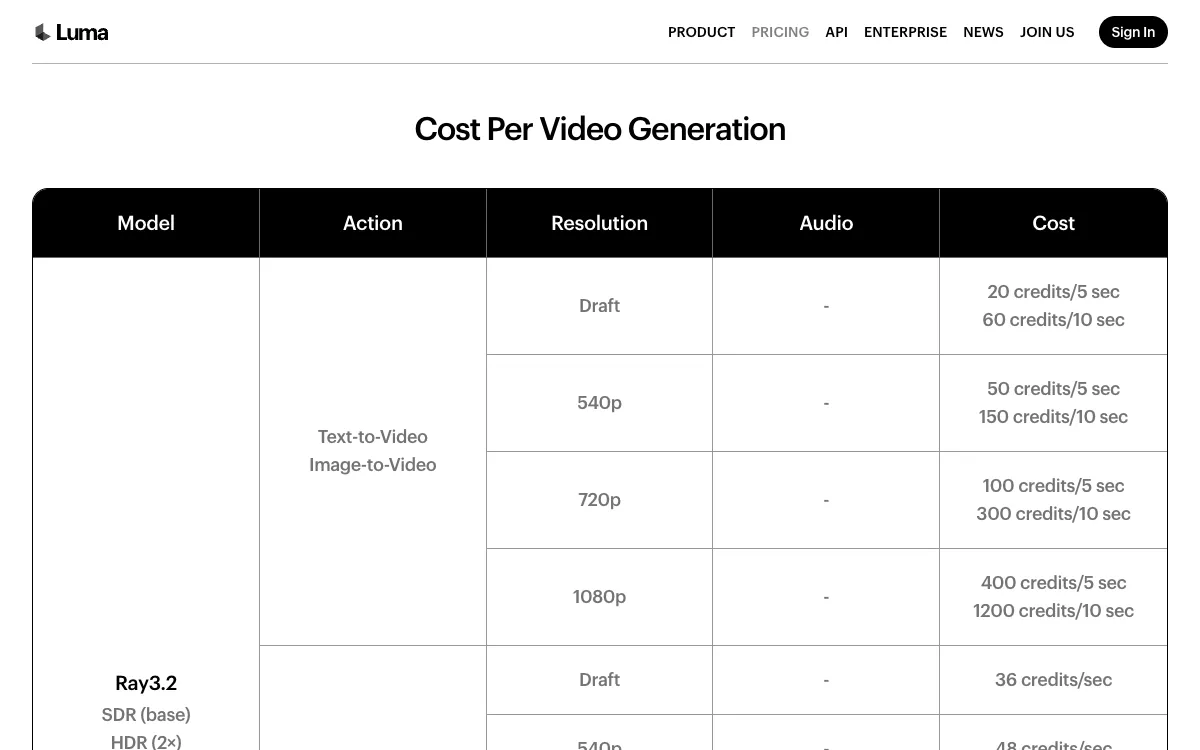 Luma: Ray3.2 priced per 5- and 10-second clip, from Draft to 1080p
Luma Dream Machine pairs Luma’s own Ray models with rented ones on one credit pool. It’s the best text-to-video pick for cheap drafts you’ll refine later.
Ray3.14 Draft mode costs 4 credits a second, and a 5-second Ray3.2 clip at 720p costs 100 credits, about $0.30 on Plus. Luma also carries Veo 3.1, Kling 3.0, Seedance 2.5, MiniMax H3 and Gemini Omni Flash.
The premium models get expensive here. Veo 3.1 with audio costs 280 credits a second, about $4.20 per 5-second clip, and Seedance 2.5 at 1080p costs 191 a second.
Pros
- Ray3.14 Draft at 4 credits a second for fast, cheap iteration
- Veo 3.1, Kling 3.0, Seedance 2.5 and MiniMax H3 on the same credits
- Seedance 2.5 at up to 1080p
- Ray3.2 offers an HDR option
Cons
- No free plan on the pricing page; Plus starts at $30/month
- Premium models burn credits fast
- Ray models don’t appear on the current Artificial Analysis leaderboard
Best for: drafting many ideas cheaply, then re-rendering the winners on a premium model. Pricing: Plus $30/month or $25 yearly (10,000 credits), Pro $90 or $75 (40,000), Ultra $300 or $250 (150,000). Checked October 26, 2026 on Luma’s pricing page.
More options in our Luma AI alternatives roundup.
Text-to-video AI comparison table
| Tool | Top models | Max length per generation | Resolution | Sound | Free start |
|---|---|---|---|---|---|
| Vidwip | 16, incl. Wan 3.0, Seedance 2.5, Veo 3.1, Kling 3.0 | 30 s | 720p–2K per model, 1080p export | 14 of 16 models | Paid plans only |
| Google Flow | Veo 3.1, Gemini Omni | 8 s (Veo 3.1) | 1080p, 4K | Dialogue, SFX, music | 50 credits/day |
| Kling 4.0 | Kling 4.0, 3.0 | 30 s | 720p, 1080p, 4K | Stereo, lip sync | Paid plans listed |
| Runway | Gen-4.5, Aleph 2.0, Kling 3.0 | 10 s (Gen-4.5) | 720p, 4K upscale | Separate generation | 125 one-time credits |
| Pika | Pika 2.5, Wan 3.0, Seedance 2.5, MiniMax H3 | 30 s (Video Studio) | Up to 1080p | Video Studio | Packs only |
| Wan | Wan 3.0 | 30 s (Pro) | 720p free, 1080p Pro | Not listed | Daily check-in credits |
| Hailuo AI | MiniMax H3 | 15 s | Up to 2K | Yes | Free credits for new users |
| Luma | Ray3.14, Ray3.2, Veo 3.1, Kling 3.0 | 10 s (Ray3.2) | Up to 1080p | On some models | None listed |
Cost per 5-second clip
Where a vendor publishes a per-model rate, here’s what one 5-second clip costs on the entry paid plan, billed monthly:
| Tool and model | Credits | Cost per 5-second clip |
|---|---|---|
| Luma Ray3.2 on Plus (720p) | 100 | $0.30 |
| Pika, Wan 3.0 on Starter (720p) | 33 | $0.37 |
| Luma, MiniMax H3 on Plus (768p) | 140 | $0.42 |
| Wan 3.0 on Wan Pro (720p) | 15 | $0.50 ($0.25 yearly) |
| Luma, Kling 3.0 on Plus (1080p, audio) | 245 | $0.74 |
| Pika, Seedance 2.5 on Starter (720p) | 122 | $1.36 |
| Runway Gen-4.5 on Standard (720p) | 60 | $1.44 |
| Luma, Veo 3.1 on Plus (audio) | 1,400 | $4.20 |
Same model, different price: Kling 3.0, Seedance 2.5 and MiniMax H3 cost different amounts on each platform. Check the model’s rate on your platform, not just the plan price.
How to choose the right text-to-video AI
- You want the best model for each shot, plus an editor. Go with Vidwip. Wan 3.0, Seedance 2.5, Veo 3.1 and Kling 3.0 sit in one picker, and every shot lands on a timeline.
- Your people need to talk on camera. Go with Google Flow. Veo 3.1 and Gemini Omni make lip-synced dialogue with the picture.
- You need 30-second takes or 4K. Go with Kling 4.0. It pairs 30 seconds per generation with 10 keyframes and 4K output.
- You’re cutting a film or ad in a pro pipeline. Go with Runway. Aleph 2.0, ProRes and HDR exports fit a grading workflow.
- You need volume on a budget. Go with Pika or Wan. A 5-second Wan 3.0 clip costs $0.25 to $0.50.
Still looking? Our Runway alternatives, Pika alternatives, Hailuo AI alternatives and Seedance alternatives guides go deeper on each model. If you used Sora, start with our Sora alternatives.
Final verdict
The best text-to-video AI in 2026 is the one that doesn’t lock you to a single model. Wan 3.0, MiniMax H3 and Seedance 2.5 lead the blind votes today, and that order will change again.
Vidwip ranks first because it puts those models, plus Veo 3.1 and Kling 3.0, on one credit balance and one timeline. Google Flow wins on dialogue, Kling 4.0 on long 4K takes, and Pika and Wan on price.
Start with the free tiers. When you’re ready to pay, generate your shots on Vidwip, run the same prompt on two models, and keep the one that wins.