
Veo 3.1 is Google's video model with native sound, 4, 6 or 8 second clips and output up to 4K. Its quality is solid but no longer top of the board: Artificial Analysis has it at 961 Elo in text to video, 22nd of 31. Google Cloud lists it at $0.40 a second with audio, Fast at $0.10 to $0.12 and Lite at $0.05 to $0.08. Its Gemini API preview models shut down on October 22, 2026. We did not run the model ourselves.
This Veo 3.1 review covers Google’s video model and its Fast and Lite tiers: realism, native audio, prompt adherence and price per second. Veo 3.1 still makes some of the cleanest 1080p footage with sound, but the leaderboards have moved on and Google has moved its developer access to Gemini Omni.
We could not run Veo 3.1 ourselves, so there is no hands-on test here. Every quality finding names its source: Artificial Analysis leaderboards, Krea’s side-by-side test, Google’s own pages and published price lists. Prices are US figures, checked November 2026.
TL;DR: Veo 3.1 review
Veo 3.1 is a capable, expensive generator that has lost its lead. It makes 4, 6 or 8 second clips with native sound at up to 4K, and Fast and Lite trade some quality for far lower prices. Rated by Artificial Analysis, it sits 22nd of 31 in text to video, behind Wan 3.0 and Seedance 2.5.
| Dimension | Veo 3.1 | Veo 3.1 Fast | Veo 3.1 Lite |
|---|---|---|---|
| Artificial Analysis, text to video | 961 Elo, 22nd | 957 Elo, 23rd | 951 Elo, 24th |
| Artificial Analysis, image to video | 954 Elo, 24th | 937 Elo, 25th | 928 Elo, 27th |
| Clip length | 4, 6 or 8 s | 4, 6 or 8 s | 4, 6 or 8 s |
| Output resolution (Google Cloud) | 720p, 1080p, 4K | 720p, 1080p | 720p, 1080p |
| Native audio | Yes | Yes | Yes |
| Google Cloud price, with audio | $0.40 a second | $0.10 to $0.12 | $0.05 to $0.08 |
What is Veo 3.1?
Veo 3.1 is Google DeepMind’s flagship video model, listed on its Veo page with 1080p and 4K output, reference images, first and last frame control and scene extension. Google’s deprecations page dates the Veo 3.1 and Fast preview models to October 15, 2025, and Lite to March 31, 2026.
Google’s Google Cloud model page adds the details: 24 frames per second, MP4 output, up to four videos per prompt, and 9:16 or 16:9 only. Veo 3.1 and Fast are listed as generally available (released November 17, 2025), while Lite is still in preview there.
 Google DeepMind’s Veo page, checked November 6, 2026
Veo 3.1 tiers: standard, Fast and Lite
Veo 3.1 has three tiers, and the cheaper two give up reach more than looks. Only the standard model outputs 4K. Fast and Lite stop at 1080p, and Google’s Cloud page says Lite does not accept image input or reference images.
Quality follows the same order on Artificial Analysis, but the gaps are small. In text to video the three sit within 10 Elo of each other (961, 957 and 951). In image to video the spread is wider, 954 down to 928, so Lite gives up more when you start from a frame.
Realism and motion
Veo 3.1 looks good, but independent scores no longer rank it near the top. On Artificial Analysis’s text to video board (with audio), checked November 6, 2026, Veo 3.1 sat in a tie for 22nd of 31 models at 961 Elo. Wan 3.0 led at 1,172, ahead of Utopai X (1,169) and MiniMax H3 at 768p (1,160).
On the image to video board it ranked 24th at 954, with Seedance 2.5 first at 1,159. Veo is a year old, so part of that gap is newer models arriving. Our Seedance 2.5 vs Veo 3.1 comparison goes through the head-to-head.
Not every tester agrees on where it falls short. In Krea’s side-by-side, published September 5, 2026, Veo’s baker pulling a loaf from an oven read more naturally than Seedance’s, though Krea said neither handled the peel and oven mouth well. A Filmora review concluded Veo 3.1 trails Sora 2 Pro on dynamic realism and casual, unscripted content, but Sora is shut down (see why Sora is gone).
Native audio
Native audio is Veo 3.1’s headline feature, and Google is candid about its limit. Google says Veo creates “sound effects, ambient noise, and even dialogue” natively, and that natural, consistent speech, especially in short segments, “remains an area of active development.”
Krea’s park ranger test fits that note. Krea found Veo gave a steadier close-up that suits a locked presenter shot, while Seedance gave the more cinematic delivery. Krea also measured Veo’s mix quieter than Seedance, at about -31.9 dB against -27 dB.
Audio changes the bill. Both Runway and Google Cloud charge double for Veo 3.1 with audio on, so a silent clip costs half. If you add your own score, render without audio and save money. For other models with built-in sound, see our Google Veo alternatives.
Prompt adherence and control
Veo 3.1 follows structured prompts and reference inputs well, and its controls are the strongest part of the package. Google lists reference images of a scene, character or object, first and last frame transitions and scene extension that continues a clip from its last second.
The limits are specific. Reference-image-to-video is 8 seconds only on Google Cloud, and clips are English-prompt only. Character consistency across separate generations is the weak point: one hands-on review in our search described the same prompt producing two different people, and said reference images help but do not fully fix it. Treat that as a single tester’s report, not a measured rate.
Veo 3.1 price per second
Google Cloud’s Veo table is the first-party price list, and Veo 3.1 is $0.40 a second with audio at 720p or 1080p. We could read it this time from the page source of Google Cloud’s pricing page. The table’s unit says “1 count”; we read that as one second of video, because the figures match Runway’s per-second rates.
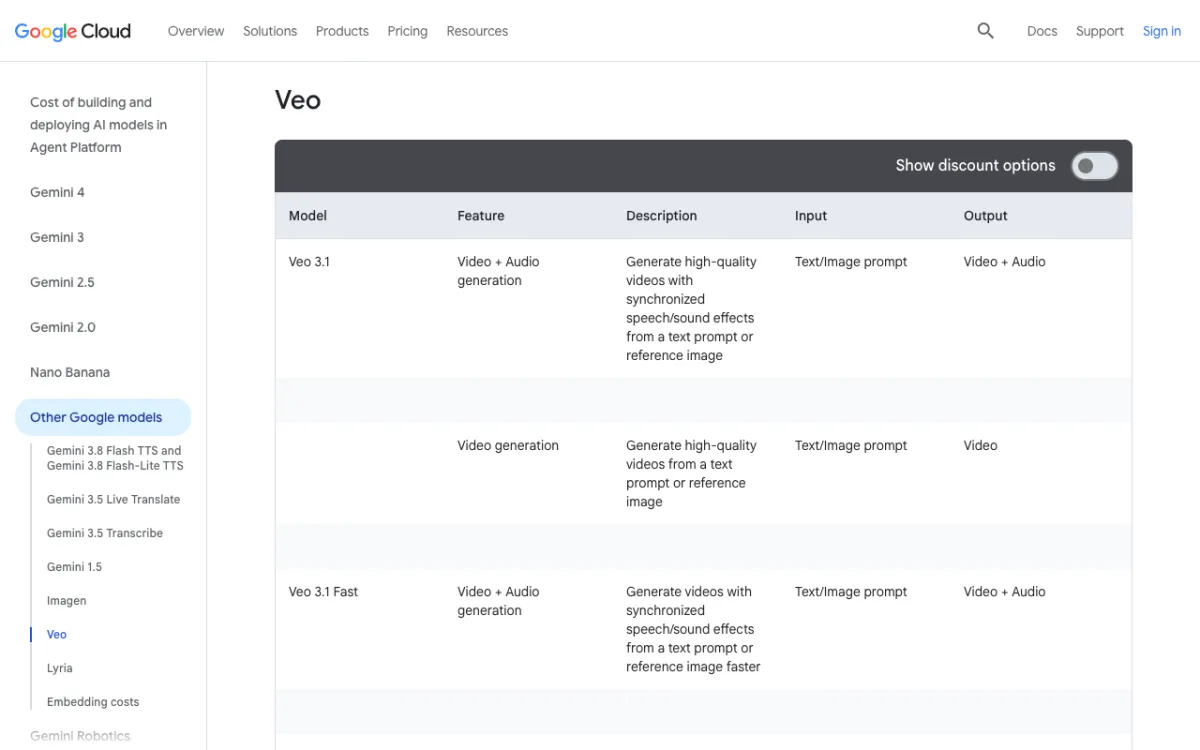 Google Cloud’s pricing page, Veo section, checked November 6, 2026. The price columns sit off to the right of this view.
| Tier | With audio, 720p | With audio, 1080p | With audio, 4K | No audio, 720p / 1080p / 4K |
|---|---|---|---|---|
| Veo 3.1 | $0.40 | $0.40 | $0.60 | $0.20 / $0.20 / $0.40 |
| Veo 3.1 Fast | $0.10 | $0.12 | not offered | $0.08 / $0.10 / not offered |
| Veo 3.1 Lite | $0.05 | $0.08 | not offered | $0.03 / $0.05 / not offered |
The page also lists a 4K price for Fast, but Google’s model page says Fast outputs up to 1080p, so we leave it out. An 8-second 1080p clip with audio is $3.20 on Veo 3.1, $0.96 on Fast and $0.64 on Lite at Google’s rates.
Third parties charge differently. Runway’s API lists Veo 3.1 at $0.40 a second with audio and $0.20 without, and Veo 3.1 Fast at $0.15 and $0.10. It does not list Lite. See cheapest Veo 3.1 provider for the full comparison.
Where Veo 3.1 still runs
Veo 3.1 is gone from the Gemini API but alive almost everywhere else. Google’s deprecations page lists veo-3.1-generate-preview, veo-3.1-fast-generate-preview and veo-3.1-lite-generate-preview with an October 22, 2026 shutdown, and names gemini-omni-1.2-flash as the replacement. The page calls its dates the earliest possible.
That leaves these places:
- Google Cloud’s enterprise platform: GA Veo 3.1 and Fast, with a listed retirement of May 4, 2027 or later.
- Google’s consumer tools: the Veo page lists the Gemini app, Google Flow, Google Vids and Google AI Studio.
- Third-party hosts: Runway’s API and Vidwip.
Veo 3.1 vs Gemini Omni
Gemini Omni is the Google model to build on now, and Veo 3.1 is the one to pick for its look and 1080p. Omni 1.2 Flash edits clips by chat and makes 3 to 15 second videos from about $0.07 a second at 720p, per Google’s API pricing. The first Omni Flash ranked first in text to video on Artificial Analysis in a July report, but no head-to-head with Veo exists yet.
Read the full Gemini Omni vs Veo 3.1 comparison and our Gemini Omni Flash review before you choose.
Pros and cons
Pros
- Native sound in every tier, including effects, ambience and dialogue, per Google.
- Up to 4K output on the standard model, with 1080p on Fast and Lite.
- Strong controls: reference images, first and last frame, scene extension.
- Cheap tiers: Lite is $0.05 to $0.08 a second with audio on Google Cloud.
Cons
- Short clips: 4, 6 or 8 seconds, against up to 30 on Seedance 2.5.
- Slipping scores: 961 Elo and 22nd on Artificial Analysis, 954 and 24th in image to video.
- Speech is still uneven, by Google’s own wording.
- No Gemini API access: the preview models were shut down on October 22, 2026.
- Audio doubles the price on Google Cloud and Runway.
Who should use Veo 3.1?
Use Veo 3.1 when you need Google’s look, 1080p delivery with sound, or an existing Veo pipeline. Skip it when you want clips over 8 seconds or the best-scoring model.
- Final 1080p or 4K shots with sound: Veo 3.1.
- Cheap drafts with sound: Veo 3.1 Lite or Fast.
- Long takes or top image-to-video scores: Seedance 2.5 or Wan 3.0 instead.
- A new Gemini API integration: Gemini Omni, not Veo.
Run Veo 3.1 in Vidwip
Vidwip’s AI Video Generator runs all three Veo 3.1 tiers in one picker, with sound, at 4, 6 or 8 seconds. Veo 3.1 is 60 credits a second at 1080p, Fast is 19 at 1080p and Lite is 8 at 720p.
| Model | Credits/s | 8-second shot | Starter | Pro annual |
|---|---|---|---|---|
| Veo 3.1 (1080p) | 60 | 480 credits | $4.80 | $3.79 |
| Veo 3.1 Fast (1080p) | 19 | 152 credits | $1.52 | $1.20 |
| Veo 3.1 Lite (720p) | 8 | 64 credits | $0.64 | $0.51 |
A credit costs $0.01 on Starter monthly ($25 for 2,500) and $0.0079 on Pro annual ($79 a month for 10,000). AI video needs a paid plan, from $25 a month. See pricing and the models page.
Conclusion
Veo 3.1 is a good model that is no longer the best one. Pick it for 1080p or 4K delivery with native sound, use Fast or Lite for drafts, and look at Wan 3.0, Seedance 2.5 or Gemini Omni when scores or clip length matter more.
We will update this review when Google publishes new Veo rates or a head-to-head with Omni. Until then, the quickest test is your own prompt on all three tiers.