
Midjourney V8.2, the default since July 24, 2026, is Midjourney's most style-focused model yet: native 2K HD, bolder default images and an edit model that takes plain-language instructions and up to four reference images. The trade-offs are cost and control. There is no free plan, unlimited Relax starts at $30/month, private images start at $60/month, and Omni Reference is gone from V8.
Midjourney V8 review: the short verdict
This Midjourney V8 review covers V8.2, the model every new prompt has used by default since July 24, 2026. We went through every V8 announcement, Midjourney’s version and plan docs, and the press coverage from launch to November 2, 2026.
We did not run a paid test batch for this review. Every claim below comes from Midjourney’s own changelogs and docs, or from named coverage, with dates.
The short version: V8.2 is Midjourney’s most style-focused model yet, and the August edit model finally lets you steer an image with words and up to four reference images. The catch is cost: there is no free plan, unlimited Relax needs the $30 Standard plan, and HD jobs burn more GPU time.
| Area | Verdict | Why |
|---|---|---|
| Image quality | Strong | V8.2 targets bolder looks and far fewer low-quality results |
| Style control | Strong | Personalization, moodboards and style references all run on V8.2 |
| Editing | Promising | Plain-language edits and up to 4 references, but still labeled a test |
| Speed | Strong | About 4 seconds per standard image and 12 in HD on V8.1, per Midjourney |
| Prompt accuracy | Fair | An early V8.0 test trailed Google and OpenAI models. Thinking Mode is still in testing |
| Pricing | Fair | $10 to $120 a month, no free tier, Relax from $30 |
Pick it if you make concept art, moodboards, editorial images or brand looks, and taste matters more to you than literal accuracy. Skip it if you need a free tier, exact text in every image, or private images on a $10 budget.
What is Midjourney V8?
Midjourney is an AI image generator for artists, designers and marketers, offering stylized images, native 2K output and video from $10/month. V8 is its eighth model family, and V8.2 is the current default.
You use it on the web at midjourney.com or in Discord. A separate alpha site gets new features first, and that is where most of the V8 story played out.
Here is the V8 timeline, from Midjourney’s update posts and its Version docs:
| Date (2026) | Release | What changed |
|---|---|---|
| March 17 | V8.0 alpha | Alpha site only. About 5x faster, native 2K with --hd |
| April 14 | V8.1 alpha | HD 3x faster and 3x cheaper, a look closer to V7 |
| June 10 | V8.1 becomes the default | Replaces V7 as the default model |
| July 24 | V8.2 becomes the default | V8.0 stops generating the same day |
| August 27 | V8.2 edit model test | Instruction edits and up to 4 image references |
| October 8 | Thinking Mode test | Alpha-only rerun aimed at prompt accuracy and text |
So “Midjourney V8” now means V8.2 for almost everyone. V8.0 images stay in your gallery, but you can’t generate with that model any more.
Image quality: from the V8.0 backlash to V8.2
V8.2’s image quality is the result of two course corrections. To judge it fairly, you need to know what went wrong first.
Why V8.0 disappointed
V8.0 launched on March 17, 2026 as an alpha with big speed claims. Midjourney’s V8 alpha post said images generated about 5x faster and that a new --hd mode rendered natively at 2K.
The look was the problem. French tech outlet Blog du Modérateur reported that V8.0’s default aesthetic broke with V7’s visual identity, and that image prompts were missing at launch.
Cost stung too. Midjourney said --hd, --q 4, style reference and moodboard jobs ran 4x slower and cost 4x as much, and Relax mode was not supported at launch.
The Decoder ran an informal prompt test the day after launch and found Midjourney “performed significantly worse” than the hybrid models from Google and OpenAI. Midjourney itself said the default V8 look wasn’t finished and pointed users to --raw, moodboards and style references.
How V8.1 pulled it back
V8.1 arrived in alpha on April 14 with what Midjourney called “a consistent and familiar aesthetic in the spirit of V7”. HD became the V8.1 default and got 3x faster and 3x cheaper.
Standard jobs got 50% faster and 25% cheaper, and image prompts and image weights came back. Midjourney also said moodboards and style references were now “super stable”.
On June 10, V8.1 replaced V7 as the default. Midjourney’s default announcement put a standard image at about 4 seconds and an HD image at about 12.
What V8.2 changes
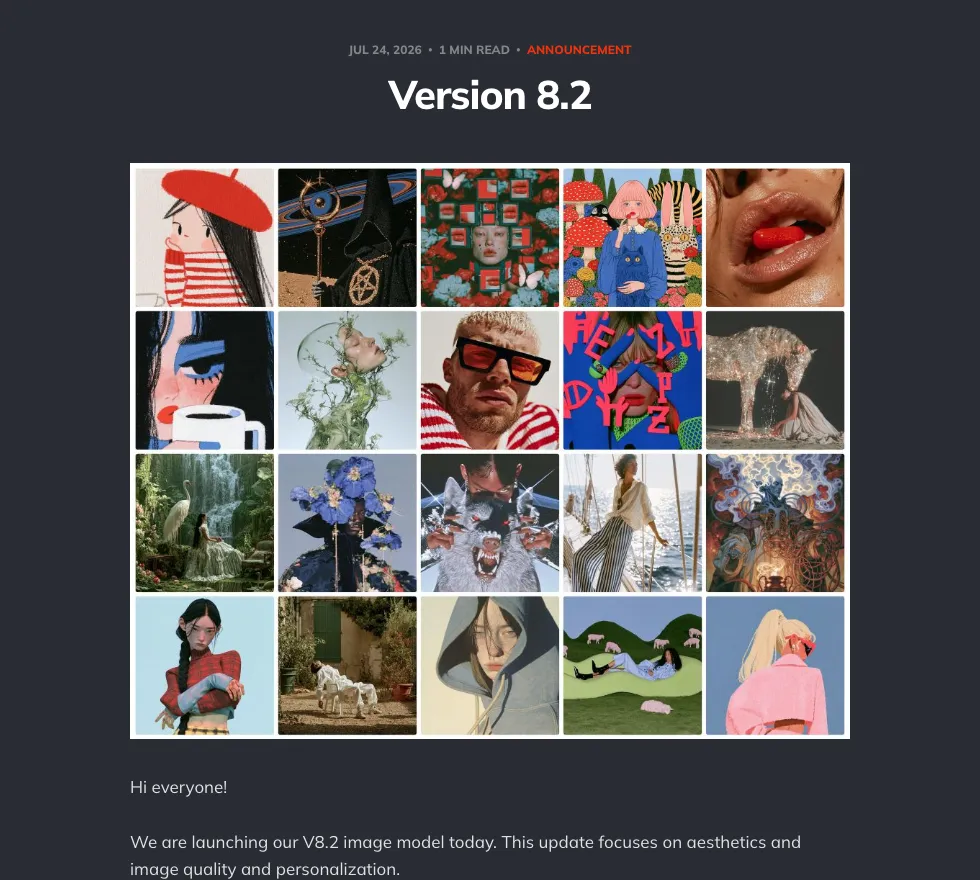 Midjourney’s V8.2 announcement from July 24, 2026, with sample images published by Midjourney
V8.2 shipped on July 24, 2026 and became the default the same day. Midjourney’s V8.2 post says the release focuses on “aesthetics and image quality and personalization”.
The promised shift is stylistic: images that feel more creative, bold, sophisticated and edgy. Midjourney also says the cases where you get a low-quality image are “dramatically reduced”.
Personalization got an upgrade too. V8.2 profiles draw from a larger, improved pool of images to rate, and Midjourney says the model reads your taste better on profiles with lots of ratings.
What that means for you: if you liked V8.1’s V7-style look, V8.2’s bolder default may take some adjusting. V8.1 still has its own section in the Version docs, so add --v 8.1 and compare the two on your own prompts before you commit a project.
HD, speed and text in V8.2
V8.1 and V8.2 share one feature set in Midjourney’s compatibility chart. Here is what that chart and the V8 posts say you get:
- HD images: 2048px output without upscaling. An HD job costs 1.3 minutes of GPU time, against 0.8 minutes for standard (SD)
- Aspect ratios: up to 14:1, or 4:1 in HD
- Text in images: put the exact words in “quotes” for better lettering, per the V8 alpha post
- Style tools: personalization, moodboards, style references, Raw, stylize, chaos, tile and weird all work
- Not on V8.1 or V8.2: Omni Reference, multi-prompting, the
--qquality parameter, Turbo mode and Niji
Prompt accuracy is the open question. On October 8, Midjourney began testing a Thinking Mode on the alpha site, a “Rerun (Thinking)” button it says improves prompt accuracy, typography and coherence.
It is a test, not a shipped feature. Until it ships, check V8.2 on prompts where exact details matter before you rely on it.
The V8.2 edit model: up to four reference images
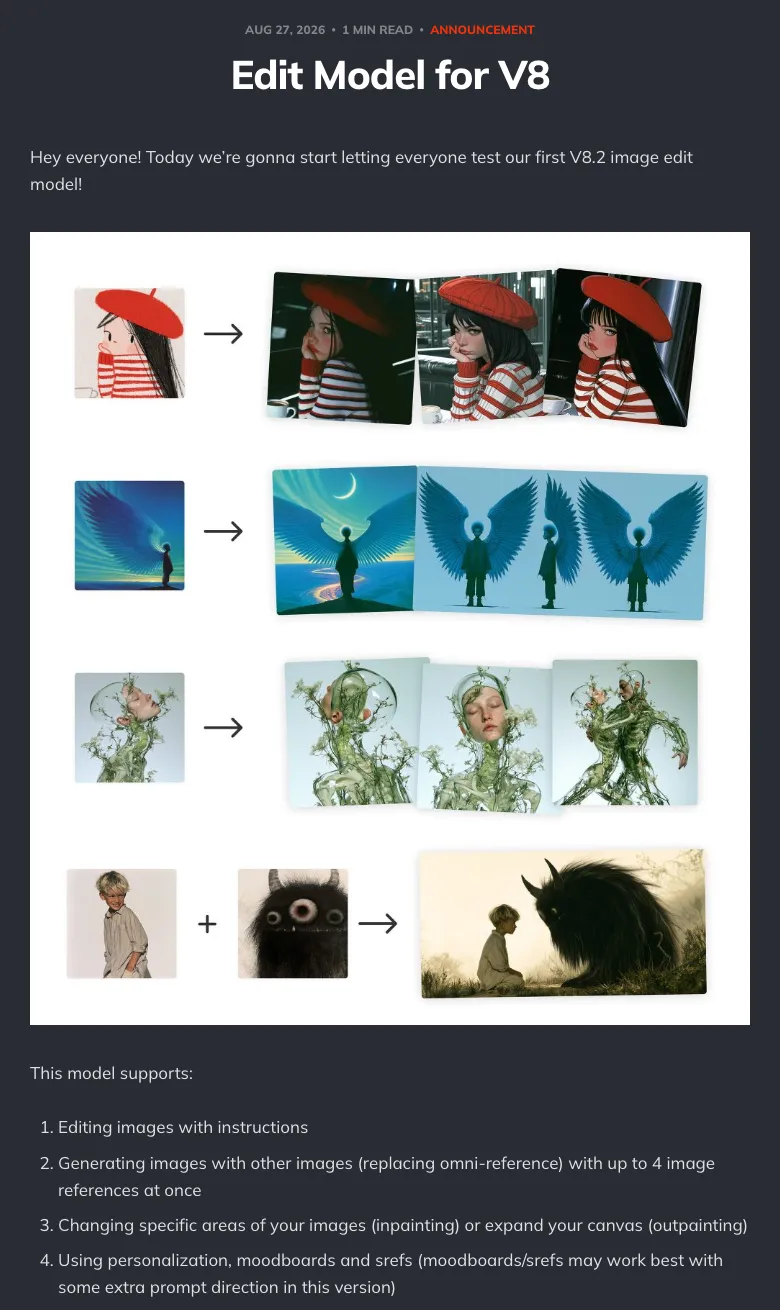 Midjourney’s edit model announcement, August 27, 2026, with example edits published by Midjourney
Midjourney’s edit model is one V8.2 model for changing images with plain instructions, combining up to four reference images, and inpainting or outpainting. It opened to everyone as a test on August 27, 2026.
The announcement lists four jobs it handles:
- Instruction edits: describe the change in words
- Image references: generate from up to 4 images at once, replacing Omni Reference
- Inpainting and outpainting: change a selected area or expand the canvas
- Your style tools: personalization, moodboards and style references
You can reach it four ways: drag images into the prompt bar under “attach to prompt”, click Edit in the lightbox, upload through the Edit tab, or type --edit with an image URL in Discord. Midjourney updated the interface on both midjourney.com and the alpha site.
What it replaces
The Version docs say the Edit Model replaces Omni Reference, Character Reference and the Retexture tool. On V8.1 and V8.2, Pan, Zoom Out and the Editor also run through the edit model.
That is a real workflow change. If you built characters around --oref weights, they don’t carry into V8; Omni Reference still works only if you switch back to V7.
How it has changed since August
- August 29: a quality update to the V8.2 edit model after the first day of feedback
- September 2: on the alpha site, the editor moved into the lightbox, with plain-language edits, up to 4 references and every edit from a session in one place. A Change Style experiment appeared there too, per the alpha changelog
- September 24: better inpainting and outpainting, where targeted edits “change only the pixels that you’ve selected”, per the edit update
Where it falls short
- Still a test: Midjourney warned there would be “a lot of edge cases” and asked users to flag bad results
- Style tools need help: moodboards and style references “may work best with some extra prompt direction”
- HD edits drop to SD: the Version docs warn that inpainting and outpainting tools on HD images return SD results, which you have to upscale again
- No numbers: Midjourney’s edit posts don’t publish accuracy figures or a separate GPU price for edits
Midjourney pricing: plans, GPU hours and cost per image
Midjourney pricing runs on GPU time, not credits. Every plan includes Fast hours, and Standard and up add unlimited Relax image generation at a slower pace.
Here are the US prices from Midjourney’s plan comparison docs. Midjourney’s site blocks automated page readers, so these come from the October 20, 2026 version of that page, checked November 2, 2026:
| Plan | Monthly | Billed yearly | Fast GPU time | Relax mode | Stealth (private) |
|---|---|---|---|---|---|
| Basic | $10 | $96/year ($8/month) | 3.3 hr (200 min) | None | No |
| Standard | $30 | $288/year ($24/month) | 15 hr | Unlimited images | No |
| Pro | $60 | $576/year ($48/month) | 30 hr | Unlimited images and SD video | Yes |
| Mega | $120 | $1,152/year ($96/month) | 60 hr | Unlimited images and SD video | Yes |
Extra Fast time costs $4 an hour on every plan. Yearly billing saves 20%, paid upfront.
What a Fast hour buys on V8
Midjourney’s Version docs put an HD job at 1.3 minutes of GPU time and an SD job at 0.8 minutes. That lets you estimate what each plan’s Fast time buys:
| Plan | Fast minutes | SD jobs | HD jobs | Fast cost per HD job |
|---|---|---|---|---|
| Basic | 200 | ~250 | ~153 | ~6.5 cents |
| Standard | 900 | ~1,125 | ~692 | ~4.3 cents |
| Pro | 1,800 | ~2,250 | ~1,384 | ~4.3 cents |
| Mega | 3,600 | ~4,500 | ~2,769 | ~4.3 cents |
| Extra time | 60 per $4 | ~75 | ~46 | ~8.7 cents |
These counts cover new image jobs only, from Midjourney’s per-job figures. Relax time on Standard and up is unlimited, so heavy users mostly pay for speed, not volume.
The fine print
- No free plan: the docs say all plans are subscriptions. Every plan can earn free GPU time by rating images
- Privacy costs $60: only Pro and Mega include Stealth Mode, which keeps your images and videos private
- Company rule: a company with more than $1,000,000 in gross yearly revenue must buy Pro or Mega
- Video: Basic renders SD video only, Standard and up add HD, and Pro and Mega add unlimited SD video in Relax
- Concurrency: Basic and Standard run 3 image jobs at once. Pro and Mega run 12 in Fast mode
Which plan to pick
- Basic ($10): enough to try V8.2 and the edit model, at about 150 HD jobs a month
- Standard ($30): the real floor for regular use, because unlimited Relax removes the monthly ceiling on images
- Pro ($60): client work you can’t show publicly, or any company over the $1M revenue line
- Mega ($120): studios that need 60 Fast hours and 12 Fast video jobs at once
Midjourney V8 pros: what it does well
- Built for looks. V8.2 was built for aesthetics, and Midjourney says low-quality results are “dramatically reduced”
- Native 2K. HD renders 2048px images with no upscale step
- Fast. About 4 seconds per standard image and 12 in HD, per Midjourney’s V8.1 numbers
- Your taste carries over. Midjourney said V7 profiles, moodboards and style references are backward compatible with V8
- One model for edits. Instructions, up to 4 references, inpainting and outpainting all run through the same edit model
- Frequent updates. Midjourney published 11 update posts between August 21 and October 8
Midjourney V8 cons: where it falls short
- No free tier. Every plan is a paid subscription, starting at $10/month
- Basic is tight. 200 Fast minutes and no Relax mode
- Privacy is a $60 feature. Stealth Mode starts on Pro
- Lost references. Omni Reference and Character Reference are gone from V8, and the edit model that replaces them is still a test
- Accuracy lags its looks. The Decoder’s V8.0 test trailed Google and OpenAI models, and the Thinking Mode fix is alpha-only
- HD edits downscale. Inpainting and outpainting on HD images return SD results, per the docs
- Docs lag the product. The compatibility chart and the changelogs don’t always agree, so test a feature before you build a workflow on it
Midjourney V8 vs alternatives
Midjourney’s edge is style control. The alternatives below win on price of entry, free use or bundled models, with prices checked November 2, 2026:
| Tool | Free option | Entry paid plan (US) | What the entry plan includes | Best for |
|---|---|---|---|---|
| Midjourney V8.2 | None | $10/month Basic | 200 Fast minutes, no Relax | Stylized art, moodboards, brand looks |
| Adobe Firefly | Free daily generations | $9.99/month Standard | 2,000 generative credits a month, plus partner models | Several image models in one Adobe plan |
| Ideogram | 30 credits a week with Google, Apple or Microsoft sign-in, public images | $20/month Plus, or $15/month yearly | 2,400 credits a month | Graphics where you set the wording and layout |
| Google Gemini | Image generation and editing on the free tier | $19.99/month Google AI Pro | 4x the free usage limits in the Gemini app, 1,000 Flow credits | People already paying for Google AI |
Adobe Firefly’s paid plans include partner models from Google, OpenAI and FLUX, including GPT Image and Nano Banana. That makes it a simple way to try several image models on one bill.
Ideogram’s free tier needs no subscription, but free images are public and email sign-ups get no free credits. Midjourney’s answer is its style system: personalization profiles, moodboards and style references that carried over from V7.
Want to animate your stills? Our best text-to-video AI tools ranking covers image-to-video quality and cost per clip, and the Kling AI alternatives list compares motion models side by side.
Who should use Midjourney V8?
- Concept artists and illustrators: yes. V8.2’s bold look and personalization are built for you. Start on Standard for unlimited Relax
- Brand and marketing designers: yes, with moodboards and style references for consistency. Use Pro if the work can’t be public
- Storyboard and pre-viz teams: yes for frames. Pair it with a shot tool from our LTX Studio alternatives guide
- Product photographers: maybe. Test the edit model’s references on your own products, since Midjourney still calls it a test
- Anyone who needs exact text or layouts: not yet. Ideogram lets you set wording and layout in the prompt, and Midjourney’s Thinking Mode is still alpha-only
- Free-tier users: no. Adobe Firefly, Ideogram and Gemini all offer free use
If you plan to move images into video, compare motion models in our Runway alternatives and Google Veo alternatives roundups. For one workspace across many models, see the Higgsfield alternatives list.
Conclusion: is Midjourney V8 worth it in 2026?
Yes, if the look of an image is the job. Our Midjourney V8 review comes down to this: V8.1 and V8.2 answered the V8.0 complaints about its look and cost, kept native 2K output, and added an edit model that takes up to four reference images.
The weak spots are control and cost. Omni Reference is gone, the edit model is still a test, prompt accuracy trailed rivals in early tests, and real use starts at $30/month for Relax or $60 for private images.
Start on Basic for a month to see if V8.2’s style fits your work. If it does, Standard at $30 is where Midjourney stops counting your images.